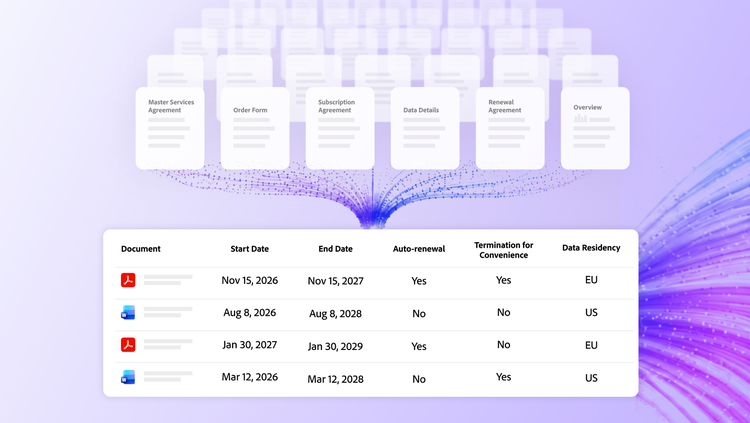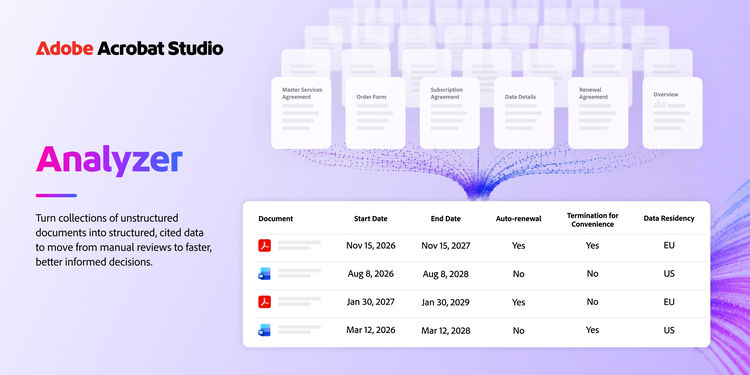
Today we’re introducing Analyzer in Acrobat, a new document intelligence capability for enterprise teams. It takes on work that is still manual across most business functions: reading large volumes of documents to find complex information in each one. Accounting and FP&A teams comb customer contracts for revenue-recognition and booking triggers, procurement operations pull commercial terms from vendor agreements and statements of work to benchmark rates and information security clears software vendors against compliance reports. The common thread: extracting structured information from unstructured documents to make business decisions.
These are business-critical tasks and doing them manually forces a compromise. The work stays slow and expensive or teams review only a sample and accept risk in everything they didn’t read. Often, it’s both.
https://video.tv.adobe.com/v/3503132?hidetitle=true
How Analyzer solves this.
Analyzer is a new enterprise capability in Acrobat Studio. It uses generative AI to turn collections of complex unstructured documents into structured data. It helps teams analyse contracts, statements of work, compliance documents and more at scale, so leaders can move from manual review to faster, better-informed decisions.
Here’s how it works:
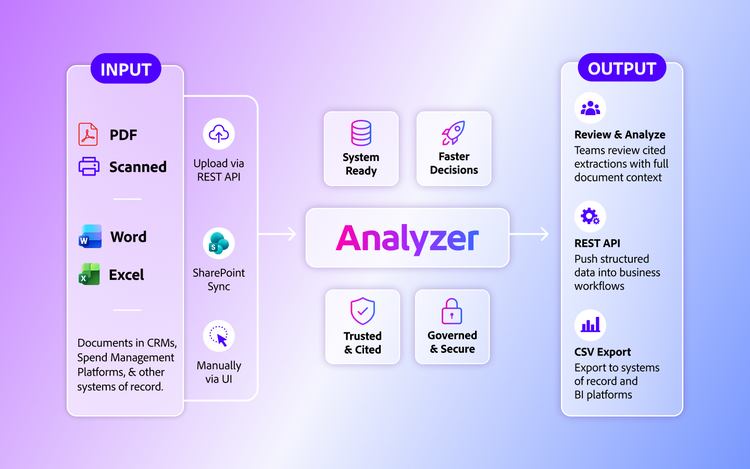
- Bring thousands of documents: Add collections of contracts, vendor agreements, statements of work, compliance reports, invoices, call transcripts and other business documents as PDFs, scans or Microsoft Word and Excel files through the user interface, REST API or SharePoint sync.
- Define extractions once, then apply them across the collection: Describe in plain language what information or insights to pull from each document and Analyzer extracts it from every document in the collection. Examples include financial terms, legal or commercial clauses, policy language or judgement calls such as whether a vendor’s controls meet a requirement.
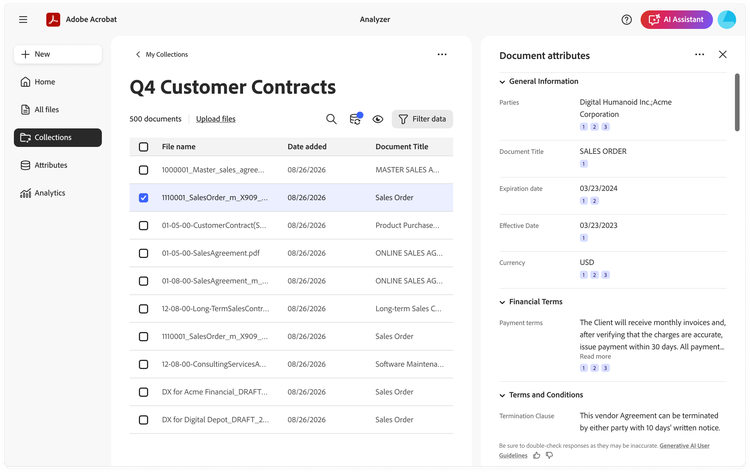
- Get structured output with citations: Analyzer returns results as structured data you can review in the UI. Every extracted value from every document carries a numbered citation that links back to the source passage, so a reviewer can read the surrounding context and confirm the result. Before applying a definition across a full collection, you can test it on a sample set and refine it to more reliably find what you need. Your team stays in control of the result.
- Automate downstream workflows: Push extracted data into your ERP, CRM, CLM and other systems of record via the REST API or export it to CSV to feed your BI tools and data warehouse.
- Enable business ownership while maintaining governance: Business teams can set up and manage their own extractions and review workflows. IT maintains administrative control, audit logs and role-based access.
What structured data lets you do.
Structured, cited data changes what a team can do with a document collection:
- Automate document review at scale: Apply the same criteria to every document rather than a sample, so the terms that matter get checked across the whole population.
- Enrich systems of record: Structured values flow straight into ERP, CRM and procurement systems that teams used to populate by hand.
- Answer portfolio-level questions: Query the whole collection like a database: find every vendor agreement with EU data residency or every contract that auto-renews, without opening a file.
Where enterprise teams put Analyzer to work.
Analyzer is useful across the enterprise. Here are a few examples:
- Finance and accounting: Revenue assurance and FP&An analysts can review every executed contract for revenue-impacting terms instead of a sample, with auditor-ready cited extractions that shorten the close cycle and cut reporting and forecasting risk.
- Procurement: Vendor management teams can automate extraction of key information, terms and clauses from vendor agreements and statements of work to enable portfolio-level tracking of auto-renewals, SLAs, inflation adjustments, reporting requirements and more.
- Sales operations: Renewals and customer success teams turn a portfolio of customer agreements into a risk view that surfaces terms like termination options and renewal conditions, so they can prioritise at-risk accounts and intervene before a renewal event without having to review contracts one by one.
- IT and information security: InfoSec can automate the completion of security questionnaires across hundreds of vendor compliance reports a year, improving vendor-onboarding SLAs without adding headcount.
- M&A: Corporate development teams analyse a target's full contract portfolio for key terms, obligations and risk, so due diligence that once took weeks is done in a fraction of the time. Post-M&An integration teams leverage the same visibility to make informed decisions for systems and process-integration.
- Sales enablement: Sales leaders can analyse every recorded call transcript rather than a hand-picked sample to uncover the behaviours that move deals, from champion engagement to buyer sentiment and deal-risk signals.
Read about how Adobe is using Analyzer across various teams here.
Getting started.
Analyzer in Acrobat Studio is available now. Keep in touch to your Adobe account team or contact us for more information.
Recommended for you
https://business.adobe.com/fragments/resources/cards/thank-you-collections/acrobat