4 key things your ecommerce team should be monitoring
Ecommerce is a team sport. On any talented team, forward progress is tracked by key performance indicators (KPIs). A successful team must be aware of the ever-changing landscape across the industry, new competitors, moving goalposts, and fresh tactics to remain competitive. Data is key to analyzing the present and the potential — and making informed decisions.
An ecommerce team’s forward progress can be demonstrated in four key areas:
- Technical health
- Performance monitoring
- Business metrics
- User experience and loyalty
Technical health
The ecommerce technical team should maintain its own processes to ensure and measure the ongoing technical health of the application, infrastructure, and connections to additional systems, platforms, and SaaS products. That’s why Adobe Commerce customers have an included tool that gives teams an understanding of the health of the implementation as well as aspects of security.
Adobe Commerce’s Site-Wide Analysis Tool was created to identify common issues and errors related to configurations, settings, and performance risks related to the deployment of the Adobe Commerce application. The Site-Wide Analysis Tool evaluates customers daily, providing a score related to the overall health and stability of their application and related infrastructure. Further, the report provided offers recommendations to remedy the findings. This report is useful to review both periodically and following all new deployments. Additionally available for staging environments, it ensures a seamless upgrade by identifying any challenges in advance.
This report doesn't uncover all potential problems, as it does not scan or comment on custom code written into Commerce projects. However, the team should additionally maintain information about their custom code designs, purpose, and performance to ensure it is maintained and updated as needed.
Performance monitoring
Site performance is another set of metrics the team must establish baselines against and benchmark across their industry peers. Slow site speed or page load is one of the most unforgiving components of the customer experience and can have a costly impact on the conversion rate. Overall performance impact should be an ongoing measure when designing, testing, and deploying new features and functions to the site. Pre-deployment load tests also help identify bottlenecks and important components to monitor.
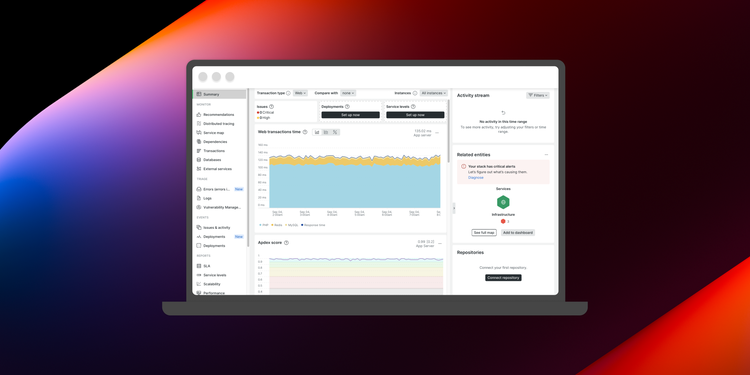
Performance monitoring tools, like New Relic, are a necessity. New Relic is provided to Adobe Commerce customers on Adobe Cloud infrastructure. This tool allows you to monitor applications, infrastructure, web browsers, and other components via a single platform. Performance monitoring tools track key performance metrics while providing insights to the root cause. Through New Relic you can query data, build dashboards, and set monitoring alerts. Adobe has also developed a pre-built New Relic application for Adobe Commerce Cloud customers — Observations for Adobe Commerce. This turn-key feature furthers the oversight of your Adobe Commerce application performance and assists in diagnosing issues.
There are several important performance KPIs to trend and track within New Relic such as caching performance, page speed, cart abandonment, error rate, transaction speed, visitor volume, order throughput, and API response times. One final important metric New Relic provides is the Apdex score which provides a rating of application performance related to user experience and sentiment.
Business metrics
Driving conversion rate and revenue is one of the fundamental objectives for an ecommerce team. Keeping an eye on these metrics and how they are affected by both intentional and unintentional changes is important. Using a tool that maintains your ongoing source of truth is ideal in order to track, measure, and observe trends relative to your primary business KPIs.
An analytics tool, such as Adobe Analytics, is valuable when it comes to developing and implementing strategies to optimize the customer journey, improve conversion rates, and ultimately boost sales.
Your analytics tool combined with other technologies — like multivariate testing with Adobe Target help to validate tactics deployed for website optimization, changes to product merchandising strategies, pricing rules, visitor sources, and promotional campaigns. Additionally, as personalization becomes more sophisticated, ecommerce teams must define their metrics of success as well as when, where, and how they will be tracked across multiple tools. This includes understanding KPIs like customer acquisition costs, traffic patterns, traffic types and sources, engagement rates, site performance, conversion rate, and customer lifetime value. Then you can analyze and utilize these insights for targeted marketing campaigns, improving product offerings, and optimizing the customer experience.
Adobe Analytics is a key tool for measuring and optimizing the performance of customer segments, customer groups, and loyalty promotions.
User experience and loyalty
Beyond analytics, other tools that measure the comprehensive user experience and customer journey matter too. Parallel teams working on marketing campaigns through email and advertising should engage with the ecommerce team to monitor the downstream effects of their efforts. Additionally, the complete journey for the customer and their experience post-sale has worthy KPIs as well with rippling impact for returning visitors and repeat sales.
Warehouse and shipping KPIs should be observed to correlate the effect of improvements or declines back to the website performance and customer sentiment. Pick, pack, ship speed and the time from order to delivery are relevant KPIs that tie back to overall customer satisfaction.
Get started
Tracking and monitoring the KPIs for your business is not an all-or-nothing endeavor. While many metrics were called out in these key functional areas, we crawl before we run. Determine primary owners for each area and start with a small number of manageable data points and refine as you learn. When teams are small, it is crucial to have a narrow but impactful focus. Each of these areas of your ecommerce organization are important.
Need more guidance?
For additional resources on these four key areas, please see the following articles on Adobe Experience League:
- Experience League: Site-Wide Analysis tool
- Experience League: New Relic monitoring
- Experience League: Observation for Adobe Commerce introduction
- Experience League: Adobe Commerce best practices, front-end performance
- Experience League: Define your top KPIs
Looking for more hands-on support? View our Adobe success plans.