










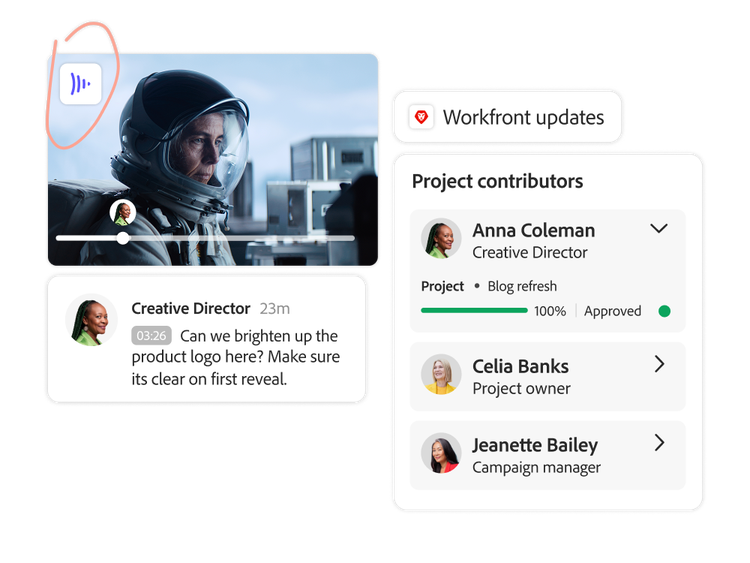
Creative review interface showing annotated visual, team feedback, and status update from ‘in progress’ to ‘approved’.
con-block-row-bgcolor
#F8F8F8

Reimagine review and approval cycles for enterprise marketing.

Adobe Workfront and Frame.io for Business streamline reviews and approvals, ensuring content is approved, compliant, and ready to activate.

Creative review interface showing annotated visual, team feedback, and status update from ‘in progress’ to ‘approved’.
#F8F8F8

Connect people and processes in one workflow.

When planning lives in one system, feedback in email, and approvals elsewhere, work slows and visibility fades. In this guide, discover how review and approval cycles can run seamlessly across teams. Explore how Adobe Workfront integrates with Frame.io for Business, Adobe GenStudio for Performance Marketing, and Adobe Express to bring everything together in one connected workflow.

AI has changed content expectations forever. What once took weeks is now expected in minutes, and customers want flawless, personalized, and real-time experiences at every touchpoint. Anything less feels generic. It’s no longer just about producing great assets, it’s about producing thousands, even millions of assets across every channel and moment.

https://main--da-bacom--adobecom.aem.page/assets/icons/resources/guides/calm-the-chaos-of-content-reviews-and-approvals/85-200x112-2x.svg | 85%

of marketers say they are under pressure to create more content — and deliver it faster than ever1.

Creating assets is only half the challenge though. The stage where content is required to move swiftly from review to approval cycles is often where momentum stalls, as stakeholder alignment, version control, and compliance requirements can lead to delays. However, this stage is critical, as it ensures every piece of content reflects your brand, meets regulatory standards, and delivers a cohesive customer experience.

https://main--da-bacom--adobecom.aem.page/assets/icons/resources/guides/calm-the-chaos-of-content-reviews-and-approvals/40-200x112-2x.svg | 40%

of marketers’ time is spent on reviews and approvals, based on research from 1,600+ marketers — time that could be spent creating high-impact content3.

This problem only compounds with scale. More content means more stakeholders, more feedback, and more complexity. Without the right systems, delays are inevitable.

This is where Adobe Workfront and Frame.io for Business make a difference. By unifying review and approvals in one, deeply connected foundation, Adobe creates a single source of truth that lives where work already happens. With one place to upload content, collect feedback, route approvals, and track status, teams gain full visibility into work in progress, stakeholders stay aligned, and content moves from creation to launch without sacrificing quality or compliance.

Efficient review and approval cycles require more than ad hoc fixes. They demand a connected approach that combines enterprise work management with creative collaboration.

Organizations now seek:

With Adobe Workfront and Frame.io for Business, review and approval become the foundation for scaling content with speed, control, and confidence.

How unified review and approval with Workfront and Frame.io for Business transforms workflows.

Teams move from reactive chaos spread across disparate tools and communications to predictable, scalable, on-brand execution with one review surface for every content type. Here are four key challenges to reviewing and approving content and how Adobe solves them.

Challenge 1: Review and approval cycles take too long.

Review cycles often become one of the most time-consuming phases of the content supply chain. And it’s not about just a few sign-offs. This process involves chasing feedback across emails and messaging apps. Stakeholders in turn end up reviewing content late or inconsistently. And multi-stakeholder or multi-stage approvals stall with no consistent process or structure. The more people and stages involved, the slower it can get.

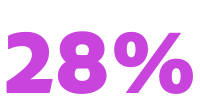
https://main--da-bacom--adobecom.aem.page/assets/icons/resources/guides/calm-the-chaos-of-content-reviews-and-approvals/28-200x112-2x.svg | 28%

of practitioners consider their organizations ‘good’ or ‘very good’ at delivering content — deploying assets quickly, automating execution, using data for personalization, and tracking insights5.

Workfront in action.

  • Collect complete project requirements upfront.
    Workfront consolidates all work requests into one system using customized forms and templates. This ensures teams get every detail upfront — goals, deadlines, specs, and stakeholders — replacing a scattered intake through emails, chats, or documents. This way, when work gets to the review stage, you’re not backtracking to find critical information that was never included in the first place.
  • Keep approvals moving with automated workflows.
    Workfront creates an automated series of sequential or parallel review stages, sets dependencies, and limits visibility to only specific users, so review cycles and feedback stay with the right stakeholders.
Here’s what this looks like in practice:
Problem
Solution
Campaign requests come in incomplete.
The structured intake in Adobe Workfront captures all required details, so teams never chase missing specs again.
Disconnected reviewers cause confusion.
Adobe Workfront sequences review stages, so the right people see the asset at the right time.
Approvals stall because someone missed an email.
Adobe Workfront automatically routes assets to the right reviewer with timely reminders.
Too many tools slow progress.
Reviews and approvals happen in the same place as the work, so nobody has to toggle between tools.
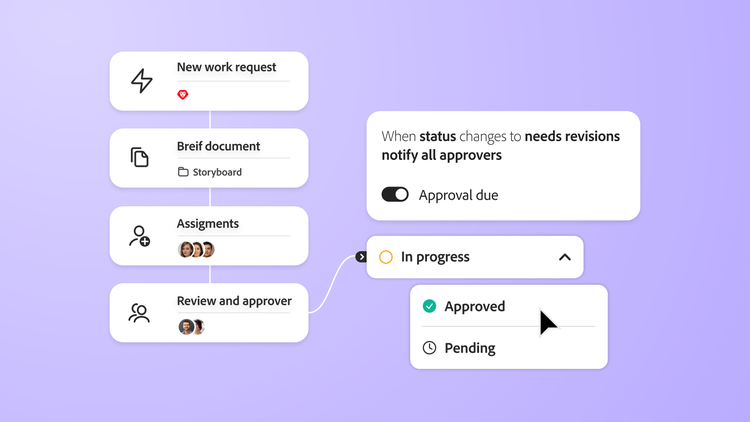
Workflow showing new work request, brief, assignment and review progress to approval.

Challenge 2: Feedback is disconnected and hard to manage.

Without a standard process, feedback comes in late, through different channels, and often conflicts. Plus, without a centralized system, version control becomes difficult to manage.

https://main--da-bacom--adobecom.aem.page/assets/icons/resources/guides/calm-the-chaos-of-content-reviews-and-approvals/50-200x112-2x.svg | 50%

of a creative’s time is spent on non-creative work — managing tasks, chasing and consolidating feedback, and navigating disconnected tools6.

Adobe Workfront and Frame.io in action.

  • Automate approval workflows.
    The automated and composable approval workflows in Adobe Workfront help maintain version control and give everyone visibility into feedback, who gave it, and when.

  • Centralize feedback in one place.

    The Frame.io for Business review surface is embedded directly in Workfront workflows, allowing reviewers to add feedback and annotations on any type of asset without leaving Workfront.

  • Collaborative digital proofing.
    Built-in proofing capabilities enable users to track comments and changes in one place, making it easy to turn feedback into action. Advanced proofing capabilities support diverse file types and Frame.io for Business enhances proofing for creatives with capabilities like enhanced video review, with an extensive set of markup tools to indicate changes and compare feedback.

Here’s what it looks like in practice:
Problem
Solution
Feedback arrives across email, chat, and documents.
Adobe Workfront consolidates all feedback in one centralized surface.
Multiple versions cause confusion.
Everyone reviews the correct file with built-in version control.
Creatives spend half their day chasing feedback.
Integrated proofing unifies markups, comments, and comparisons.
Creative review interface showing annotated visual, team feedback, and status update from in progress to approved.

Challenge 3: Review cycles happen across different systems.

Most review cycle tools aren’t built for both creative and marketing workflows. Project planning happens in one system, intake in another, production in creative tools, and feedback in emails or chat, while approvals are tracked somewhere else entirely.

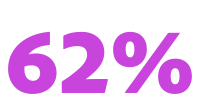
https://main--da-bacom--adobecom.aem.page/assets/icons/resources/guides/calm-the-chaos-of-content-reviews-and-approvals/62-200x112-2x.svg | 62%

of senior executives agree their organizations have become more efficient — but at the cost of time and freedom to be creative8.

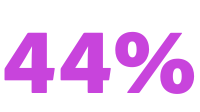
https://main--da-bacom--adobecom.aem.page/assets/icons/resources/guides/calm-the-chaos-of-content-reviews-and-approvals/44-200x112-2x.svg | 44%

of practitioners cite lack of time for creativity as a major barrier to delivering great customer experiences9.

Adobe Workfront in action — powered by Frame.io for Business, Adobe GenStudio for Performance Marketing, and Adobe Express.

Adobe connects Workfront with Frame.io for Business, Adobe GenStudio for Performance Marketing, and Adobe Express, integrating end-to-end creative processes automatically syncing projects, users, folders, assets, review and approval workflows, annotations, commenting, etc. directly from those tools which they rely on every day.

Adobe Workfront + Frame.io integration.

Frame.io eliminates the creative blind spots that typically slow production. With Workfront and Frame.io working together, teams can:

  • Use the Frame.io reviewer directly in Workfront workflows.
  • Automatically sync and access the same project folders, file versions, and comments — in real time.
  • Review high-quality video, motion, and design work directly in Frame.io.
  • Eliminate duplicate uploads, lost feedback, and out-of-date versions.
  • Sync approvals, annotations, and status updates automatically back into Workfront.

Adobe Workfront + Adobe GenStudio for Performance Marketing.

Adobe GenStudio for Performance Marketing connects structured workflows in Adobe Workfront with generative production — automatically syncing assets, metadata, users, and approval paths. This means:

  • Creative briefs and approvals flow directly into content generation.
  • Teams can produce variations at scale while maintaining brand guardrails.
  • Reviews, including multi-stage, happen in context, with Workfront tracking every decision.

Adobe Workfront + Adobe Express.

Adobe Express empowers non-creative teams to quickly produce on-brand content using approved assets and templates — all tied to Workfront projects.

  • Every design stays connected to the correct campaign.
  • Assets sync back to Workfront with full visibility and traceability.
  • Approvals use advanced Workfront proofing capabilities directly in Adobe Express templates.
Together, this ecosystem removes the operational friction between tools and teams, giving marketers, creatives, and stakeholders a single, integrated workflow from concept to completion.
Here’s what it looks like in practice:
Problem
Solution
A video edited in Frame.io requires approvals elsewhere.
Adobe Workfront syncs versions, comments, and statuses automatically, or reviewers can review directly in Workfront.
Non-creative teams need on-brand content fast.
Adobe Express helps teams create and remix content faster, with Adobe Workfront proofing and approvals ensuring every version stays on-brand.
You need content variations at scale.
Adobe GenStudio for Performance Marketing and Adobe Workfront connect structured workflows with scalable content production — so teams can create more, faster.
Generate interface showing prompt to create video ads, ad preview, and review comment requesting approval.

Challenge 4: Compliance reviews are complicated and lengthy.

Compliance reviews bring more stakeholders, more steps, and higher stakes. When these workflows happen across disconnected tools, they become slow, error-prone, and difficult to document. Internal brand, legal, and PR teams add more review layers, and if you need to meet compliance with external regulatory bodies, approval cycles become even more lengthy. The complexity of compliance workflows can compound the existing challenges of reviews and approvals.

Adobe Workfront in action.

  • Workfront automatically tracks every review, approval, and compliance check across the entire workflow, creating a complete audit trail that meets even the most complex compliance needs.
  • It automatically routes compliance checks to the right people.
  • The AI-powered asset reviewerin Adobe Workfront streamlines brand compliance and shortens feedback loops with quality controls that can alert creatives when assets are out of sync with brand or regulatory standards. Creatives and marketers can spend more time strategically reviewing assets, knowing that brand compliance has been built into the review process.
Here’s what it looks like in practice:
Problem
Solution
A required disclosure is missing.
The AI-powered compliance checks in Adobe Workfront flag it before legal reviews.
Compliance teams need a full audit history.
Adobe Workfront automatically captures every decision, version, and action.
Only a part of an asset changes.
Modular review paths allow faster approvals without restarting the entire cycle.
Brand compliance alert on video asset with tasks, issue tracking, and completion status at 75%.

Maintaining an auditable compliance trail.

Auditable workflows maintain a historical audit trail to make sure all digital content is compliant.

  • Adobe Workfront tracks everything that happens in a project — from ideation to completion — including reviews, approvals, and compliance checks, documenting a history of all approvals and actions.
  • It allows new content to be reviewed in a modular fashion, significantly shortening review and approvals.
#F8F8F8

The future of content approvals.

As we’ve explored in this guide, review and approval cycles don’t have to slow your team down. Adobe Workfront brings everything together — people, processes, and tools — into one connected system. With integrated workflows and centralized collaboration, teams can move faster, stay aligned, and deliver content that’s on-brand and compliant, even at scale. Ready to see how Adobe Workfront can fast-track your content approvals?

Explore here

Sources

https://main--da-bacom--adobecom.aem.page/fragments/resources/cards/thank-you-collections/workfront