Get started with Adobe Marketo Engage programme templates
As a marketing operations (MOps) professional, you’ll find yourself supporting a number of common campaign requests, repeated processes and similar tasks from internal stakeholders. Doing the same thing over and over again can lead to burnout for you and your MOps team, but there is hope. Optimising your Adobe Marketo Engage instance with programme templates can help your team build smarter, faster and more efficient programmes.
A programme template is a cloneable Marketo programme that is fully tokenised and incorporates all of the necessary components — such as emails, Smart Campaigns and reports — from the campaign you are creating. Programme templates are typically a part of your centre of excellence or programme template library that allows you to clone from one central place to other Marketo folders or programmes.
In this blog, we’ll talk through the strategy for identifying what programme templates you need, how to build them, how to use Marketo tokens to optimise the template and next steps for incorporating the templates into your team’s overall processes.
Programme template strategy
Before you get started building your programme templates, it’s important to step back and think through the templates you need. It can be tempting to create templates for everything your team does, but first think through your most frequent use cases and the most common requests your team receives and write them down. It’s also important to remember you don’t need a separate template for every imaginable programme — just the most common scenarios to satisfy the majority of your campaign needs.
Once you have this list of templates, complete a prioritisation exercise to determine which template needs to be built first. Where do you currently spend the most time building campaigns from scratch? What programme template could you build first and then iterate on to create your next templates?
Most MOps teams will start with one of the most simple templates — the email programme template. Even though it doesn’t take long to get an email programme out the door, having a template will save time with every send and reduce the number of errors that can come from rushing a one-off email.
There are a number of ways to start building your programme templates, but having a clear plan in place will help to prioritise your work and provide your team immediate time savings by releasing templates as they are created — rather than waiting to have an entire programme template library created.
Align on an overall structure before you begin
Before you start building your first programme template, you should align on an overall structure that will apply to each of your templates.
Start by thinking through your overall folder structure and what folders you need to make your programmes scalable, clear and modular with what is contained within each. You want to be able to find campaign assets quickly and understand the type of assets contained in a folder by the name.
An example of an overall folder structure may look like this:
-
Campaigns
- Progression campaigns — smart campaigns tracking programme status
- Send campaigns — smart campaigns sending emails
-
Emails
-
Landing pages
-
Smart lists
-
Lists
-
Forms
-
Reports
While each programme template may not need to contain each of these folders based on the assets included, it is helpful to understand what your overall structure should be so it can stay consistent and carry the same naming throughout all of your programme templates.
You will also want to align on naming conventions for each of your assets. There are a few things to remember as you align on naming conventions for the assets contained within your programme templates:
- Emails. Clearly name your email assets. If you only have one email in your programme template, you could name it “EM” or “Email.” If you have multiple emails within a template, you may need additional numbering and context such as “01 - Invite, 02 - Confirmation, 03 - Reminder.” If you have multiple emails sending at the same stage in the programme, you could add additional context with lettering such as “04a - Follow-up Attendee” and “04b - Follow-up - No Show.”
- Landing pages. Similar to how you would name your email assets, you should name your landing pages with numbering and context so you know where they appear in the campaign flow. For example, for a webinar programme template, you could name them “01 - LP: Register” and “02 - TY: Confirm.”
- Progression smart campaigns. Using lettering to alphabetise your progression smart campaigns demonstrates the clear order in which these campaigns will run. In a webinar programme template, for example, you could use “A - Invited,” “B - Registered” and “C - Attended - No Show” to track someone’s progression through the programme.
- Send smart campaigns. Using numbering and context for any sending smart campaigns will show the order in which emails are sent throughout your programme. For example, for invites in your webinar programme template you could use “01a - Invite 1” and “01b - Invite 2” to show the order in which the emails are sent.
You can use the examples above as you start to build out other components of your programme template such as lists, smart lists and more.
Building your programme template
Now that you have determined a consistent structure for your programme templates, you can start building your first template. We’ll focus on the email programme template as we walk through the next steps for set-up.
As you start setting up your programme template, consider what type of Marketo programme should be used. You have four options:
- Default
- Event
- Engagement
For the email programme template, we can narrow down to the email programme (postbox icon) and the default marketing programme (briefcase icon). Each programme type has its advantages and drawbacks, which are broken down below.
Email programme
- Use for one-off, timely email sends.
- Includes A/B testing, email head-start scheduling and recipient time zone.
- Can be quickly cloned into event programmes.
Default programme
- Handles complex or recurring email sends.
- Can be used to send nested nurture emails within engagement programmes for skipping specific email sends or excluding audience segments based on previous engagement.
- One example of this is excluding leads who have already completed a demo from receiving an email promoting the same demo.
- Advanced A/B testing — including the random sample flow step option and champion/challenger testing.
Once you decide on your programme type, make sure you select the correct channel for the programme template which will determine the channel statuses and success you track for reporting. For an email send channel, you could track delivered, opened, clicked and unsubscribed — or customise these based on the most important campaign success metrics for your organisation. Tracking these statuses at the programme level also makes it easier to create target audiences based on programme engagement on future emails or resends.
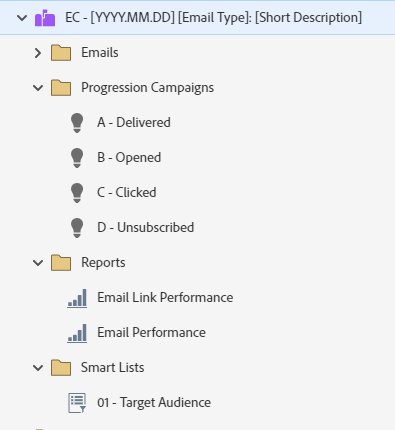
Your email programme template should be set up for a one-off email send, which could be a single CTA email, a newsletter format or something else entirely based on your use cases. At a high level, think through each of the below components and what you may need in this programme template.
- Emails. Include an email asset using an email template that will be most commonly used in this use case, such as a standard marketing email with a banner image, a single body copy section and a single CTA button. You may choose to customise the email itself depending on your use case, but the included email should be one that can be used in most situations.
- Progression campaigns. Include any smart campaigns that will be used for setting your programme statuses and tracking success. By tracking statuses at the programme level, it will be easier to target their engagement on future emails or resends.
- Reports. Include any out-of-the-box reports you would like included in each programme. It’s most common to include an email performance report and an email link performance report.
- Smart lists. Include any smart lists, such as a target audience list or exclusion list.
Once you have your assets set up, start thinking through what tokens you can use within your email to make the email build more streamlined and efficient. By including the main sections of your email as tokens, you can quickly create your email without having to open the email editor.
Common tokens you may want to include are:
The token names should be organised and descriptive so that their location and the information they represent are as apparent to you as they are to your marketing stakeholders.
Below you’ll see an example of how you can use these tokens in your email asset:

An additional option for taking tokens one step further is to also include folder-level tokens. These tokens could specify key footer information such as the copyright year, regional office address and links to your privacy policy. These tokens make it easy to clone your programme template into region folders and pull in localised information that can be updated in one place.
The final stage of setting up your programme template is to put it through vigorous testing to make sure everything works as intended. One approach to testing is to use an existing email campaign request and build it using your new programme template. Not only should you set up the email using your tokens, but you should also activate any smart campaigns and send the email to a test audience list. This will ensure that your programme and smart campaigns are running as expected and producing the necessary results.
Streamlining your email request process
Once you have your email programme template and token framework in place, you can streamline the email request process for your marketing stakeholders.
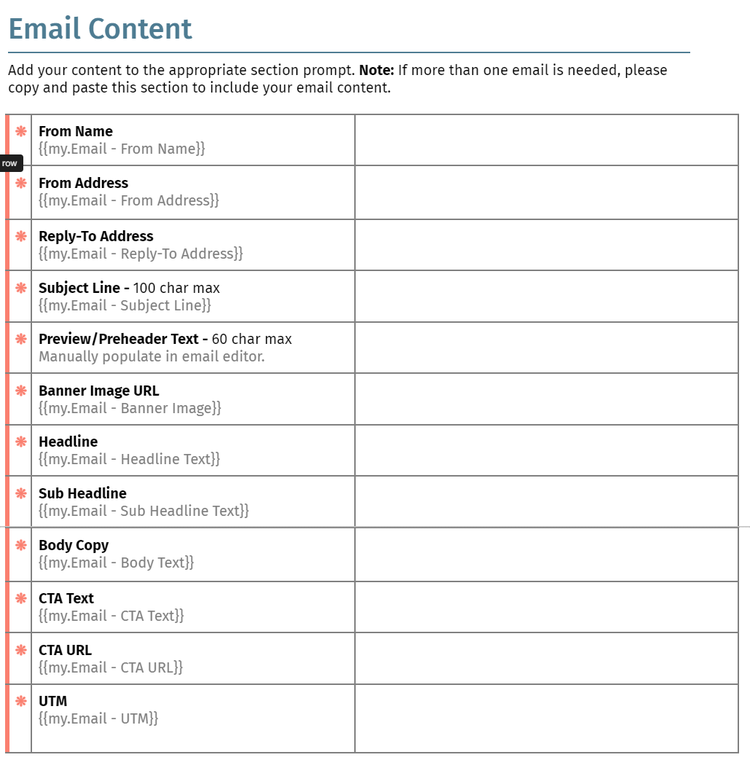
You can create a simple content submission document for each programme template you develop and have marketing stakeholders submit the completed document as part of their request process. The document should contain the token name (for your reference), a brief description of the section if needed and guidelines for what text, links or images need to be provided. The advantages of using an approach like this are twofold:
- It will decrease build time, as you’ll have every element of the email provided upfront.
- It will define the email elements that marketing stakeholders can customise.
Below is a sample of the email content portion of a content submission document:
As a part of the content submission document, you’ll also want to capture the following:
-
Send date/time
-
Email type, including formatting and whether or not the email is operational
-
Target audience, including relevant criteria:
- Region
- Job titles
- Industry
- Contact type
-
A/B testing details
-
Any SFDC campaign details
Training and documentation
Once you have your programme templates set up and your intake process aligned, it is now time to create documentation for each part of the process. Make sure the marketing operations team has detailed instructions on how to use your programme templates, how to make changes and how to handle each step in the process. Training the MOps team and walking through real-life scenarios are keys to making sure they have the information they need.
You should also make sure your marketing stakeholders have step-by-step instructions on how to submit requests and what is expected of them. You could also conduct a live training to answer any questions and align on the new process.
What’s next after email programme templates?
Now that you have your first email programme template created, you can continue to work through your prioritised list of programme templates to develop your next templates — including webinar, content, list acquisition and more. The steps will be similar as you work through what components you need in each, including a good folder structure, tokens and more.
It’s also important to remember that while your programme templates may be completed, the work is never truly done. Programme templates should fall into a regular review cycle and be reviewed at least one or twice a year. This allows your team to solve for any pain points or evolve the templates to meet new marketing needs. You don’t have to wait to review and update until then, but this gives you a clear time to make sure your programme templates are still working for you.
Now that you know how to think about programme template strategy, key steps for creating the templates and how to optimise your process to support your requests, you’re ready to set up your programme templates and make your team more efficient than ever. Get a product demo to learn how Marketo Engage can help.
Natalie Kremer is a passionate marketing leader with 10 years of experience in marketing operations. She is a highly involved Adobe advocate as a three-time Marketo Engage Champion and current co-leader of the Marketo Engage North America Virtual User Group. She thrives at being a people leader, developing new industry-defining MOps processes and creating all kinds of documentation. Currently, Natalie is a senior marketing operations manager at Etumos where she leads a team of consultants, helping them to grow in their MOps careers and develop solutions to help clients to improve their campaign production processes.