#F5F5F5

Adobe Customer Journey Analytics Features

Actionable intelligence

Put customer insights to work with activation and integration tools that improve experiences, increase marketing optimisation and maximise ROI. No more waiting weeks to leverage data that could lift your bottom line.

Audience analysis and publishing

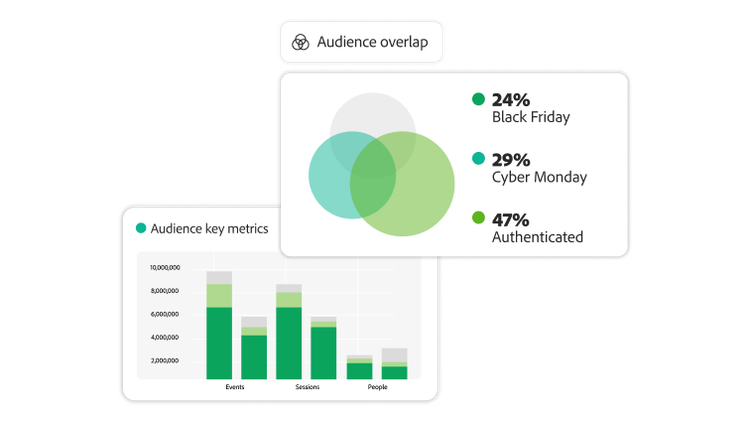
Get actionable insights by defining and analysing audiences — including traits and behaviours across time — and immediately share them across Adobe products.

  • Segmentation. Use multiple filters simultaneously to create insight-driven audience segmentation based on specific customer actions.
  • Audience sharing. Publish audiences to help shape your customer journey in Adobe Journey Optimizer or export to a variety of destinations using Adobe Real-Time CDP.
  • Activation and refinement. Analyse behaviour from your activated audiences for further insight discovery and refinement to drive more effective personalisation.
https://main--bacom--adobecom.aem.live/fragments/products/modal/videos/analytics/customer-journey-analytics/audience-analysis-publishing#audience-analysis-publishing | Audience metrics and audience overlap visualisations. | :play-medium:

MCP server

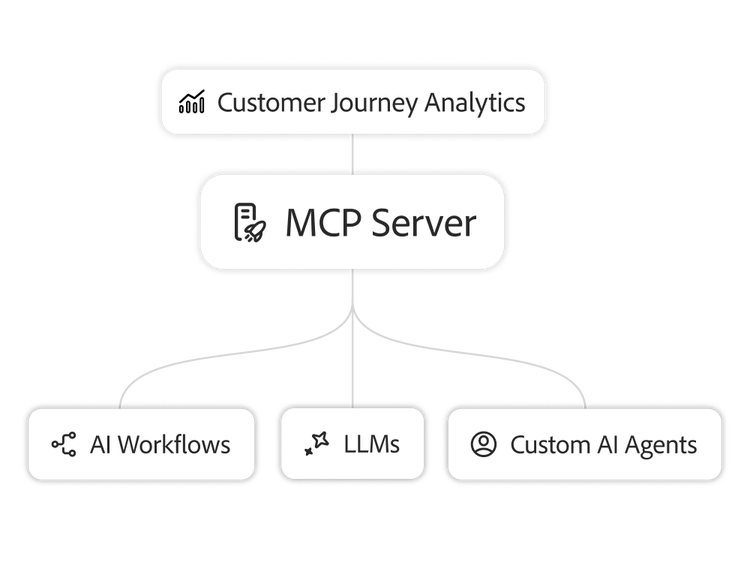
Enable analysts and third-party AI systems to work seamlessly with your customer journey data. With real-time, programmatic access designed to fit into your existing AI infrastructure, you can turn insights into action across workflows, agents and your AI ecosystem.

Data feeds (in development)

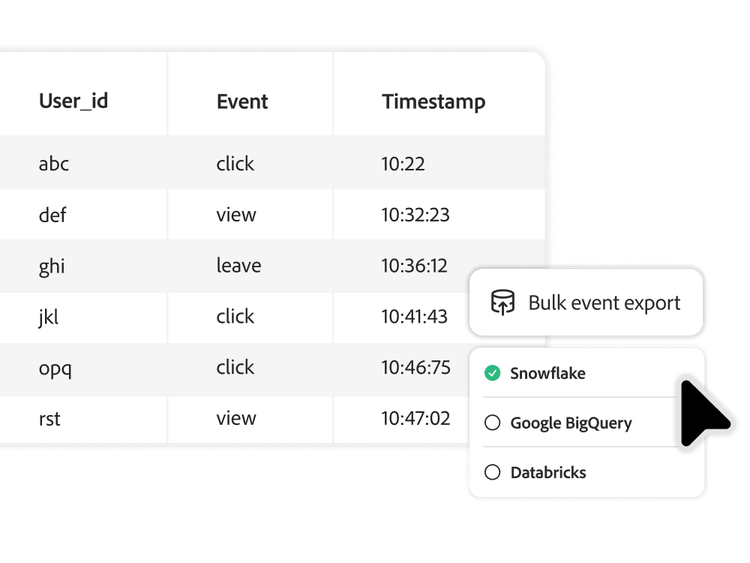
Export fully processed, event‑level data in bulk to the enterprise cloud storage or warehouse of your choice, enabling advanced analysis, integration with other data sources, customised attribution models and long-term archiving.
Learn more about actionable intelligence.

Content as a Service v3 - Actionable intelligence - Thursday, 16 October 2025 at 13.37

#D0F1E1

Learn how to use actionable intelligence features.

Find what you need in Experience League, our vast collection of how-to content — including documentation, tutorials and user guides.

Learn more | Learn more about how to use actionable intelligence features

Questions? We have answers.
Is "actionable intelligence" here just a report I export or something I can act on directly?
It is more than a report. Customer Journey Analytics can publish an audience you define in analysis directly into Adobe Experience Platform's Real-Time Customer Profile, where it becomes a targetable audience for Adobe Real-Time CDP or Adobe Journey Optimizer to activate, in the same motion rather than a separate export-and-reupload step. That is the difference between an insight staying in a dashboard and an insight becoming a campaign.
What do I need already in place to publish audiences out of Customer Journey Analytics?
Publishing an audience requires Unified Profile, which is not included with Customer Journey Analytics on its own; it comes bundled with either Adobe Real-Time CDP or Adobe Journey Optimizer. If your organisation already has one of those, audience publishing from Customer Journey Analytics works without any additional entitlement; if not, confirm with your Adobe account team before planning on this capability.
Can I connect my own tools or AI agents to Customer Journey Analytics, instead of only using Analysis Workspace?
Yes, through the Customer Journey Analytics MCP server, which lets external agents and LLM-based tools query your reporting data using natural-language prompts instead of building against Customer Journey Analytics' full reporting APIs directly. Access is not open by default: a Customer Journey Analytics administrator has to grant MCP access permission in Admin Console before any external agent can connect, so enabling it is a deliberate step, not an automatic one.
Can I export Customer Journey Analytics data to my own systems, beyond what is built into Workspace?
Yes, Customer Journey Analytics supports Data Feeds exports of raw, event-level data to your own warehouse or BI tools, which complements the MCP server's natural-language agent access rather than replacing it. Use Data Feeds when you need the underlying data itself in another system; use the MCP server when you want an agent or tool to query Customer Journey Analytics directly without moving the data at all.