Boost asset management capabilities with easy integrations.
Extend the power of Experience Manager Assets through Adobe and third-party integrations, all while ensuring asset governance, accelerating production, and improving reuse.
Adobe product integrations with Experience Manager Assets
Connect your DAM and your CMS.
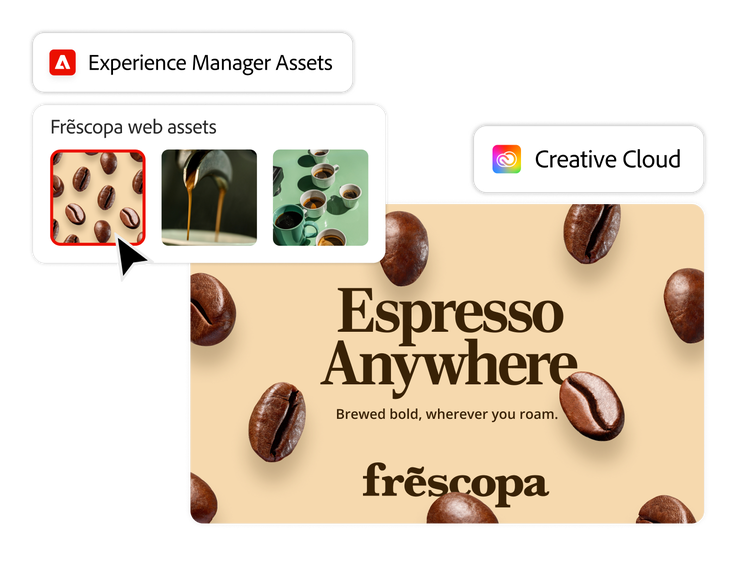
Easily search for, find, and ingest rich media — including images, videos, and PDFs — from Experience Manager Assets into the Experience Manager Sites CMS for activation.
Author and deliver web experiences faster with modular capabilities that connect content seamlessly across applications.
Quickly find, assemble, and publish high-impact experiences with Edge Delivery Services, our composable architecture that lets you quickly deliver high-performing digital experiences.
Update assets and digital content everywhere automatically, saving time for developers and marketers.
Give your marketing teams the tools to find and use branded content from the Experience Manager Assets DAM directly in GenStudio for Performance Marketing.
Increase content reuse by giving marketers the power to create new on-brand asset variations of existing assets for various channels using generative AI.
Empower marketers to accelerate campaign content for paid social, marketing emails, and display advertising channels with embedded generative AI tools.
Empower all teams to easily reuse and remix on-brand content.
Quickly edit and republish in-line visual content directly within Experience Manager Assets — without creative support tickets or project delays.
Use Adobe Express in Content Hub to make real-time edits based on templates with built-in guardrails, ensuring brand integrity and efficient distribution.
Give teams beyond marketing — such as human resources and sales — direct access to Experience Manager Assets within Adobe Express for quick customization of on-brand content.
Spark creativity and streamline content production.
By connecting Experience Manager Assets with Adobe Creative Cloud applications, campaigns can move faster from ideation and creation to activation.
Adobe Asset Link. Search for, browse, sort, preview, upload, check out, and modify assets stored in the DAM from Creative Cloud applications. This lets creative teams stay in the tools they’re most familiar with.
Adobe Express. Access assets stored in the DAM from the Adobe Express interface. Assets created or modified in Express can then be saved back to the DAM.
Frame.io. Push approved assets directly from Frame.io to the DAM so marketers can access and deliver those assets to any channel.
Unlock insights — from content creation through digital channel performance.
Integration with Adobe Analytics gives you the insights you need to analyze and optimize content across channels.
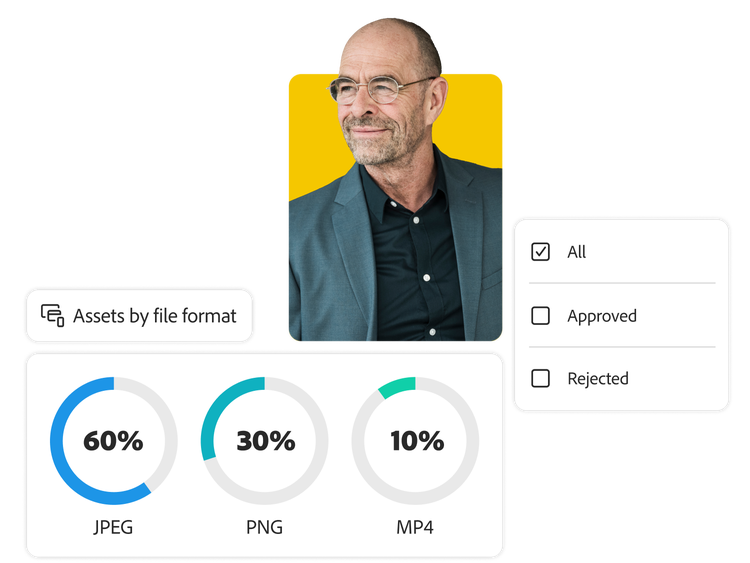
Track how an asset is performing and see trends using graphs displayed in the Experience Manager Assets interface.
Access performance data such as clicks and asset usage information, including video insights, and score each asset based on performance statistics to help determine images to reuse or archive.
Third-party integrations with Experience Manager Assets
Experience Manager Assets is an open, flexible, and extensible platform that easily integrates with third-party systems and channels via open APIs and SDK capabilities. Users can connect it to their diverse marketing technology ecosystem to streamline asset discovery, production, delivery, and performance processes.
Build custom microservices or single-page applications and integrate Experience Manager Assets capabilities and business logic across your entire IT stack with Adobe Developer App Builder.
You can control how Adobe websites use cookies and similar technologies by making choices below. But note that if you disable cookies and similar technologies entirely, Adobe websites may not function properly.
Cookies are small text files stored by your web browser when you use websites. There are also other technologies that can be used for similar purposes like HTML5 Local Storage and local shared objects, web beacons, and embedded scripts. These technologies help us do things like remembering you and your preferences when you return to our sites, measure how you use the website, conduct market research, and gather information about the ads you see and interact with.
You can make choices in the menu below about what cookies and other technologies you want us to use on Adobe sites when you visit them from this browser. You can always change those choices later by clicking on the Cookie Preferences link at the bottom of the page.
If enabled:
We can improve your experience by tailoring the site and the content to things we think might be of interest
We can better keep track of your preferences — like what language you prefer to use
We will better understand your likely interests so we can provide you more relevant Adobe ads and content on non-Adobe websites and in non-Adobe apps
It will help us improve the performance of our website and those of our partners who use the Adobe Experience Cloud
If disabled:
We won’t be able to remember you from session to session so the experience may not be tailored to your interests
You’ll still have access to the content of the site but certain features that depend on cookies may not function
You’ll still see ads, they just may not be as relevant to you
General information
You can control how Adobe websites use cookies and similar technologies by making choices below. But note that if you disable cookies and similar technologies entirely, Adobe websites may not function properly.
Cookies are small text files stored by your web browser when you use websites. There are also other technologies that can be used for similar purposes like HTML5 Local Storage, web beacons, and embedded scripts. These technologies help us do things like remembering you and your preferences when you return to our sites, measure how you use the website, conduct market research, and gather information about the ads you see and interact with.
You can make choices in the menu below about what cookies and other technologies you want us to use on Adobe sites when you visit them from this browser. You can always change those choices later by clicking on the Cookie Preferences link at the bottom of the page.
If enabled:
We can improve your experience by tailoring the site and the content to things we think might be of interest
We can better keep track of your preferences — like what language you prefer to use
We will better understand your likely interests so we can provide you more relevant Adobe ads and content on non-Adobe websites and in non-Adobe apps
It will help us improve the performance of our website and those of our partners who use the Adobe Experience Cloud
If disabled:
We won’t be able to remember you from session to session so the experience may not be tailored to your interests
We’ll still count your use of our site and services
You’ll still have access to the content of the site but certain features that depend on cookies may not function
You’ll still see ads, they just may not be as relevant to you
Operate the site and core servicesOperate site and measure engagement
Always active
These cookies are required, and they are used to enable the site and related services core functionality. Without them the site could not operate, so they cannot be disabled.
These cookies enable the site and related services’ core functionality and collect statistics about user engagement, such as counting active use to help us understand trends. These cookies cannot be disabled.
Measure performance
These cookies are used to analyze site usage to measure and improve performance. Without them Adobe cannot know what content is most valued and how often unique visitors return to the site, making it hard to improve information we offer to you.
These cookies are used to analyze site usage to measure and improve performance. Without them Adobe cannot know what content is most valued, making it hard to improve information we offer to you.
Extend functionality
These cookies are used to enhance the functionality of Adobe sites such as remembering your settings and preferences to deliver a personalized experience; for example, your username, your repeated visits, preferred language, your country, or any other saved preference.
Personalize advertising
These cookies are used to enable Adobe and our partners to serve ads more relevant to your interests. Without them you will still see ads, but they might not be as relevant to you.
Performance Cookies
ConsentLeg.Interest
All Consent Allowed
Adobe Assistant
No chats available
Are you sure you want to end your chat session? Chats can't be re-opened once ended.
Message failed to send. Please try again.
Your use of this automated chatbot constitutes consent that the personal information you provide in the chat session will be collected, used, disclosed, and retained by Adobe and service providers acting on Adobe’s behalf in accordance with the Adobe Privacy Policy. Please do not provide sensitive personal information (such as financial or health information) in the chatbot.
I'm the Adobe Assistant. How can I help you today?