

Adobe Marketing Campaign Analytics
AI-powered measurement to continuously maximise marketing dollars.
Marketing Campaign Analytics unifies measurement and planning, showing you the impact of each channel and where to shift spend next, sharpening every campaign you run.

Take measurement from an annual event to an always-on advantage.
Powered by AI and built on the Adobe CX Analytics data foundation, Marketing Campaign Analytics transforms paid, owned and earned data into channel-level answers in minutes — so every team can plan, adjust and prove the value of their spend, any time.
- Insights & recommendations
- Unified modelling
- Planning & forecasting
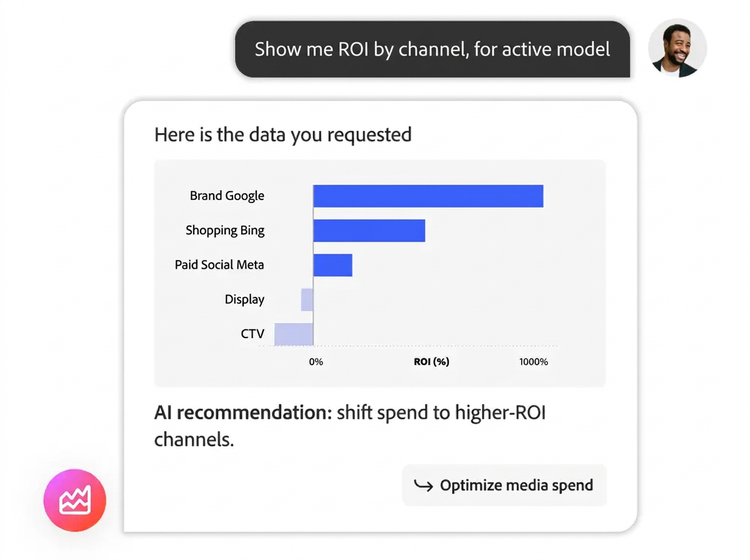
Optimise in-flight campaigns with real-time performance insights.
Use natural language to investigate your marketing mix, surface recommendations and generate executive-ready readouts.
- Uncover deeper campaign insights. Ask questions using natural language and get immediate in-depth answers, complete with easy-to-understand visuals.
- Reallocate budget while it still matters. Get spending shift recommendations as performance changes, so you can adjust, pivot or double down mid-campaign.
- Generate an executive readout straight from your model. Get the headline finding, the KPIs that moved and a prioritised list of where to scale, shift and cut.
- Discover each channel’s incremental impact. See what’s actually driving performance, from media spend to pricing, seasonality and other non-media factors.
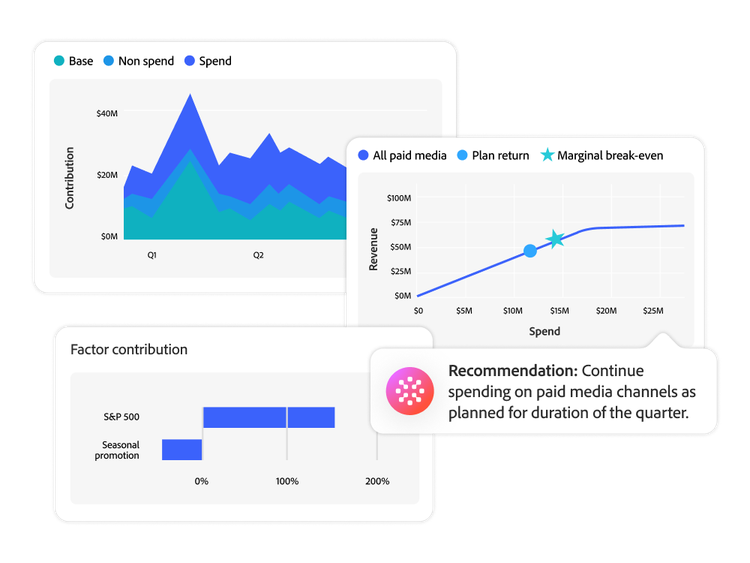
Measure your entire marketing mix in a single model — controlled by you.
Every model runs on the CX Analytics data foundation, where paid, owned and earned data is connected, harmonised and governed — all accessible whenever you need it
- Get one answer across every channel. Marketing mix modelling (MMM) and multi-touch attribution (MTA) work together through patent-pending technology to deliver a single, consistent view of performance.
- See how channels amplify each other. Find which channels lift results together and where each channel’s next dollar stops returning.
- Tune the model to your business. Inspect and adjust its assumptions and add the pricing, promotion and market factors that shape your results.
- Add new regions and business lines as you grow. Rescore in minutes as new data lands and expand without starting the data work over.
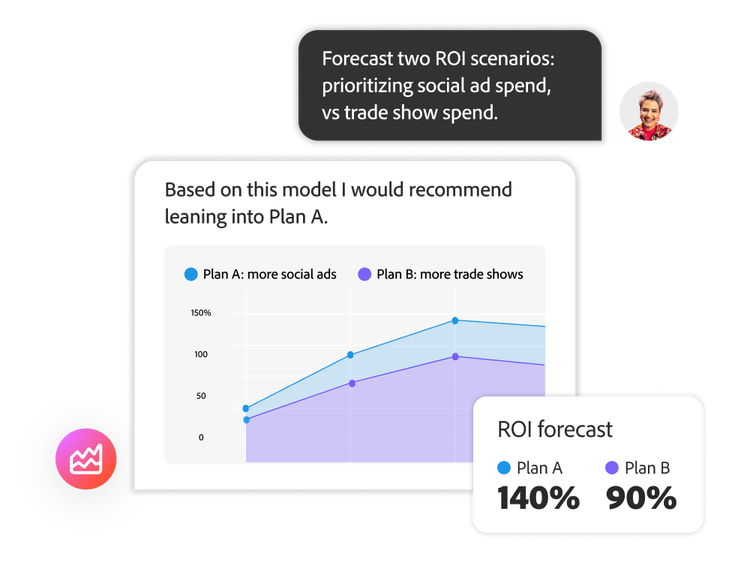
Generate and compare what-if budget scenarios before you commit.
Test the trade-offs in the model instead of in market.
- Build the budget that hits your target. Start from a revenue goal or a spend cap and get a recommended allocation across every channel.
- Know what each plan will deliver. See projected revenue, ROI and channel mix for every scenario, side by side.
- Plan around the commitments you already have. Set channel minima, maxima and business rules and every scenario holds to them.
- Keep the plan honest against actuals. Track budget, revenue and ROI against plan, revise and send the updated channel budgets to your team or agency.
Adobe Marketing Campaign Analytics use cases.


Learn more about Adobe Marketing Campaign Analytics.
Unlock more with Adobe integrations.

Marketing Campaign Analytics + Adobe Customer Journey Analytics
Connect campaign reporting and macro-level insights from Marketing Campaign Analytics with rich behavioural data and outcomes in Customer Journey Analytics to create personalised, higher-performing customer experiences.

Marketing Campaign Analytics + Adobe Content Analytics
Align channel- and campaign-level insight from Marketing Campaign Analytics with content and attribute-level insight in Adobe Content Analytics to improve proactive paid media optimisations.
Marketing Campaign Analytics FAQs.
Marketing Campaign Analytics gives you two complementary views:
- Recorded campaign performance: impressions, clicks, conversions, revenue and spend by campaign or channel, based on the data your organisation supplies and maps.
- Modelled measurement and planning: channel contribution, attribution results for MTA-enabled models, model diagnostics and plan forecasts, including paid-channel ROI, revenue, conversions, CPA and marginal return by channel.
Available metrics, breakdowns and time comparisons depend on your data mapping, model configuration and the Marketing Campaign Analytics capabilities included in your offer.
Start with the business outcome you want to measure, such as revenue, orders, leads or another conversion. Each model needs one conversion, one or more marketing touchpoints—using summary-level data, event-level data or both—and lookback and training windows. You can also add internal or external factors that may affect results. Before you begin, ask:
- What business outcome are we measuring?
- What marketing spend and activity history have we got?
- Which channels or touchpoints are in scope?
- Are dates, units and definitions consistent?
- Which contextual factors could affect the outcome?
How much history you need depends on your data coverage and model configuration.
Each product answers a different question:
- Adobe Analytics: What happened across my websites and mobile apps?
- Customer Journey Analytics: How did customers interact across channels and touchpoints and where did they progress or drop off?
- Marketing Campaign Analytics: Which marketing activities contributed to business outcomes and how might we allocate budget next?
The products can work together. For example, you can export incremental touchpoint scores to Customer Journey Analytics or an external BI tool for more granular analysis.
Let us show you the full power of Adobe Marketing Campaign Analytics.