3D digital twin is a photorealistic virtual replica of a physical product used to generate marketing content at scale. It is created from 3D manufacturing data such as CAD files, mesh models and material definitions, ensuring accuracy to the real product. The twin also includes variant information (e.g., colours, trims, configurations) along with encoded business logic that defines valid combinations and constraints. Once created, it can be reuse to produce packshots, composite imagery and other assets while preserving product accuracy and brand consistency.
Digital twins aims to target three main problems:
- Content bottlenecks. Difficulty producing enough product display images, campaign visuals and variants to support personalisation and localisation.
- High production costs. Repeated studio shoots and bespoke renders for every product refresh and channel.
- Inconsistent visuals. Easily create variations in lighting, angles and quality between markets and agencies.
By centralising digital twins and automating renders, teams can standardise visuals, cut photoshoot reshoots and keep campaigns aligned globally.
Digital twins enable workflows from product design to marketing asset delivery.
A typical end-to-end workflow includes:
-
Create the digital twins.
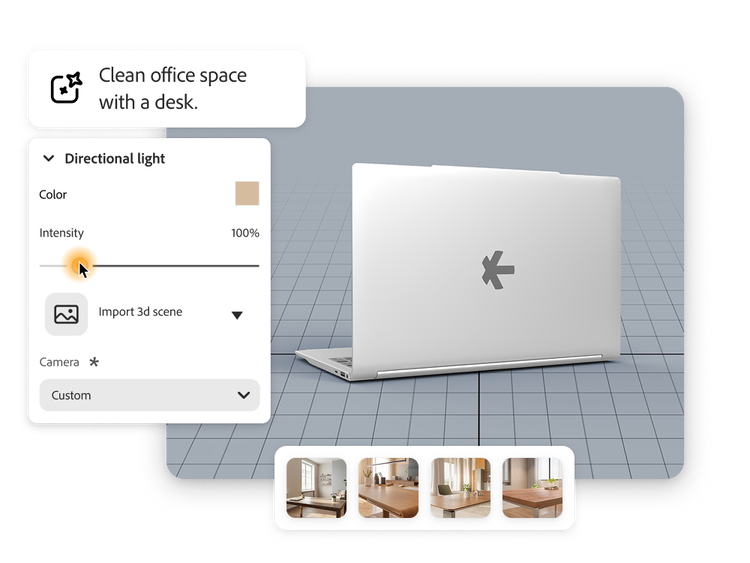
Design or CAD data is converted and optimised in Substance 3D, where materials, textures, lighting and cameras are defined to build a high-fidelity digital twin for 3D product visualisation.
-
Standardise at scale.
Optional Substance Automation scripts generate variants to support large-scale product merchandising from a single pipeline.
-
Author the workflow in Adobe Firefly Creative Production.
In Firefly Creative Production, teams can utilise the digital twins node, configure angles and scene options and chain it with 2D actions like resize, colour-grade, composite and generate image or video.
-
Run at scale with cloud rendering.
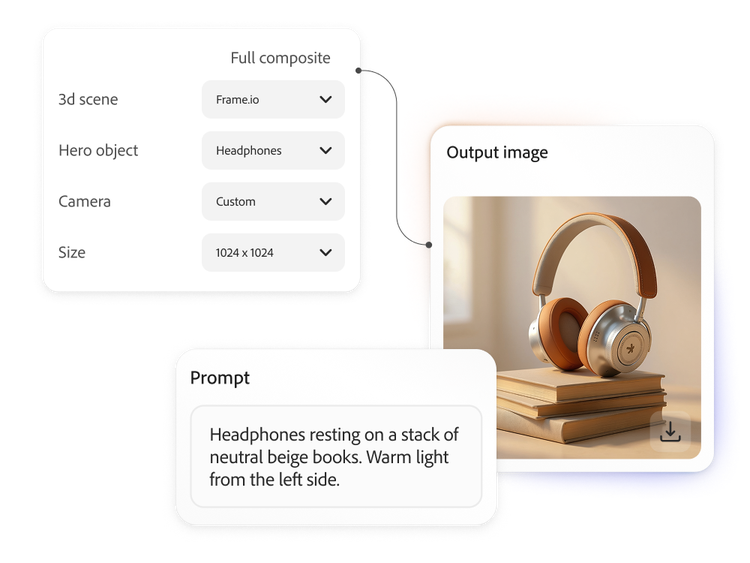
Firefly Services 3D APIs and cloud rendering are used to convert the digital twins into 2D images and short videos at scale, supporting hero assets and campaign visuals without manual intervention.
-
Review and activate.
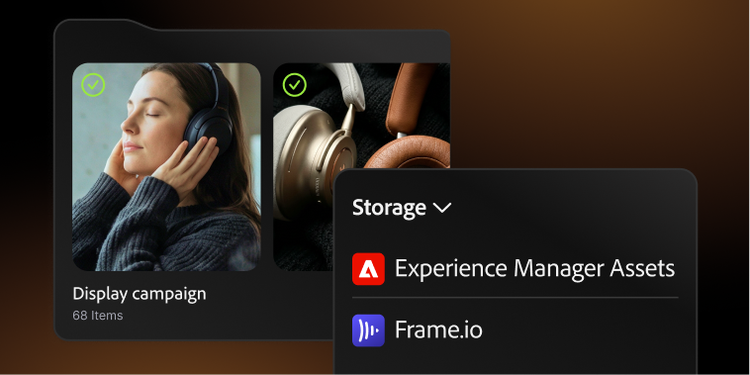
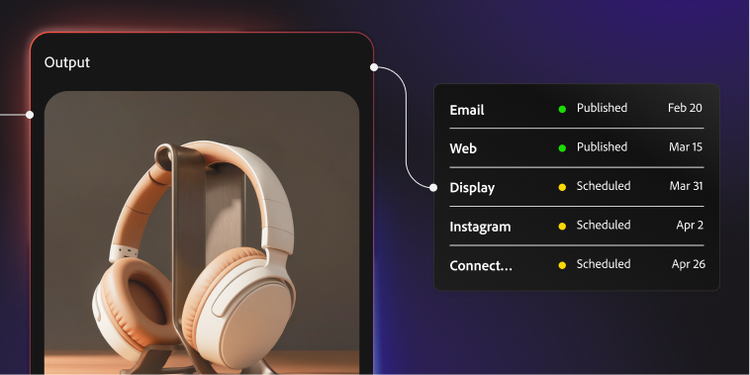
Outputs are pushed to AEM Assets, Frame.io or other systems for review, approval and activation across ecommerce and marketing channels.
Top enterprise use cases focus on 3D product visualisation and scaled product merchandising:
-
Standardised packshots.
On-brand or single-colour product imagery for thousands of SKUs, rendered consistently via cloud rendering from the same digital twins library.
-
Lifestyle and hero imagery.
Compositing digital twins into Firefly-generated scenes, while preserving accurate lighting, shadows and refractions.
-
Variant and 3D configurator imagery.
Automating colorways, finishes and packaging variants by rendering multiple options for each twin.
-
Localisation and personalisation.
Re-rendering scenes with localised environments and creative treatments without reshooting or rebuilding scenes per market.
-
Launch kits and campaign kits.
Quickly generate multiangle, multiformat asset sets for each new product launch, based on a single approved twin and workflow.
Think of Adobe's solution stack as three co-ordinated layers that deliver enterprise-grade 3D product visualisation and product merchandising automation together:
- Substance 3D and Substance Automation (Upstream).
- Create and standardise digital twins from CAD or design data.
- Automate prep, materials and studio set-up to support large-scale 3D pipelines and feed advanced 3D configurator software use cases.
- Firefly Services 3D and Imaging APIs (Downstream).
- Use cloud rendering to convert those twins into packshots and lifestyle imagery via Render 3D Object and Generate 3D Object Composite APIs.
- Pair digital twins with Firefly image and video generation for campaign content, localisation and personalisation.
- Firefly Creative Production (Orchestration).
- A no-code workflow canvas used to assemble automated pipelines across 2D, 3D and video combining digital twins, Firefly generative models and downstream routeing to DAMS and activation systems.
- This is the layer where digital twins drive everyday product merchandising assets and powers richer 3D product visualisation experiences at scale.
Most enterprises start with a focused pilot aimed at a concrete 3D product visualisation or product merchandising problem:
-
Pick a high-impact product line.
Choose one to two hero categories where better imagery, launch cycles or a richer 3D experience would clearly move the needle.
-
Inventory 3D inputs.
Confirm available CAD or 3D assets and identify gaps. Where needed, work with partners to create a small but complete digital twins set in Substance 3D.
-
Stand up a Firefly Creative Production pipeline.
Define a Firefly Creative Production graph that leverages cloud rendering of those twins plus downstream Firefly generation to product imagery packshots and a small set of lifestyle scenes.
-
Measure ROI vs. Today.
Compare cycle time, asset volume and cost per asset against your current shoots and CGI vendors for that product line, including localisation and variant additions.