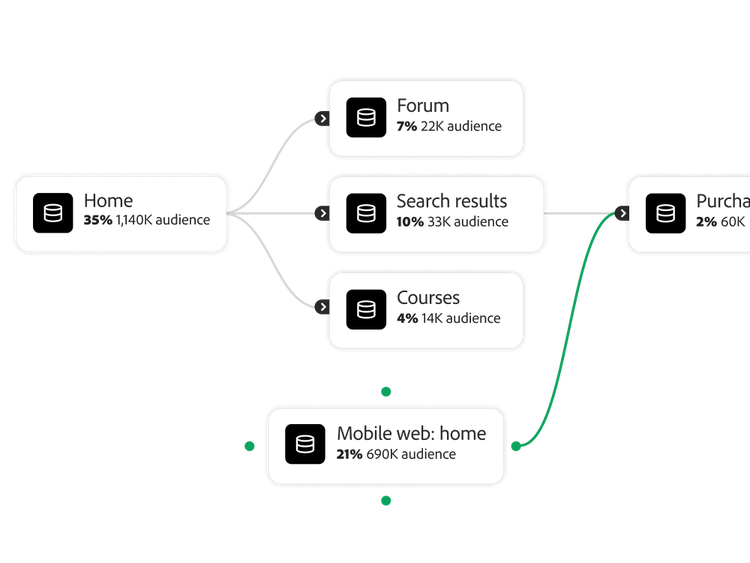
Customer-level analysis resolves anonymous and known interactions into a single person profile over time, rather than measuring isolated sessions or visits the way session- or cookie-based tracking does.
Customer Journey Analytics does this through identity stitching, which retroactively re-associates earlier anonymous activity once a person is identified, for example backfilling ten anonymous pageviews with an email identity the moment that visitor logs in on the eleventh. The result is a customer-level view, not a device- or session-level one.
Customer Journey Analytics supports
two stitching modes and which ones you have access to depends on your CJA licence tier. Field-based stitching connects data using a common identifier that is literally present in each dataset, such as a device ID or email address and restates historical anonymous events once that identifier appears.Graph-based stitching instead uses the Adobe Experience Platform Identity Graph to resolve a person across identity namespaces, such as an ECID, device ID and email, without needing the same identifier stamped on every dataset and it must be enabled for your AEP tenet to work. Confirm your CJA tier and whether graph-based stitching is enabled for your tenet with your Adobe account team before assuming both modes are available.
Yes, Customer Journey Analytics lets you build and compare attribution models using your stitched, cross-channel customer data, so credit for a
conversion can be spread across the touchpoints that led to it rather than assigned to a single last-touch event. Because the underlying data is person-level and cross-channel, an attribution model here can span web, app and offline touchpoints in the same view, not just a single channel's session data.
Identity stitching is retroactive and non-destructive: it re-associates historical anonymous events with an identity once that identity is known, without altering the underlying raw event data itself. This runs as a report-time process, so your source data in Adobe Experience Platform stays intact and stitching can be reprocessed as your identity resolution improves rather than locking in whatever was known at collection time.
You need a consistent Person ID present in every source dataset you want stitched, populated on every row, in the same format across sources and free of personally identifiable values (hash anything sensitive before it reaches the data view). Beyond that, each dataset needs to be connected into
Adobe Experience Platform with the appropriate schema; once Person ID and your connection are in place, stitching and the resulting customer-level metrics apply automatically in Analysis Workspace.