.

ADOBE JOURNEY OPTIMIZER CHANNELS

Web personalisation

Engage customers with dynamic web experiences. With Journey Optimizer you can tailor in-browser messages based on customer behaviour, deliver consistent engagement across each customer’s journey and ensure every interaction is meaningful.

Watch demo

In-browser messaging

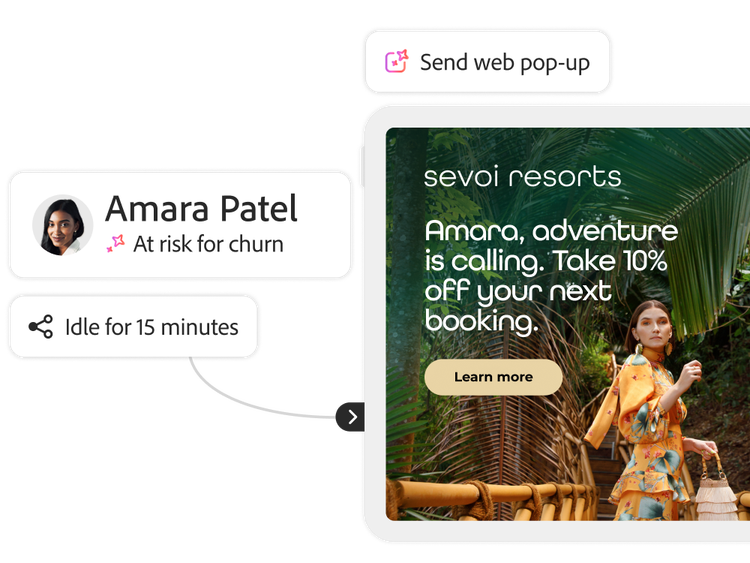
Create and launch engaging pop-ups, banners, overlays and more with out-of-the-box templates, no-code workflows and customisation options.

  • Behaviour-based messaging. Set triggers to deliver the right in-browser message at the right time. Show messages based on customer behaviours such visiting a page, engaging with content or adding items to basket.
  • No-code creation. Create in-browser experiences such as a full-screen takeover, stripe banner, modal or customised code message. Speed up your workflows with out-of-the-box templates and visual feedback.
  • Frequency rules. Ensure every message makes an impact by setting message frequency rules, including every visit, one time, until click-through, or a specific number of views.
A pop-up ad and the product UI of the triggering conditions
A landing page showing visual editing options for the headline copy image and link

Visual web page editing

Design the perfect customer experience using a visual editor to modify content, links, fonts, images, offers and more.

  • Component editor. Use the component editor to drag-and-drop section dividers, HTML blocks, images, headings, links or paragraphs. Open an HTML designer on any object to access and modify the underlying code.
  • Code-free modifications. Edit everything from containers and content blocks to background colours, borders and fonts, all without diving into the code.
  • Browse and edit modes. Toggle between browse and edit modes to select your surface, navigate to the right pages and make changes, fast.
  • Device-specific previews. Ensure your site looks flawless for every customer by selecting from various device types to preview your web experience.

Single page application editing

Personalise single page applications (SPAS) with the same “what you see is what you get” (WYSIWYG) authoring controls as a standard web page.

  • View-based personalisation. Select and apply personalisation to specific views, from full site to a group of visual elements. Personalise at any level, from all product pages down to the delivery preferences frame on a checkout page.
  • Flexible editing. Review and apply modifications to single, multiple or all views within your single page application.
A webpage and UI showing an HTML link change applied across the home and product pages

Learn more about engaging customers with personalised web experiences.

A profile with real-time behaviour data and a personalised pop-up ad

Learn how to use website personalisation features.

Find what you need in Experience League, our vast collection of how-to content - including documentation, tutorials and user guides.

Learn more

Questions? We have answers.

Let’s talk about what Adobe Journey Optimizer can do for your business.

Get started