What is an Agile epic? Definition and examples | Adobe Australia

Epics in Agile – everything you need to know to get started

Woman sitting at a laptop with overlays of an Agile epic chart for a wilderness promo campaign.

Large, complex projects can be tough to manage. Keeping track of multiple tasks while aligning everything with your company’s overall strategy takes real effort. Agile epics offer a practical way to break that complexity into manageable pieces, helping your teams stay organised and focused on delivering real value to customers.

In this guide:

What is an Agile epic?

An Agile epic is a substantial body of work that gets broken down into smaller, more actionable items called user stories. These user stories are typically grounded in what your customers or end-users need, ensuring the project directly addresses their requirements. Size is what defines an epic — it’s generally too large to complete within a single Agile sprint, which is a short, focused work cycle. Instead, you break the epic into smaller stories that can be tackled step by step across multiple sprints.

An Agile epic gives you a high-level view of your project, keeping the focus on the main strategic goal and the value it will deliver. While user stories cover specific features and functionality, epics keep your team oriented toward the bigger picture. The scope of an Agile epic can also shift as the project progresses and you gather more feedback from stakeholders and customers. This flexibility is central to Agile — it lets you adjust your approach based on real-world learning.

How epics fit into the Agile framework

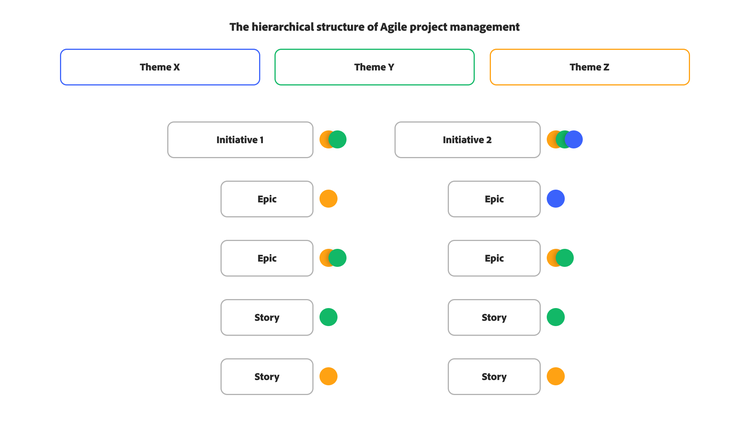
In an Agile framework, the project roadmap sits at the top of the hierarchical structure. Each roadmap may include a series of clearly defined goals or milestones, visualised as initiatives plotted along a timeline. Initiatives can consist of one or more epics, which are then broken down into smaller, more manageable tasks called user stories.

To summarise, here are the definitions of the various hierarchical pieces involved in the Agile framework:

  • Theme – The project roadmap or overarching project goal
  • Initiative – A group of epics
  • Epic – A high-level user story
  • User story – A single task within an epic
  • Sprint – A one-to-two-week period in which one or more user stories are completed
Chart representing the hierarchical structure of Agile project management.

In Agile, an epic sits within a project’s hierarchical organisation, breaking a larger deliverable down into smaller chunks known as stories or issues. You can also think of these ‘stories’ as tasks to be completed during a one- to two-week sprint. Because an epic is made up of multiple user stories, it typically takes several sprints to complete them all. Time frames can vary by team and project, though — shorter epics may be wrapped up within one or two sprints.

At the end of each sprint, the team gathers feedback from stakeholders, executives, and clients on the completed user stories. For example, if you launch a new product feature and customers find it difficult to use, you’ll need to rework it based on that feedback. This process builds flexibility into the project, supports adjustments to keep pace with market trends, and drives a continuous cycle of improvement across the overall project roadmap.

Create Agile epics

Agile epics should align directly with strategic initiatives or high-priority goals, connecting broad objectives to actionable user stories. For example, if your team’s roadmap includes launching a new search feature for your ecommerce site, the related epic should support that goal by focusing on user-facing outcomes — such as improving product discoverability or reducing search time.

Start by reviewing your team’s quarterly or annual objectives. Identify the key problems to solve — particularly those with significant impact on customers or stakeholders. Then build your epics around these challenges, each representing a clear, customer-centred goal that can be delivered incrementally.

Best practices for writing and managing your Agile epics

To make the most of Agile epics, consider these best practices:

  • Define clear objectives: Each epic should have a clear, concise objective that aligns with your broader business goals and delivers tangible value to your customers.
  • Establish acceptance criteria: Define clear criteria for when the epic is complete and successful.
  • Break down into user stories: Divide each epic into smaller, more manageable user stories that can typically be completed within a single sprint.
  • Prioritise effectively: Prioritise your epics based on business value and urgency, so you’re always working on what matters most.
  • Estimate effort: Although epics span multiple sprints, estimate the overall time and effort required to support planning and resource allocation.
  • Visualise progress: Use tools like burndown charts or Kanban boards to track the progress of your epics and maintain transparency across your team.
  • Gather feedback: Continuously collect feedback from stakeholders and incorporate it into your epics to ensure the outcome meets expectations.
  • Regularly review and refine: Review the status of your epics regularly and refine them based on progress, new insights, and evolving requirements.

Examples of Agile epics

Here are a couple of examples to help you better visualise what epics look like in practice.

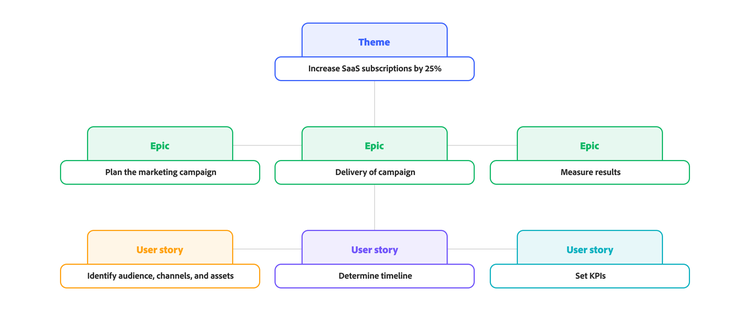
1. Launch a major marketing campaign to boost SaaS subscriptions by 25%

A marketing team is launching a major campaign to boost SaaS subscriptions and support their organisation. The marketing plan will target both new and existing customer bases, involve multiple channels and assets, and carry an overall budget of USD 1 million. This is not only a large, multi-month project but also demands a clear plan of who does what and when. To get the highest ROI from the project, working in an Agile way lets the team incorporate feedback throughout and adjust tactics or channels as needed.

Epics:

  1. Plan the marketing campaign.
  2. Deliver the campaign.
  3. Measure results.

From here, each epic is broken down into user stories.

User stories for epic #1:

  • Identify the target audience, channels, and types of assets.
  • Determine the campaign timeline.
  • Set KPIs for the campaign.

Once all the user stories are complete, you can move on to the next epic – in this example, campaign delivery. You can also keep gathering feedback from product stakeholders on the first epic – for instance, whether they feel you’re targeting the right customer audiences and channels. Based on that feedback, you may need to adjust your campaign plan before rolling it out.

Example of an Agile epic displayed in chart form to increase SaaS subscriptions by 25%.

2. Adding a search feature to an ecommerce site

To improve the customer experience, a web development team and a product team are working to integrate a search feature into their business’s ecommerce site. The goal is to help customers find the products they want, quickly and easily. Part of what makes the project complex is ensuring all products are included in the search database and tagged across multiple search formats to deliver the closest match to what the customer is looking for.

Epics:

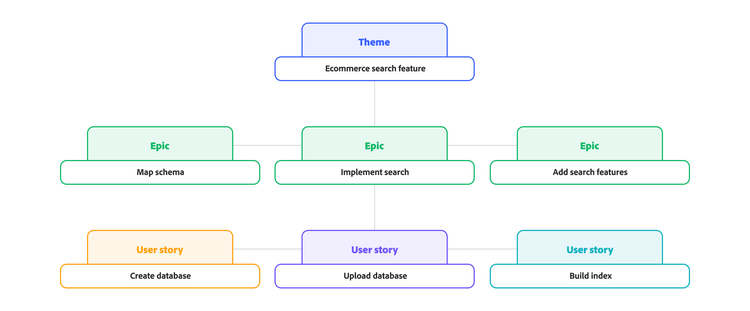
  1. Map the schema for search.
  2. Implement search on the front end.
  3. Add advanced search features.

With these three epics defined, the next step is working out the user stories for each epic.

User stories for epic #1:

  • Create a database file of products.
  • Upload the database file to search wizard.
  • Build product Index.
Example of an Agile epic in chart form to implement an ecommerce search feature.

Measuring Agile epics

Tracking project progress closely is essential to keep projects on schedule, manage resources effectively, and spot bottlenecks before they arise. Reports such as burndown charts, velocity charts, and cumulative flow diagrams let you measure the progress of your epics. With the right Agile project management tool, these reports are straightforward to create and customise:

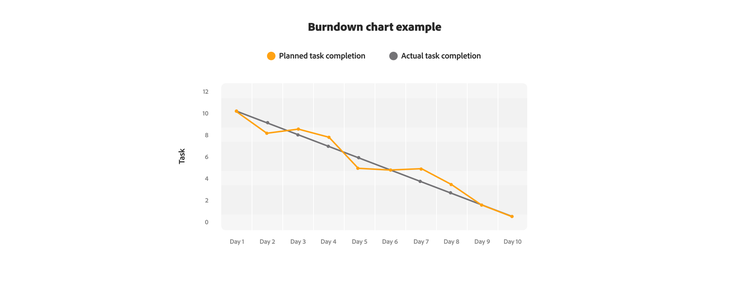
  • Burndown chart. A simple chart that tracks a team’s work progress against the time remaining to complete the work.
  • Velocity chart. This chart compares committed work against completed work to show how quickly your team delivers on the project.
  • Cumulative flow diagram. This diagram visualises the entire workflow, helping identify problems or bottlenecks and reduce your average cycle time. It also supports better management of your work-in-progress limits and increases your team’s throughput.
An example of a burndown chart displaying the differences between planned task completion and actual task completion.
Source: Adobe, “Burndown Chart.”

Beyond having the right reports to track the progress of your epics, additional reporting and dashboard features can boost visibility and transparency across all project teams and stakeholders. When choosing an Agile project management tool, look for these features:

  • Real-time data gives you complete visibility into the progress of your epics at all times.
  • Customised reporting and dashboards make it easy to create reports and project views that suit how your organisation or project managers run Agile projects.
  • Automation lets you deliver reports automatically to various stakeholders, ensuring the right teams or team members always have the most up-to-date information.
  • Alignment between stories and strategic goals provides a clearer view of the big picture, enabling executives to make data-driven decisions and project managers to address bottlenecks before they occur.

Why use Agile epics?

Adopting Agile epics brings several advantages to your project management, particularly when dealing with complex initiatives:

  • Improved organisation. By grouping related user stories under a common epic, you can create a clear hierarchy and make large projects easier to understand and manage. This structured approach lets you break down work into smaller, deliverable pieces, so you can deliver value to customers continuously rather than waiting for a massive project to wrap up.
  • Enhanced agility. Epics let your teams break down their work without losing sight of the main objective. This gives you the flexibility to adapt to change and incorporate feedback on smaller increments, while still contributing to the overall strategic vision.
  • Customer alignment. Epics keep your development efforts focused on what your customers need, acting as containers for user stories that directly address those requirements.
  • Better team collaboration. Completing an epic often calls for multiple teams to work together towards a shared goal, fostering stronger teamwork and communication across your organisation.
  • More practical time management. Breaking down large epics into smaller, sprint-sized user stories helps you keep project timelines on track. This granular approach makes it easier to estimate the effort needed and track progress.
  • Clearer progress visibility. Epics give managers and executives a high-level view of project progress, keeping everyone across the status of key projects.
  • Reduced scope creep. Defining epics clearly and breaking them down into user stories helps you keep the project’s scope in check, reducing the risk of it expanding beyond its original boundaries.

Managing Agile epics with Adobe Workfront

Adobe Workfront is a full-featured platform for managing Agile epics and streamlining Agile processes. With Workfront, you can create and manage Agile teams, with support for Scrum and Kanban methodologies. Manage your product backlog directly in Workfront, organising and prioritising epics and their associated user stories.

For Scrum teams, Workfront makes sprint planning straightforward, letting you assign user stories from epics to specific sprints with ease. Kanban teams can use Workfront’s Kanban Boards to visualise the workflow for epics and track progress through customisable stages.

Adobe Workfront also connects with other Adobe products and a range of external applications, making collaboration easier and workflows more efficient. As a central platform, Adobe Workfront gives you better visibility, stronger collaboration, and clearer progress tracking towards your strategic goals.

Let’s talk about what Adobe can do for your business.

Get started