Some legal departments have been slow to adopt AI in their work — and for good reason. Occasionally, attorneys have made headlines after using a public large language model (LLM) to assist with their legal filings, only for a judge to point out that these documents contain fake case law invented by AI.
The stakes of AI-induced errors are high. For legal teams and their employers, consequences can include regulatory penalties, lost cases, and reputational damage. Still, the appeal of AI technology is undeniable. Attorneys face information overload in their work, with email inboxes overflowing with lengthy contracts, compliance memos, and notes on never-ending regulatory changes.
To keep up without creating new problems, legal teams need an enterprise-grade platform like Acrobat Studio, which brings AI features and other new capabilities to Adobe’s familiar PDF tools.
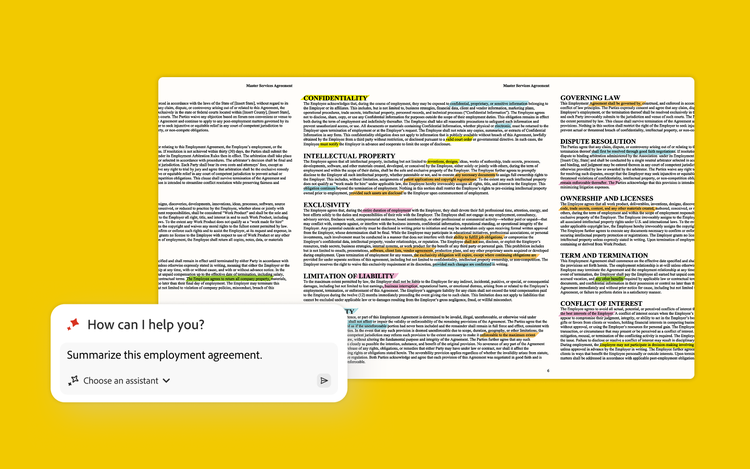
AI Assistant: No-hallucination insights.
Like popular LLMs, the Acrobat Studio AI Assistant feature lets users upload documents for instant summary, analysis, or queries. Unlike consumer-grade offerings, Acrobat Studio is both secure and reliable, providing verifiable citations and preventing enterprise data from being used for AI training.
“When we speak to legal teams, one thing they say is that there’s almost no substitute for reading a document end-to-end, because their job and their credibility are on the line,” says Job Chanasit, senior manager of product marketing at Adobe. “They need to make sure that everything they do and say is accurate. That’s why the ability to trust and to verify with Adobe AI Assistant is so important.”
In a January 2025 analysis, Forrester found that AI Assistant improves the efficiency of document summarization and analysis by 45%.
Most attorneys, Chanasit notes, will still insist on reading contracts themselves. However, AI Assistant can help surface critical insights before legal teams dive into important documents. “Based on my conversations with legal teams, they’re never going to trust AI to do their work for them,” he says. “But it can help them get started. It can help them get the lay of the land of the document and decide where to focus their attention. It can also help with understanding new regulations.”
Acrobat Studio: Protection for sensitive documents.
Privacy, of course, has always been important in the legal profession. But as cyberthreats continue to grow, legal teams are under even more pressure to ensure that the tools they use will keep documents safe. According to the American Bar Association’s latest Cybersecurity TechReport, 29% of surveyed attorneys said their firm had experienced a security breach at some point, with another 19% saying they were unsure if their firm had ever experienced one.
“Our tools are enterprise-ready in terms of security,” Chanasit says. Acrobat Studio includes Acrobat Pro, which allows users to permanently redact sensitive data from PDFs, add passwords and permissions to documents, and securely obtain e-signatures. For legal teams, these features can help enforce compliance with regulations governing encryption and audit trails.
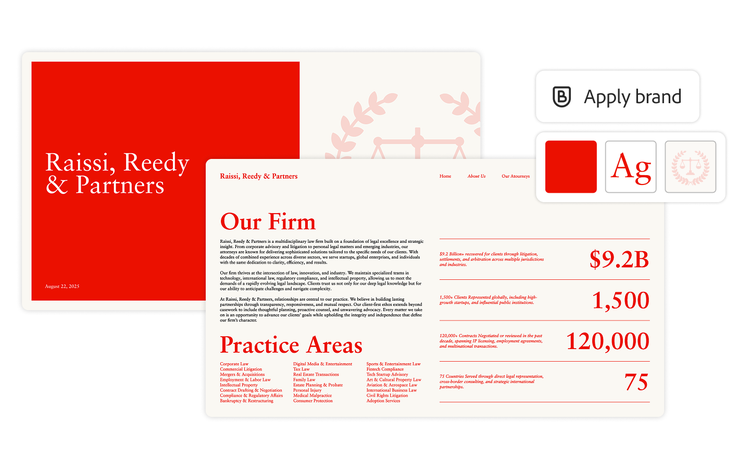
Adobe Express: Keeping documents on brand.
Adobe Express offers users a simple way to create what Chanasit calls “standout” content — assets like professional presentations, reports, and social media content. The tool can help legal teams apply consistent branding to documents where needed, approve templates with locked elements such as fonts and colors, quickly resize content, and insert or remove images.
Chanasit stresses that Adobe Express is specifically meant for non-designers, helping employees in departments like legal and human resources when they need to tweak existing content or create new assets in a pinch. “You can quickly create content without going to your design team,” he says.
PDF Spaces: Collaboration across documents.
PDF Spaces allows users to centralize up to 100 different files — of up to 600 pages each — in a single, unified workspace. This means legal teams can bring together up to 60,000 pages of documentation, providing opportunities to search across related documents for critical information and generate cross-document insights with AI.
For instance, Chanasit says, legal teams might upload contracts, along with relevant legal precedent, to quickly hunt down any clauses that don’t comply with the law in a particular jurisdiction. This gives legal teams a starting point for time-intensive and highly essential work.
Learn more about Acrobat Studio and how it empowers legal teams.