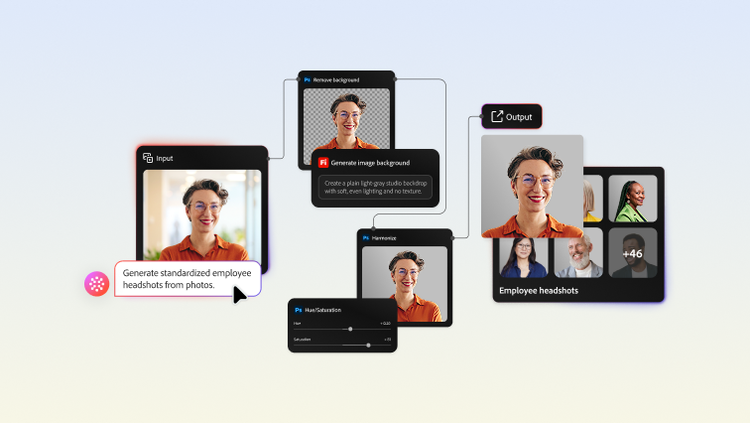
The one-brand workforce playbook: Standardizing employee headshots with AI-powered workflows.
11-19-2026
Most enterprises have a brand playbook for their content and creative assets. Far fewer have one for how their workforce is represented. The gap becomes especially visible during periods of change. Imagine a post-merger scenario in which a new brand has been rolled out, with updated logos, websites, and design systems, creating a cohesive visual presence. But when someone opens the employee directory, they find inconsistent images that reflect different styles and legacy brand standards, subtly changing the perception of a single, unified company.
Every employee is a visible representative of the brand, playing an important role in corporate identity design. However, as teams grow and evolve, standardizing headshots across business units often becomes a logistical burden.
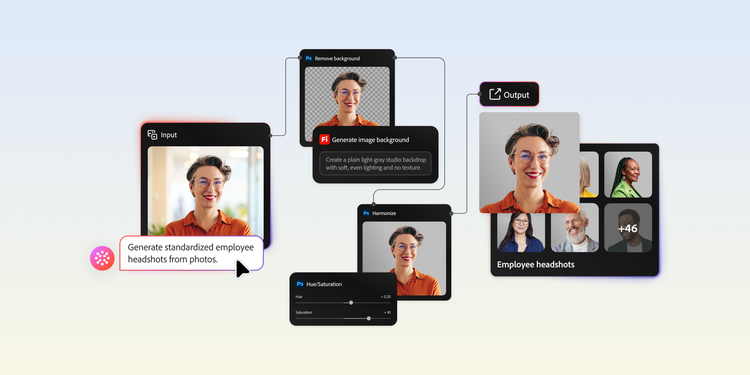
Brand and creative leaders can solve this challenge at scale through AI-powered headshot standardization. They can establish repeatable, scalable workflows to turn existing employee photos into professional, brand-aligned headshots, quickly and efficiently. This helps create a truly one-brand workforce, with employees represented consistently across every touchpoint. At the same time, enterprises can achieve in days what traditionally required months of coordination, scheduling, and manual work.
Here’s what you need to know for operationalizing AI-powered headshot standardization:
- The strategic importance of visual consistency.
- Challenges of business headshot standardization.
- How AI-powered workflows simplify headshot standardization.
- Use cases for AI-powered headshot standardization.
- How to build an AI-powered headshot standardization workflow.
- Key considerations for responsible AI headshot standardization.
- A smarter approach to managing workforce imagery.
The strategic importance of visual consistency.
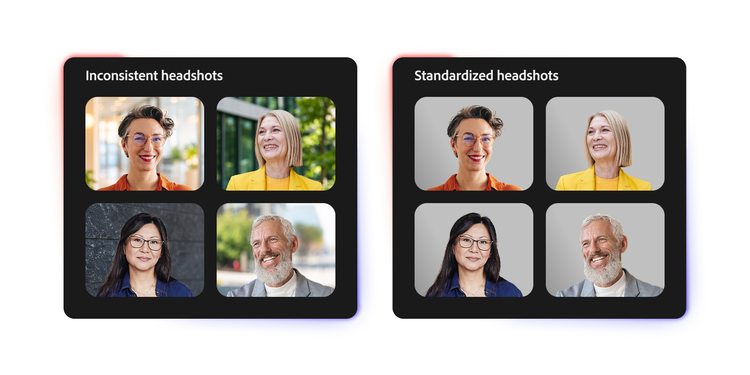
Headshot standardization isn't a cosmetic issue. Employee photos appear everywhere, from LinkedIn profiles and company websites to press materials, investor communications, event speaker pages, and internal directories. They are often among the first visual touchpoints that customers, prospects, and partners encounter. When a disconnect is obvious across those images, it can create an impression of inconsistency and, in some cases, internal disorganization.
According to Edelman’s 2026 Trust Barometer, 88% of consumers say that trusting a brand is an important or critical purchase criterion. Trust is shaped through a range of brand interactions, including the visual experiences audiences encounter across channels. A cohesive visual identity signals professionalism, attention to detail, and credibility. Conversely, fragmented visual experiences can weaken the confidence enterprises work hard to build across customer and stakeholder journeys.
In B2B environments, where buyer relationships often develop over months or years, brand perception and trust are shaped across a series of interactions rather than a single touchpoint. Similar dynamics apply in many customer-facing industries, where customers form impressions through repeated engagements with a brand and its employees. Therefore, brand identity must extend beyond traditional assets to the people who represent the brand every day. Ensuring consistency in employee imagery helps reinforce the sense that every part of the organization is aligned and presented cohesively.
Challenges of business headshot standardization.
Maintaining a cohesive and professional representation of a brand’s workforce is rarely straightforward. Employee images are often captured over time using different photography styles and quality standards, especially in large and distributed organizations. This makes it difficult to present employees consistently across customer-facing and corporate communications.
Here are the key challenges enterprises encounter:
- Traditional approaches don't scale easily. Coordinating professional photography sessions across multiple offices and countries is costly, time-consuming, and difficult to manage. Keeping headshots up to date as employees join, change roles, or leave adds a further layer of ongoing effort.
- Remote work introduces inconsistency. Employees may rely on photos taken by themselves or previous employers, captured on different devices and in varying environments. This leads to inconsistencies in lighting, image quality, backgrounds, and framing.
- Organizational change adds complexity. As enterprises expand into new markets, onboard new teams, or evolve brand standards, maintaining a consistent visual identity across thousands of employee photos becomes increasingly difficult. What starts as a manageable task can quickly turn into a large-scale operational challenge.
When employee headshots do not feel part of the same story, they can weaken brand perception and diminish customer trust. With AI, enterprises can modernize how workforce imagery is managed without recurring photography investments.
How AI-powered workflows simplify headshot standardization.
AI-powered workflows offer a streamlined approach to employee headshot management. By automating many of the tasks that traditionally required extensive manual effort, they help you save time and resources while improving visual consistency. Their value is particularly evident across the following areas:
- Exposure normalization: Employee photos are often captured in a variety of environments, from home offices and conference rooms to event venues. AI can analyze and automatically adjust brightness, contrast, shadows, and color balance to bring images closer to an established visual standard.
- Background replacement: Instead of requiring employees to retake photos, AI can remove existing backgrounds and replace them with brand-approved alternatives. This helps create a consistent visual identity regardless of where the original photo was taken.
- Batch processing at scale: Reviewing and editing individual photos is rarely practical at enterprise scale. AI workflows can apply the same standardization rules, including lighting, background, framing, and formatting standards, across large batches of images, dramatically reducing turnaround time and effort.
- Quality control automation: Not every photo is suitable for standardization. AI can identify issues such as low resolution, poor visibility, incorrect framing, or extreme lighting conditions and flag images for review. This allows brand and creative teams to focus on high-value work.
Together, these capabilities enable standardization of corporate imagery with far greater speed and efficiency.
Use cases for AI-powered headshot standardization.
AI-powered headshot standardization helps ensure workforce representation across touchpoints keeps pace as an organization’s people, structure, and footprint evolve. Whether navigating a major transformation or managing a growing team, AI can help you turn a traditionally resource-intensive process into a repeatable and efficient workflow.
Some common use cases include:
- Mergers and acquisitions. When two companies merge, establishing a unified brand identity is often a top priority. For example, an enterprise acquiring a business with 5,000 employees may need to quickly align thousands of headshots that reflect different visual standards and brand guidelines. AI-powered batch processing can rapidly transform these images to match the acquirer's brand requirements, creating a more cohesive workforce identity without the need for large-scale photo sessions. The result is faster brand integration with significantly less time, cost, and coordination.
- Corporate rebrands. When a global firm modernizes its visual identity or a technology company refreshes its brand ahead of a market expansion, thousands of employee photos can quickly look out of sync. This is especially true for long-tenured employees whose headshots have accumulated over the years across collaboration platforms, HR systems, and external websites. AI can refresh images across the organization, ensuring every employee’s visual identity is aligned with new brand standards, without requiring new photo sessions.
-
Zero-touch onboarding. AI can help reduce the administrative burden of coordinating professional headshots for every new hire, especially for a global workforce. Through a self-service portal, a graduate hire in Chicago, a sales representative in London, and a remote engineer in Toronto can each upload a smartphone photo. AI can automatically optimize lighting, refine the image quality, and apply approved styling. Within minutes, every new hire receives a professional headshot that looks as though it was taken in the same corporate studio, regardless of location or device.
-
Global workforce expansion. As organizations expand across markets and locations, maintaining a consistent visual identity becomes increasingly challenging. A multinational company with corporate headquarters in New York, regional hubs in Singapore and Frankfurt, and distributed teams across dozens of countries may receive employee photos captured in a wide range of environments and lighting conditions. AI, with certain guardrails, can help enforce consistent visual standards across the organization, ensuring employees in every region appear as part of a unified global brand rather than a collection of independent local offices.
- Ongoing brand governance. Workforces are constantly evolving. Employees join, change roles, relocate, and update their professional profiles. In a large organization, employee images may need to be updated every month as new hires are onboarded, leaders are promoted, and teams are reorganized. AI-powered workflows can standardize every incoming image automatically, helping HR, communications, and client teams maintain consistent representation over time instead of relying on periodic refresh projects.
Across these use cases, AI-powered headshot standardization shifts workforce imagery from a one-time branding exercise to a continuous capability.
How to build an AI-powered headshot standardization workflow.
AI can automate much of the heavy lifting, but successful headshot standardization starts with process, not technology. The goal is to create a scalable system that delivers consistent results whether you're updating 50 photos or 50,000. The following steps can help you establish a streamlined workflow:
1. Audit your current employee headshots.
Before launching a standardization effort, take stock of how employee photos are currently represented across the organization. Review a representative sample of images from sources such as HR systems, internal directories, collaboration platforms, and company websites. Look for inconsistencies in lighting, backgrounds, framing, image quality, and overall style. This exercise quickly reveals the scope of standardization work, and helps identify where to focus first.
2. Define and document your visual standards.
Consistency is difficult to achieve without a clear definition of success. Create a headshot style guide that outlines approved backgrounds, framing preferences, lighting standards, and technical requirements, including file formats and resolution. Think of it as extending your brand guidelines to the people who represent the brand.
3. Configure your batch processing workflow.
Once standards are defined, build an AI workflow that applies them consistently across multiple images. Exposure correction, background replacement, image enhancement, and quality checks can all be automated with guardrails in place. This helps ensure every headshot adheres to approved brand standards while minimizing manual review and rework.
4. Make photo submissions effortless.
A consistent submission process helps reduce variability before images enter the production workflow. Give employees a simple, self-service channel to submit photos, along with practical guidance on lighting, attire, framing, and background selection. A few clear instructions upfront can significantly improve output quality and reduce the need for retakes.
5. Implement a tiered approval workflow.
AI can streamline the process, but human oversight remains essential. Establish review and approval paths based on how photos will be used. For example, an internal directory photo may require less scrutiny than an executive headshot in a company website or press kit.
6. Centralize and tag the standardized assets.
Once approved, store headshots in a centralized asset repository with consistent metadata, such as employee name, role, location, and processing date. This ensures HR, marketing, communications, and leadership teams all have access to the same approved images rather than relying on different versions stored across multiple systems.
Sample headshot style guide for an AI-driven workflow.
An AI-powered workflow gives you more than a standardized photo library. It's a system that helps brands maintain a consistent workforce identity, regardless of how quickly the organization grows or changes.
Key considerations for responsible AI headshot standardization.
While AI can dramatically simplify headshot standardization, it is not without challenges. Poorly governed implementations can lead to overprocessing, producing results that feel artificial and disconnected from an employee's real appearance. At the same time, processing employee images requires responsible data practices.
Clear guardrails are essential to ensure the process supports brand consistency without compromising authenticity, inclusion, or employee trust. Some key considerations while designing a streamlined workflow include:
- Preserving authenticity: The goal should be standardization, not transformation. AI should align lighting, backgrounds, and image quality without altering an employee's appearance.
- Establishing transparency: Employees should understand how their photos will be processed, where they will be used, and what changes AI is permitted to make.
- Addressing bias and inclusivity: Enterprises should verify that AI-generated headshots accurately and consistently represent employees from diverse backgrounds and identities.
- Maintaining human oversight: A review process should be established to ensure outputs remain aligned with expectations and brand standards.
- Protecting privacy and data security: Employee photos are personal data. Enterprises should ensure images are processed, stored, and governed in accordance with internal policies and applicable regulations.
When automation is paired with the right safeguards, you can create workforce images that are unmistakably on -brand.
A smarter approach to managing workforce imagery.
Employee photos may seem like a small detail, but at enterprise scale, they influence thousands of daily brand interactions across websites, collaboration platforms, sales materials, and leadership communications. As organizations grow, expand into new markets, and integrate new teams, maintaining a consistent visual identity becomes increasingly important.
AI-powered workflows help standardize employee imagery at scale, ensuring every visual touchpoint reflects the same professional brand standards. More importantly, they enable enterprises to move beyond a recurring operational task and establish a sustainable, governed approach to visual identity management. The result is a unified and recognizable workforce presence where employees look like they belong to the same organization regardless of which location they work from, when they joined, or how their photo was originally captured.
Explore how Adobe Firefly Creative Production enables you to efficiently batch-process thousands of employee photos while maintaining brand consistency and governance at scale.
Recommended for you
https://business.adobe.com/fragments/resources/cards/thank-you-collections/firefly