When creating a work breakdown structure, start by outlining the desired outcome. Working backwards from completion to kickoff, divide the Project into smaller deliverables, then break each deliverable down into manageable tasks and subtasks.
Depending on the size and scope of your Project, your work breakdown structure might have three Levels or ten. There’s no set number of Levels or tasks for a finished WBS – just keep breaking work down into its smallest parts. You’ve reached the right Level of detail when a deliverable can no longer be divided into sub-deliverables and each work package has a single Project outcome.
Step 1: List every major deliverable
Start by identifying your final deliverable – the overall outcome or Project goal. This sits at the top of your WBS (Level 1) and might be something like: Launch a targeted content campaign.
Once that’s defined, break it down into major deliverables (Level 2) – the key categories of work needed to achieve that goal. These might align with departments, workstreams, or Project phases.
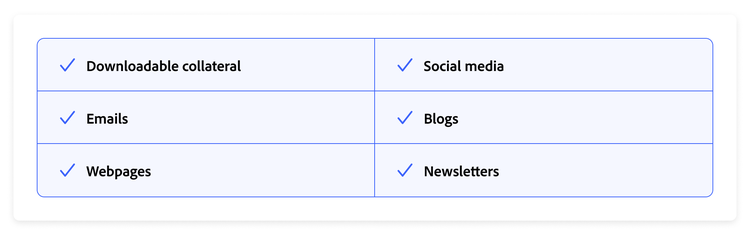
For example, the major deliverables of a targeted content campaign might be:
- Downloadable collateral
- Emails
- Webpages
- Social media
- Blogs
- Newsletters
If there’s any ambiguity or confusion about the Project resources, deliverables, or constraints, resolve them before you start on your work breakdown structure. Sorting this out early will save considerable time on revisions and prevent conflicts down the track.
Finally, make sure your list is reviewed and approved by all the stakeholders using a digital proofing tool. Depending on the Project, there may be multiple stakeholders from different teams, departments, or even different companies. It’s important that everyone has signed off on the list of deliverables and that all parties are in agreement.
Step 2: Break each deliverable into work components
Work components are groups of related deliverables that combine to form a larger, major deliverable. Depending on the size and scope of your Project, you may have more than one Level of work components. A practical way to start dividing them is by task type or role. For example:
Deliverable: Social media
- X
- Instagram
- Facebook
- LinkedIn
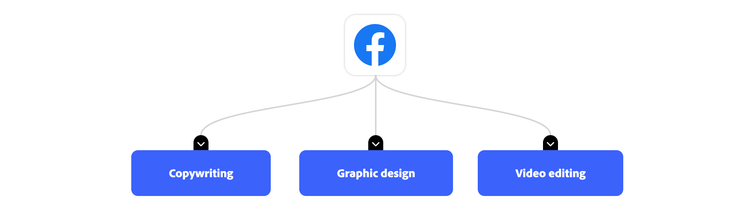
You can break down work components further if needed:
Facebook
- Sub-component: Copywriting
- Sub-component: Graphic design
- Sub-component: Video editing
There’s no requirement or limit on the number of work components you can have. Whatever works best for your team is the right answer.
Step 3: Break each work component into work packages
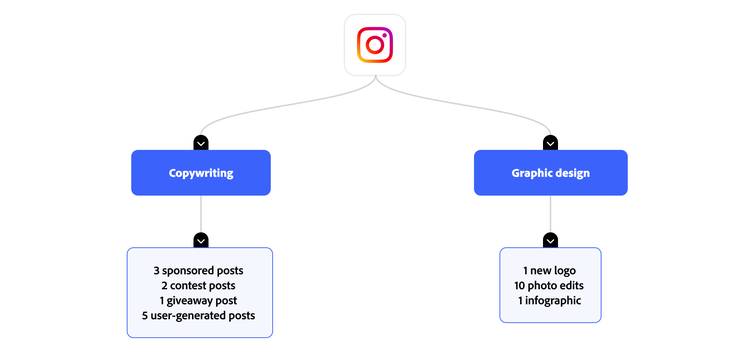
The final and most detailed Level in your work breakdown structure is made up of work packages – lists of individual tasks that one person can complete. Think of each work package as a mini project with its own budget, resources, schedule, and milestones.
Each work package should be unique, and no work package should appear more than once under any work component.
For example:
Deliverable: Social media
Step 4: Identify dependencies
Once you’ve mapped out all the work down to the most detailed task, identify any work that depends on other tasks being completed first. For example, you can’t complete video editing until you receive the voiceover script from the copywriter. Understanding the order in which work must be completed will help you schedule, manage time effectively, and anticipate roadblocks.
Step 5: Prioritise and assign
The final step in creating a work breakdown structure is organising all work in priority order, using your list of dependencies. Once your WBS is in logical order, assign work packages to individuals, then build your schedule from work packages all the way back through to the final deliverables.
Your WBS can also include any of the following information to support organisation and transparency:
- Name of the department responsible for each piece of work
- Estimated project cost and estimated work component costs
- Start dates and delivery dates
While you can create a work breakdown structure in an outline format, one of its key benefits is a visual hierarchy of your workflow, broken down into its smallest components. Every deliverable is accounted for and assigned, and it’s easy to see how individual components fit within a larger task — and, ultimately, the entire project. Consider creating your work breakdown structure using a table, flowchart, or collaboration software.
When sharing your WBS, you have several options. Common choices include spreadsheets, flowcharts or tree diagrams, outlines, or Gantt charts. Each has its own advantages and disadvantages, so experiment to find the version that works best for you.
- Spreadsheets are straightforward to use and easy to edit, but they can lack visual appeal.
- Flowcharts offer a clear visual representation of a project’s hierarchy and show the relationship between tasks at a glance.
- Outlines also provide a hierarchical view, but in a text-based format. These work well for a simple WBS but become too complex on larger scales.
- Gantt charts with integrated work breakdown structures combine visual representation with a timeline view, giving you an additional perspective.