Keep product imagery in sync with inventory using automated workflows.
11-18-2026
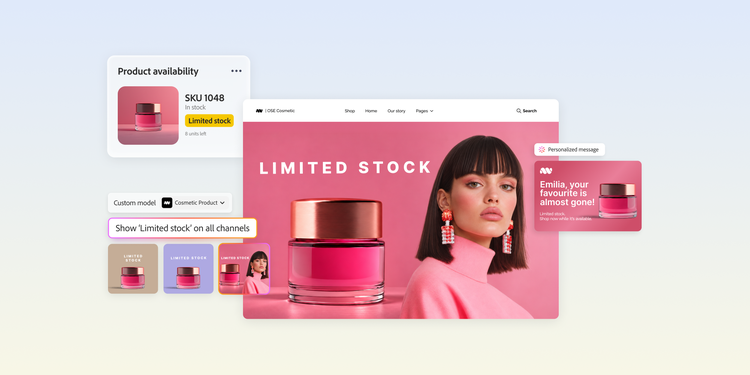
Enterprise retailers invest heavily in inventory visibility. But one critical customer touchpoint often remains disconnected from inventory data — product imagery.
A product's availability can change quickly, while the visuals customers see across storefronts, marketplaces, and ecommerce marketing channels may not reflect those changes in real time. This disconnect can create unnecessary friction for both shoppers and internal teams.
Businesses with frequently changing inventory and scaling product catalogs need ways to connect availability signals directly to the customer-facing content.
This article discusses how automated product imagery workflows can help enterprise teams keep inventory status and customer-facing content aligned across channels.
In this blog, we'll explore:
The cost of static product imagery in a dynamic inventory environment.
Inventory data is constantly changing for enterprise ecommerce businesses. Product imagery, however, is often managed through workflows that have less frequent updates.
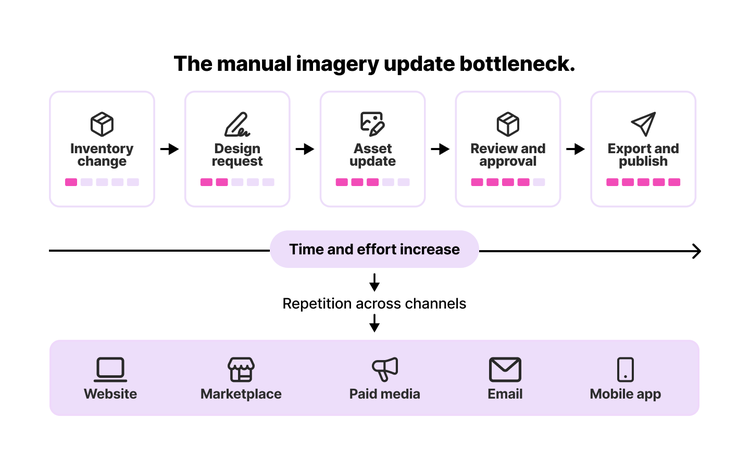
A product may move from in stock to low stock, out of stock, or backordered while the visual assets across product pages, marketplaces, paid campaigns, and regional storefronts remain unchanged. Over time, this creates multiple bottlenecks across content production and delivery workflows.
Keeping product imagery aligned with inventory status is easier when only a few products are involved. The challenge grows significantly for organizations managing large catalogs across multiple channels, markets, and formats.
A single inventory change can trigger a series of asset updates, reviews, approvals, and republishes. What begins as a routine merchandising task can quickly become a resource-intensive process when multiplied across thousands of stock-keeping units (SKUs).
Outdated imagery affects customer experience.
Customers expect product information to reflect current availability. Consider a product that sells out after a flash sale. Inventory systems register the change immediately, but product pages, marketplaces, and marketing channels may continue displaying imagery designed to drive purchases.
The consequences of the mismatch extend beyond a missed sale. Industry research shows that 72% of consumers expect real-time inventory accuracy, and 69% abandon purchases when they encounter out-of-stock products. If customer expectations are not met, brands have little opportunity to apply recovery tactics. This can create confusion, erode buyer confidence, and negatively affect conversion and engagement metrics.
Inventory volatility strains manual workflows.
Inventory status can change rapidly during seasonal peaks, major promotions, product launches, and clearance events. The periods that drive the most revenue often generate the highest volume of inventory updates, adding pressure on merchandising and creative teams.
As update requests increase, manual workflows become increasingly difficult to sustain. Organizations investing in ecommerce automation, AI-powered workflows, and automated inventory management must ensure that inventory changes are rapidly and accurately reflected across customer-facing channels without creating excessive operational overhead.
How to use product imagery automation to signal inventory status.
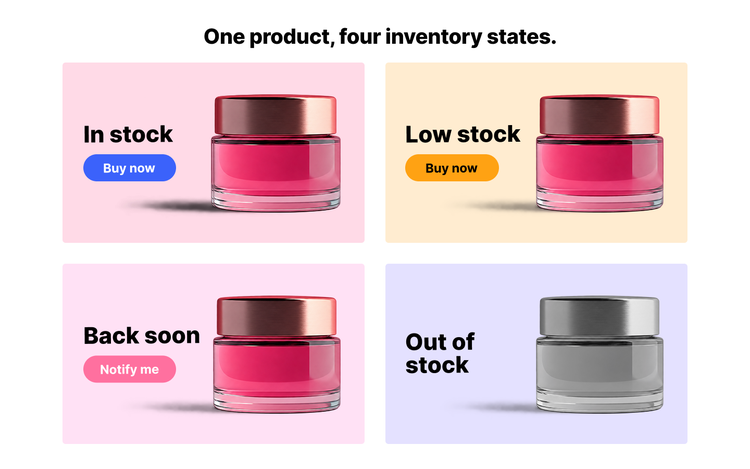
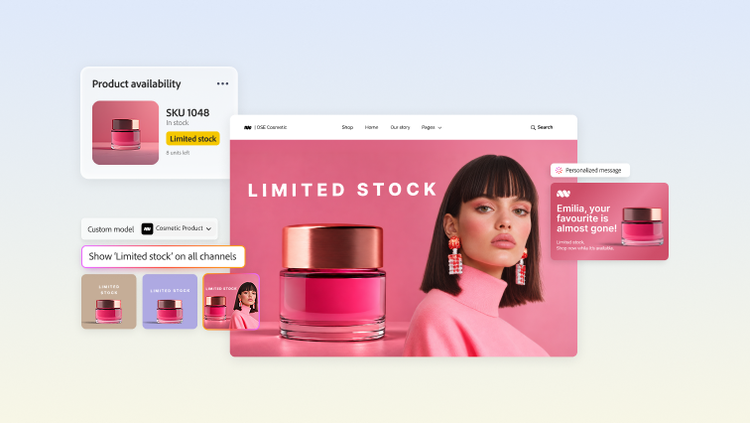
AI-powered product imagery workflows can adapt content to reflect different inventory states. From standard in-stock products to low-inventory, restocking, and out-of-stock items, automated workflows can apply approved visual treatments to keep customer-facing content aligned with availability. Here’s how you can use imagery to signal varied inventory status:
-
Low stock: Reinforce urgency to drive immediate action.
When inventory reaches a predefined threshold, imagery can incorporate subtle visual cues that reflect limited availability. For example, a product image might automatically shift to a warmer tone, a more prominent lifestyle backdrop, or another approved merchandising variant designed for low-stock inventory. This helps align imagery with inventory status during critical purchase moments.
-
Back soon: Maintain interest during the restock window.
Products with confirmed replenishment dates can be automatically labeled as “Back Soon” or “Notify Me” rather than being removed from promotional placements entirely. These signals support notification opt-ins, help keep customers engaged, and encourage them to return when the product is available again.
-
Out-of-stock products: Visually signal unavailable inventory.
When a product is out of stock, imagery can automatically shift to a desaturated or subdued treatment that signals unavailability while keeping the product page live. This helps preserve organic search visibility and maintain customer awareness while communicating clear inventory status.
-
Seasonal availability: Adapt imagery automatically.
Seasonal products often require updates tied to specific dates, campaigns, or sales windows. Automated workflows can apply approved seasonal treatments across an entire product set without needing manual intervention. For example, imagery can reflect spring-themed visual treatments, holiday shopping campaigns, or limited-time seasonal collections through approved backgrounds, overlays, and promotional labels.
How to fix out-of-stock imagery with an asset management workflow.
Keeping product imagery aligned with inventory status requires a system that responds automatically as conditions change. One approach is batch background replacement, which connects inventory data to pre-approved imagery treatments and applies them across multiple product assets simultaneously. Here's how the process works.
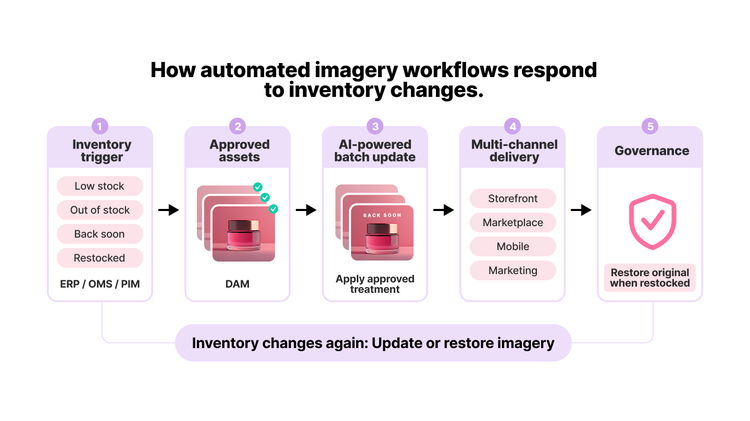
1. Detect inventory changes automatically.
The first step is establishing a live connection to an inventory data source, such as an enterprise resource planning (ERP) system, order management system (OMS), or product information management (PIM) system. When a SKU's status changes, such as when inventory reaches zero, falls below a predefined threshold, or enters a restocking phase, the source automatically triggers the next stage of the workflow.
2. Match inventory states to approved treatments.
When the trigger fires, the workflow pulls the appropriate visual treatment from a connected digital asset management (DAM) system. This could include an out-of-stock variant, a low-stock treatment, a “Back Soon” visual, or another approved merchandising template. As these assets are created and approved in advance, teams can respond quickly to changing inventory conditions while maintaining brand governance and consistency.
3. Update imagery at scale.
In the next step, the selected treatment is applied across every relevant product image associated with the SKU. Using AI-powered batch processing, teams can update image variants simultaneously rather than modifying assets one by one. This helps maintain consistency across customer touchpoints while reducing the manual effort required to manage imagery at scale.
4. Publish across customer touchpoints.
Once updated, assets are automatically formatted to meet the requirements of each destination channel and delivered accordingly. This removes repetitive publishing tasks and helps ensure inventory-related imagery updates appear consistently across storefronts, marketplaces, mobile experiences, and marketing channels.
5. Maintain governance as inventory changes.
Organizations can introduce human-in-the-loop approvals and checkpoints for high-visibility placements or sensitive merchandising updates before assets are published. When inventory status changes, such as when a product is restocked or a seasonal promotion ends, the workflow can automatically restore the original imagery or apply the next approved treatment without rebuilding assets from scratch.
Start building an end-to-end product imagery workflow.
As ecommerce operations scale, enterprise brands must treat their product imagery with the same operational discipline as their inventory systems, ensuring availability signals are reflected consistently across every customer touchpoint.
This is where AI-powered automation creates value. By connecting inventory intelligence to imagery workflows, organizations can fast-track production work, respond more efficiently to changing conditions, and deliver experiences that remain aligned with product availability.
Leading brands are already investing in governed, scalable content operations that make this kind of automation possible. Nestlé, for example, uses Adobe Firefly Custom Models as part of a governed content supply chain to accelerate the creation and adaptation of product imagery, helping teams scale content production more efficiently.
Teams looking to put these capabilities into practice can use Adobe Firefly Creative Production to support scalable, automated workflows. From applying approved imagery treatments in batches to delivering assets across channels, it helps teams streamline how product content adapts to changing business needs.
Get a demo and see how Adobe Firefly Creative Production for enterprise can automate your product imagery management.
Recommended for you
https://business.adobe.com/fragments/resources/cards/thank-you-collections/firefly
caas:content-type/blog, caas:products/firefly,
caas/blog-author/adobe-for-business-team