Before you build another tool: How to choose the right level of AI for your CX stack.
11-17-2026
The real measure of AI maturity in the enterprise isn’t how many advanced models you deploy or how many agents you build. It’s whether your teams can consistently select the right capability for their work and improve quality, efficiency, and returns.
Like most enterprise technology decisions, making those choices well means putting the business need first and letting the capability follow. But the frenzy around AI has turned that logic on its head.
I’ve seen conversations start with “we need AI” or “we need an agent” before anyone has defined what the AI is supposed to fix. This tendency gets reinforced by the way we talk about AI. It has become a catch-all term, treated as if it were a single capability that can be pointed at any process, rather than a range of different capabilities suited to different jobs.
When those distinctions blur, it becomes easy to overshoot what the task needs, adding cost and complexity without improving the outcome.
Most enterprises have already gone through a round of this, adopting the latest AI tools and increasing usage in the hope that results would follow. But Adobe’s State of AI Readiness report found that 58% of organizations remain stuck at the pilot or deployment stage with their AI projects.
The answer isn’t to start over or use less AI. It’s to make better decisions about where, when, and how to use it. Those decisions become easier to navigate when you break them into four areas of consideration.
A framework for finding the right AI fit.
The four-part decision framework helps you distinguish when existing technology is enough, when automation is sufficient, when generative AI adds value, and when agentic AI is additive.
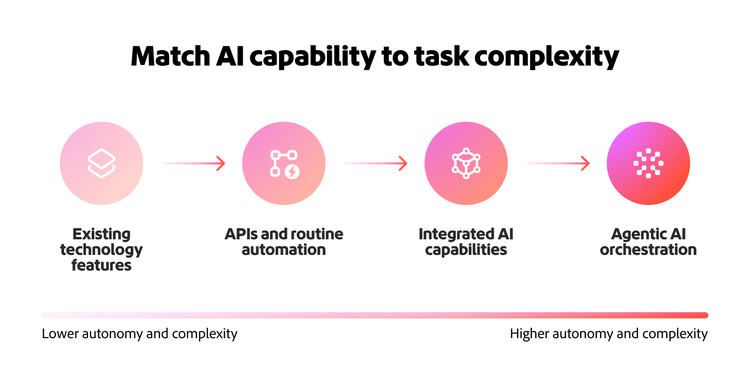
It starts with leveraging what you already have and moves to new capabilities where AI is worth the investment. That keeps AI decisions grounded in business value, rather than adopting AI for AI’s sake.
1. Start with the capabilities you already have.
Before adding another AI tool, check whether the technology already in place can do the job effectively.
If a marketer needs to create 50 campaign variations for different audiences or markets, a generative AI tool can reduce the time and effort required to produce them. But if the same marketer needs to find an approved asset that already exists for a particular campaign or region, existing search and metadata could be a better option.
The first step, then, is to understand what your existing stack can do. Because many enterprise platforms have also started building AI directly into the products you license, the functionality you’re looking to add may already be present, but your team may not have fully adopted or even identified it.
Using existing capabilities where they fit can prevent duplicate spend and avoid unnecessary integration, governance, and maintenance work. From there, the question is whether another approach could improve speed, scale, quality, or outcomes enough to justify moving beyond what you already have.
2. Automate what’s predictable and use AI where it adds value.
Once you establish that an existing capability isn’t enough, the next check should be whether the task needs generation or reasoning at all. When the inputs and outputs are known and the same action repeats consistently, rule-based automation or an API may be what you need.
Say your team needs to know how many people clicked an email last Tuesday. That number already exists in a dataset, and a standard connection or API can retrieve it directly. There’s no reasoning involved, so there’s no reason to route it through a generative model or an agent.
Generative AI is a good fit for that kind of work. If the team needs to go beyond the click count and understand what themes emerged across thousands of customer responses, a generative AI tool can synthesize and interpret that information at scale. Identifying those patterns manually would otherwise require significant effort.
The goal is to concentrate AI on the parts of a workflow where it improves the process or the outcome. The more narrowly you can define where AI adds value, the easier it becomes to avoid unnecessary complexity elsewhere in the workflow.
3. Connect AI to your existing stack instead of bypassing it.
When you decide that a task would genuinely benefit from generative AI, the challenge shifts from whether to use AI to where that capability should live. A common trap at this stage is assuming the AI experience needs to do everything itself, or that underlying enterprise systems must be rebuilt around it.
I’ve often seen a pattern where teams keep expanding what the AI experience can do through prompts and AI-generated custom code, only to discover they have rebuilt functionality they already own. It’s happened with everything from presentation software to project management tools.
That’s because AI can make it look deceptively easy to build something new. Making that experience work at enterprise scale also means handling:
- Permissions and access controls
- System integrations and data connections
- Historical records and business context
- Reliability at enterprise scale
What looks like a quick win can become a much larger engineering commitment. Instead of taking on that burden, a better approach can be to connect the AI capability to systems that already handle the underlying work.
So, if a team member wants to create, update, or query a project using natural language, the value lies in letting the AI interface call into the project management system, where the underlying records, permissions, and processes already live. You get a new way to interact with the system without needing to rebuild and maintain it.
4. Reserve agentic AI for multi-step orchestration, not routine automation.
Connecting AI to enterprise systems does not automatically make a workflow agentic. Because agents often operate across multiple tasks and systems, it becomes easy to treat any workflow that spans systems as an agentic one.
The distinction is whether people continue to direct the workflow or give agents the autonomy to decide what happens next to achieve a broader goal.
With agents, one instruction can be enough to set off a sequence across multiple tasks and systems, rather than producing a single response. That kind of multi-step orchestration becomes useful when the path isn’t fixed and you want agents to reason across changing inputs, coordinate actions across systems, and decide what comes next.
But delegating the workflow to agents also raises the bar for data reliability, permissions and controls, human oversight, and cost effectiveness. The additional autonomy needs to create enough value to justify the complexity and risk.
Consider the customer response example from earlier. Generative AI is enough to synthesize thousands of responses into recurring themes. An agentic solution could be a useful addition when the work needs to be taken further, such as cross-referencing identified themes against CRM profiles, analytics, and service interactions, isolating the affected customer segments, and recommending or triggering the appropriate response in each downstream system.
That is the kind of multi-step work agentic solutions like Adobe CX Enterprise Coworker are designed to support, coordinating actions across customer experience and data systems rather than handling each step in isolation.
Build decision discipline to get the most out of AI.
Judgment on valuable uses of AI works best when you involve the people closest to the work. They are the ones who know what quality looks like, which systems carry the right context, and where more automation or autonomy would improve the outcome.
When grounded in that expertise, AI decisions start to look more like any other technology decisions. Enterprises have always had to decide what to standardize, what to integrate, and where a new technology is worth the investment. AI widens the range of options, but it doesn’t change the discipline required to make the decisions.
As enterprises add more AI-enabled tools and agents, the next challenge is making those capabilities work together across the broader stack. In the next blog, we’ll look at how interoperability connects models, agents, and enterprise systems into a more cohesive AI ecosystem.
Recommended for you
https://business.adobe.com/fragments/resources/cards/thank-you-collections/cx-enterprise-coworker