No-code vs. pro-code: Choosing the right automation approach for creative workflows.

Adobe for Business Team

10-06-2026

Teams use automation to help produce more content across channels, markets, and audiences, faster than ever, but choosing to automate is only part of the decision. As automation options grow, teams need to determine which type of automation they should use and when.

No-code and pro-code approaches support creative automation, but they are suited to different workflow requirements. The efficacy of automation depends on how the workflow is triggered, who owns it, and where it needs to connect with other systems.

In this article, we’ll look at the key considerations for choosing the right creative automation approach. We’ll cover:
No-code and pro-code automation in creative workflows.

No-code automation allows non-technical users to configure applications using visual, drag-and-drop tools and pre-built components rather than writing code. Creative and marketing operations teams can use these applications to automate production tasks and make changes without relying on developers to make every adjustment.

Pro-code, also known as API-based automation, uses traditional programming languages and developer tools to build and automate workflows. Unlike visual drag-and-drop tools, API automation gives developers more control over how workflows are built and connected. It can support deeper integration with enterprise systems such as digital asset management (DAM), content management systems (CMS), and customer data platforms (CDP), along with more customized business logic.

When it comes to scaling creative productivity, neither approach is inherently better than the other. The key aspect is which option is suited to your workflow requirements.

When to use no-code automation.

No-code automation is most effective when workflow requirements are relatively standardized, and marketing and creative teams need to build, adjust, and run processes based on common patterns. It is particularly useful in the following cases:

When to use API automation.

API automation should be used for workflows that require deep integration, customization, and upfront development. These workflows typically justify greater engineering investment because reliability, scalability, and long-term maintainability are crucial.

It is particularly useful in the following cases:

How to choose between no-code and API automation.

The scenarios above specify the conditions that favor each approach. A structured set of decision criteria can help teams apply those principles to specific workflows. Use the following questions to identify which approach is the stronger fit.

Decision dimension
What the workflow looks like
Best fit
1. Who initiates the workflow?

a. Initiated by a designer, marketer, or other team member.

b. Runs automatically in response to a system or data trigger.

a. No-code automation

b. API automation

2. Does the workflow need to exchange data with other enterprise systems?

a. Operates independently or connects to a limited number of systems using standard integrations

b. Requires custom data exchange across multiple enterprise systems

a. No-code automation

b. API automation

3. What level of customization does the workflow require?

a. Can be configured using the capabilities and connectors available within the platform.

b. Requires customization beyond what a no-code platform’s standard capabilities can support.

a. No-code automation

b. API automation

4. Who will build and maintain the workflow?

a. Managed by creative and marketing teams without dedicated engineering support.

b. Built and maintained by engineering or creative technology teams.

a. No-code automation

b. API automation

5. What is the acceptable setup timeline?

Can be set up in days or weeks.

Allows weeks or months for implementation, including deeper integration and customization.

a. No-code automation

b. API automation

Some workflows may not fit neatly into any one of these decision dimensions. For example, a workflow may require both human initiation and deep integration, or it may be managed by a marketing team that depends on custom logic that a no-code platform can’t support. When the answers are mixed, trigger type, integration depth, and customization requirements help clarify the right decision.

How to use both automation types in creative workflows.

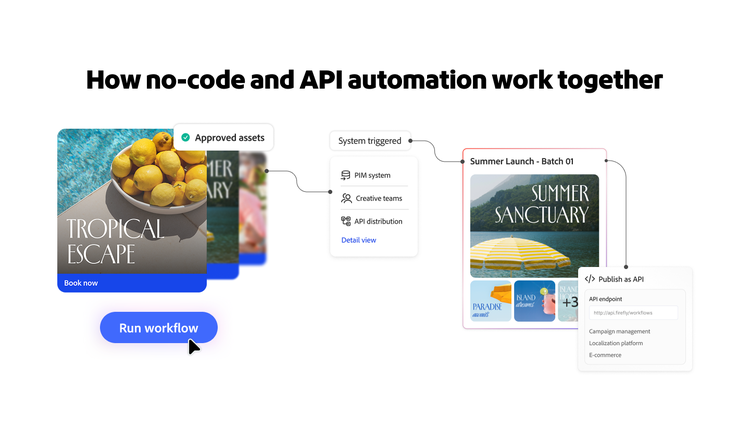
A graphic representing how no-code and API automation work together.

When the decision dimensions point in fundamentally different directions, choosing a single automation model may not be the best solution. In those cases, no-code and API-based automation can work side by side, with each supporting the workflows they are best suited to handle.

A hybrid approach supports enterprise content supply chain automation better for several reasons:

Start using no-code and pro-code automation in your creative workflows.

As creative automation becomes a more integral part of enterprise content operations, the goal is not to standardize every workflow around a single approach. It is to determine which approach fits the requirements of each workflow. Over time, that means building an automation process that can support different types of workflows as content operations evolve and grow.

Adobe Firefly Creative Production helps enterprise teams turn approved assets into activation-ready content at scale, across channels, markets, and formats, in one governed environment that supports both no-code and API-based automation.

https://business.adobe.com/fragments/resources/cards/thank-you-collections/firefly