Most organisations hit a tipping point where shared drives, email attachments, and ad-hoc naming conventions can no longer keep pace with the volume of digital files teams produce. When that happens, the cost is measured in hours lost searching for the right version, campaigns delayed by approval bottlenecks, and brand inconsistencies that erode customer trust. Digital asset management exists to solve exactly this problem, and for Australian organisations operating across multiple states, channels, and agencies, the stakes are higher than a cluttered folder structure might suggest.
What is digital asset management and how does it work?

What is digital asset management?
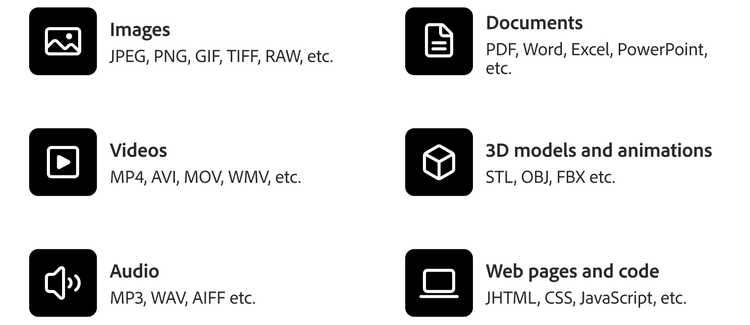
Digital asset management (DAM) is the practice of storing, organising, retrieving, and distributing digital files (images, videos, documents, brand templates, and rich media) through a centralised system purpose-built for the task. Where a shared drive relies on folder hierarchies and human memory, a DAM applies structured metadata, taxonomy, and permissions so that any authorised user can locate the exact asset they need in seconds rather than minutes.
The teams that encounter DAM first are typically marketing departments drowning in campaign assets, creative teams managing brand consistency across state-based operations, and IT teams fielding a growing volume of access-control requests. Consider a national retailer with 50 stores launching seasonal campaigns: without a DAM, each store may pull outdated hero images from last quarter's folder, while the marketing team scrambles to redistribute corrected files via email. A DAM eliminates that cycle entirely.
DAM becomes relevant once an organisation's asset library exceeds what folder structures and naming conventions can manage, typically when multiple teams or external agencies need simultaneous access to approved, up-to-date files. If your organisation has reached that threshold, you are already paying the hidden cost of not having one.
How does digital asset management differ from a CMS or file storage?
A common source of confusion is the overlap between DAM, content management systems (CMS), and cloud file storage. All three hold files, but they serve fundamentally different purposes:
Dimension
DAM
CMS
Cloud file storage
Primary purpose
Govern and distribute approved assets
Publish content to digital channels
Store and share general files
Metadata depth
Rich, structured taxonomy with custom fields
Page-level metadata
Minimal (filename, date)
Version control
Full asset-level versioning with visual comparison
Page/document versioning
Basic file versioning
Rights management
Licence tracking, expiry alerts, usage restrictions
Limited or none
None
Creative workflow
Review, annotate, approve within the platform
Editorial workflow only
No native workflow
Design tool integration
Deep (e.g. Creative Cloud panels)
Typically via plugins
File sync only
DAM sits upstream of a CMS. Assets are created, reviewed, and governed in the DAM, then pushed to the CMS for publication. This distinction matters for organisations running multi-channel campaigns where the same hero image appears on web, email, social, and in-store screens. The DAM ensures every channel pulls the single approved version.
Creative Asset Management (CAM) is a subset of DAM focused specifically on in-progress creative files and designer collaboration. DAM encompasses the full lifecycle from creation through archival. Teams evaluating tools should recognise that a CAM-only solution will not address downstream distribution and governance needs.
What are the core benefits of digital asset management?
Without a DAM, the failure modes are predictable: outdated collateral reaches customers, licence violations trigger legal exposure, and campaign timelines blow out because no one can find the approved file. The benefits of DAM address each of these directly.
Brand consistency at scale. A national financial services firm with branches across six states can ensure every office uses the current logo, compliant disclaimers, and approved imagery. The DAM enforces this by making only current, approved assets available. Retired versions are archived, not deleted, but removed from active search results.
Time savings through metadata search and AI tagging. Instead of emailing colleagues to locate a file, teams search by keyword, campaign name, or visual similarity. Organisations that implement structured DAM systems commonly reclaim multiple hours per person per week that were previously spent on asset hunting, and that time compounds across large marketing teams.
Rights and licence management. DAM tracks usage rights and expiry dates, preventing costly legal exposure when a stock image licence lapses mid-campaign. This scenario is common in fast-moving retail marketing teams managing thousands of product images with varying licence terms.
Faster speed-to-market. Centralised approval workflows mean a campaign asset moves from creative sign-off to channel deployment without manual handoffs between disconnected tools, compressing launch timelines for multi-state rollouts.
Which teams and industries rely on digital asset management?
The challenge for many organisations is not recognising that they need a DAM but rather understanding which teams will benefit and how adoption should be sequenced.
Marketing and brand teams are the primary users, managing campaign assets, brand guidelines, and channel-specific renditions. A government department running public health campaigns across print, digital, and social is a typical use case, where accessibility-compliant document versions must coexist alongside creative assets.
Creative and design teams use DAM as the single source of truth for work-in-progress and final deliverables. Version confusion is acute when multiple designers collaborate remotely across time zones, and this is a common reality in Australia with teams split between east and west coast offices.
IT and operations are responsible for access control, integrations, and governance. DAM reduces shadow IT by giving teams a sanctioned, secure repository instead of personal cloud storage accounts that sit outside organisational oversight.
Industries with heavy asset volumes include retail (seasonal catalogues, product photography), financial services (compliance-sensitive collateral), higher education (recruitment campaigns, research media), and government (public communications requiring multiple format versions for accessibility).
How is AI reshaping digital asset management?
The historical barrier to DAM adoption was the manual effort required to tag, categorise, and maintain assets. Organisations that lacked dedicated librarians or metadata specialists often saw their DAM degrade into another unstructured repository within months. AI capabilities are directly addressing this failure mode.
Auto-tagging and smart search. AI analyses image content, recognises objects, scenes, and text within assets, then applies metadata automatically. This reduces the tagging burden that historically made DAM adoption slow for under-resourced teams. The practical effect is that a newly uploaded product image is immediately searchable by colour, scene type, and subject without a human touching the metadata form.
Generative AI for asset variations. Modern DAM platforms integrate with AI-powered content creation tools, automating repetitive design tasks such as producing localised or channel-specific renditions. A hero banner can be resized for Instagram Stories, email headers, and billboard formats without returning to the design team each time, and this capability directly compresses production cycles.
Predictive asset performance. Some enterprise DAM systems surface analytics on which assets drive engagement, helping marketers retire underperforming content and invest in what converts. When connected to data analysis and visualisation tools, this turns the DAM from a static library into a strategic intelligence layer.
The business implication is significant: AI shifts DAM from a cost centre (storage and retrieval) to a revenue enabler (faster personalisation, reduced production cost, data-driven creative decisions). The trade-off is that AI features require clean metadata foundations. Organisations with poor tagging discipline will not see returns without an initial governance investment.
How should you choose a DAM solution for your organisation?
The most common mistake in DAM selection is choosing based on feature lists rather than organisational conditions. A platform with extensive capabilities delivers no value if it does not match your team's actual workflows and pain points.
Scale and complexity determine tier. If your organisation has fewer than 50 users and simple approval needs, a lightweight, cloud-native DAM with out-of-the-box templates may suffice. If you operate across multiple brands, regions, or channels with complex permissions, an enterprise DAM with granular role-based access and API-driven integrations is necessary.
Evaluation criteria checklist:
- Integration with existing creative tools (e.g. Adobe Creative Cloud)
- Metadata and taxonomy flexibility
- Scalability of storage and users
- AI capabilities (auto-tagging, smart crop)
- Workflow automation depth
- Vendor support for Australian data residency requirements
- Alignment with your organisation's data governance frameworks
Adobe Experience Manager Assets is an enterprise-tier example: natively integrated with Creative Cloud and Adobe's broader experience platform, it offers AI-powered tagging via Adobe Sensei, dynamic media delivery, and connected workflows that link asset creation to personalised delivery. For organisations already invested in the Adobe ecosystem, this integration eliminates the friction of stitching together disconnected point solutions.
Decision framework: If your primary pain is creative collaboration, prioritise workflow and versioning features. If your pain is brand governance across distributed teams, prioritise permissions, expiry controls, and audit trails. If your pain is speed-to-market, prioritise automation and channel-specific rendition capabilities. Match the tool to the problem, not the other way around.
Get started with Experience Manager Assets
For organisations ready to move beyond shared drives and fragmented workflows, Experience Manager Assets brings together AI-powered asset intelligence, creative workflow integration, and enterprise-grade governance in a single platform. It is built for the scale and complexity that Australian enterprises face: multi-state operations, multi-channel delivery, and the need for consistent brand governance across every touchpoint.
Explore how Experience Manager Assets can centralise, automate, and scale your digital asset management. Request a personalised demo today.
Recommended for you
Title
Digital Asset Management (DAM) | What It Is and Why It Matters
CardDescription
Learn what digital asset management is, how DAM systems work, and how to choose the right solution for your organisation. A practical guide for Australian teams.
cardDate
2026-09-09
cardImage

primaryTag
caas:content-type/blog
Tags
caas:content-type/blog, caas:topic/content-management, caas:blog-author/adobe-for-business-team