Most teams don't fail because they lack effort, they fail because work becomes invisible. Tasks pile up, priorities shift without warning, and no one can confidently say what's blocked versus what's actually moving. Kanban addresses this problem directly by making workflow visible, measurable, and improvable without forcing a wholesale process overhaul.
What is Kanban and how does it help teams deliver better work?
What is Kanban?
Kanban is a visual workflow management method that originated in Toyota's manufacturing system in the 1940s and has since been adopted across knowledge-work domains, including software development, marketing operations, and government digital delivery. The word itself means "visual signal" in Japanese, and that signal is the method's core mechanism: making the state of work obvious to everyone involved.
It becomes relevant when a team struggles with invisible bottlenecks. Consider a marketing team running campaign production across multiple states, assets are stuck in review, but no one realises until a deadline passes. Kanban surfaces that blockage in real time, before it becomes a missed launch date.
Unlike prescriptive frameworks that demand new roles, ceremonies, or reporting structures, Kanban starts with your current process and evolves it incrementally. This makes it accessible to teams that cannot pause operations for a methodology change, a common constraint in large Australian organisations with established governance structures.
How do Kanban boards and cards work together?
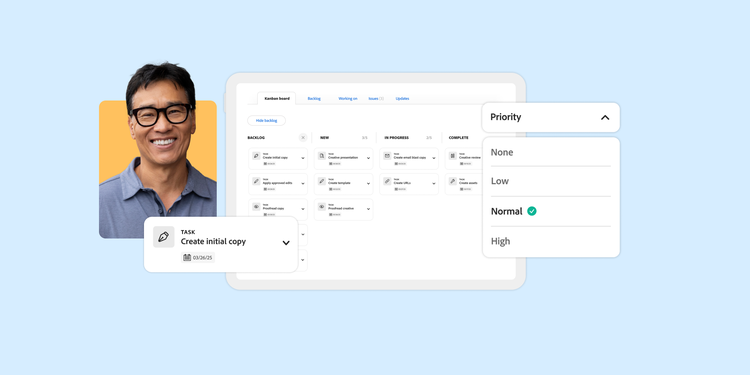
Without a shared view of work, status updates rely on meetings, emails, and memory, all of which degrade as team size or geographic distribution increases. Kanban boards and cards solve this by externalising workflow state into a visual system anyone can read at a glance.
A Kanban board represents workflow stages as columns, typically "To Do", "In Progress", and "Done" at minimum. Teams add columns to match their real process: "Awaiting Approval", "In Legal Review", or "Deployed". A distributed team with members in Sydney and Perth might add a "Handover" column to account for timezone gaps, ensuring work doesn't stall overnight.
A Kanban card represents a single work item. Each card carries metadata, assignee, due date, priority, and blockers. Moving a card across columns signals status without requiring a meeting or status email. When a designer in Melbourne finishes an asset, they move the card to "Ready for Review" and the copywriter in Brisbane knows immediately.
The critical mechanism is work-in-progress (WIP) limits, caps on how many cards can occupy a column simultaneously. When a column hits its limit, the team must finish or unblock existing work before pulling new items. This prevents overload and exposes bottlenecks that would otherwise remain hidden until a deadline is missed.
What are the core practices and principles of Kanban?
Teams often adopt Kanban boards without adopting Kanban practices, and then wonder why the board becomes a neglected digital wall. The method's value comes from six core practices applied consistently:
Practice
What it solves
Example in practice
Visualise the workflow
Hidden work and unclear status
Every task has a card; every stage has a column
Limit work in progress
Overload and context-switching
A "Design" column capped at three forces focus
Manage flow
Stalled items going unnoticed
Daily board reviews identify cards that haven't moved
Make policies explicit
Unwritten rules causing inconsistency
"Cards require a brief attached before entering Design"
Implement feedback loops
Missed improvement opportunities
Fortnightly retrospectives reviewing cycle time data
Improve collaboratively
Top-down mandates that don't stick
Team-driven experiments with WIP limits
Foundational principles underpin these practices: start with what you do now, agree to pursue incremental change, respect current roles and responsibilities, and encourage leadership at every level. These principles make Kanban adoptable without organisational restructuring, critical for government agencies or large enterprises with rigid reporting lines where wholesale change is politically or operationally impossible.
What benefits does Kanban deliver and who uses it?
The most common failure in workflow management isn't choosing the wrong tool, it's operating without visibility into how work actually flows. Kanban addresses this with measurable outcomes.
Reduced cycle time. When WIP limits force focus, teams deliver faster. A software team pulling five items instead of fifteen through active development sees fewer context switches and fewer items stuck in code review.
Improved predictability. By measuring lead time (request to delivery) and cycle time (start to delivery), managers can forecast delivery dates without guessing. This is valuable for teams reporting to executive sponsors who need reliable timelines, particularly in government digital delivery where budget cycles demand accountability.
Greater transparency. Every stakeholder can see the board. In multi-state operations, say a retail chain coordinating store-level marketing across NSW, VIC, and QLD, a shared Kanban board replaces weekly status calls. Teams that pair Kanban with data analysis and visualisation tools can track flow metrics over time and identify systemic patterns.
Continuous improvement without disruption. Because Kanban doesn't mandate sprints or ceremonies, teams adopt it alongside existing processes, particularly relevant for organisations already running hybrid Agile approaches.
Use cases span software engineering, content production, HR onboarding, and IT service management, any domain where work items flow through defined stages.
How does Kanban compare to Scrum?
Teams evaluating Agile approaches frequently face a binary choice that isn't actually binary. Understanding the trade-offs helps you choose, or combine, intelligently.
Dimension
Kanban
Scrum
Cadence
Continuous flow
Fixed sprints (typically two weeks)
Roles
No prescribed roles
Scrum Master, Product Owner, Development Team
Change policy
Items can enter at any time
Sprint backlog is locked once committed
Planning overhead
Minimal, replenishment as needed
Sprint planning, review, and retrospective ceremonies
Best fit
Support/ops teams with unpredictable inflow
Product teams with defined backlogs
The trade-off is clear: Scrum provides stronger accountability through sprint commitments but imposes ceremony overhead that can consume significant time for small teams. Kanban offers flexibility but requires team discipline around WIP limits, without that discipline, it becomes a glorified to-do list with no forcing function.
Hybrid approaches (often called Scrumban) exist for teams that want sprint cadence with Kanban's visual flow. This is common in Australian digital agencies managing client work alongside internal product development, where external deadlines demand sprint-like commitments but internal work flows continuously.
How do you choose and implement Kanban software for your organisation?
The mistake most organisations make is selecting a tool before understanding their workflow maturity. A tool that's too simple frustrates growing teams; one that's too complex discourages adoption.
Decision framework:
- If your team is fewer than ten people with a single workflow, a lightweight tool (Trello-style) suffices.
- If you coordinate cross-functional work across departments with reporting requirements, you need enterprise work management with Kanban views, resource planning, and governance controls.
- If your organisation operates under data governance frameworks or audit requirements, role-based permissions and audit trails become non-negotiable selection criteria.
Evaluation criteria: integration with existing tools (creative suites, CRM, analytics), role-based permissions, audit trails, the ability to visualise dependencies across boards, and support for automating repetitive design tasks that otherwise clog your workflow columns.
Adobe Workfront provides Kanban board views within a broader work management platform that manages the lifecycle of work in one place. For organisations already using Adobe Creative Cloud or Adobe Experience Manager, Workfront integration eliminates handoff friction between creative teams and project managers.
Getting started: Map your current workflow stages honestly before configuring columns. Start with one team, measure cycle time for four weeks, then expand. Avoid the common mistake of designing an ideal-state board that doesn't reflect how work actually moves today, that board will be abandoned within a month.
Discover how Adobe Workfront brings Kanban boards, resource planning, and creative workflows together, request a demo to see it in action.
Recommended for you
Title
Kanban — a complete beginner's guide.
CardDescription
Learn what Kanban is, how boards and cards work, core practices, and how to choose between Kanban and Scrum for your organisation's workflow.
cardDate
2026-09-09
cardImage

CardImageAltText
Person reviewing a Kanban-style work management board on a tablet, with columns showing tasks moving from to-do through in-progress to done.
primaryTag
caas:content-type/blog
Tags
caas:content-type/blog, caas:products/workfront, caas:topic/work-management, caas:blog-author/adobe-for-business-team