How to build a brand-specific customised AI model for creative teams.

A brand doesn't just speak through words. It also speaks through visuals. Its unique mix of imagery, illustrations, colours and design elements creates a recognisable visual language that sparks emotions, strengthens identity and helps audiences connect with the brand. As enterprises increasingly rely on AI to scale on-brand content creation, maintaining that visual identity becomes challenging. Generic AI can create content quickly yet struggles to capture creative nuances. And this gap is driving enterprises to build customised AI models that can learn and replicate their unique visual language at scale.

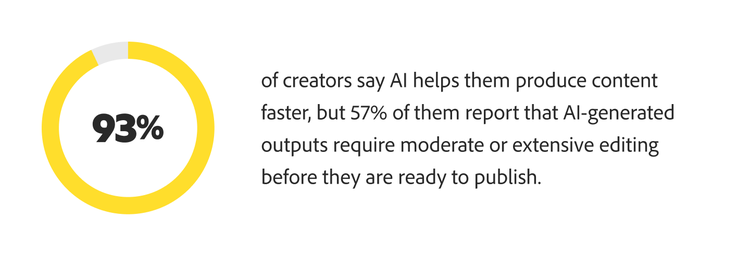
If you've experimented with generative AI for creative work, you may have experienced the same cycle of impressive speed followed by disappointing results. The images feel similar to your brand, but not quite aligned — its colours are off-brand or the composition lacks the refinement that meets your creative standards. As a result, instead of accelerating workflows, your team spends valuable time revising, correcting and realigning AI-generated assets.
Source: Adobe

At a time when creative teams are under growing pressure to get more out of AI, a brand-specific AI model is valuable. Unlike general-purpose AI tools, it understands the design principles that define a brand and automates creative production while maintaining human oversight. As a result, teams can spend more time on innovation.

The opportunity is compelling. More importantly, there are ways organisations can simplify the complexities of custom model development. Let’s start by taking a closer look at the five key steps to building a customised AI model.

What is a customised AI model?

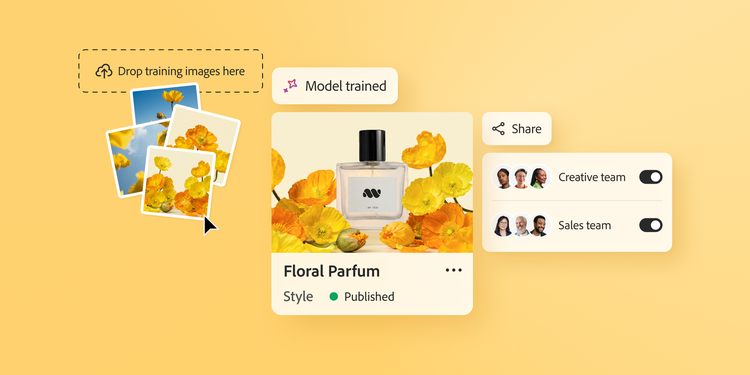
A customised AI model is a generative AI model trained using a brand’s proprietary data to produce outputs that reflect the brand's unique visual identity, adhere to its style guide and align with its creative direction. Custom models are trained on 10-30 images that represent a brand’s key visual style or character. The model internalises the patterns that distinguish a brand or style, enabling consistent creative execution at scale.

Think of a customised AI model as a digital extension of your creative team. Brand leaders spend years developing a brand’s creative signature and it’s important to be able to scale that hard-earned expertise easily and accurately. A customised AI model builds on this foundation, helping amplify the work while shortening production cycles and lowering costs.

So, where do enterprises begin? Let’s break the customised AI model development process into five key steps.

Step 1: Curating training assets for your customised AI model.

The first and arguably most important step is curating high-quality, on-brand training data. A customised AI model is only as effective as the data it learns from. Many organisations assume that feeding the model the largest or most recent asset library will produce the best results, but that's rarely the case. In practice, quality outweighs quantity, making asset selection one of the most critical decisions in the entire custom model development process.

To make this first step truly effective, focus on the following aspects:

  1. Select assets that best represent your brand identity: Custom models typically can be trained on one concept at a time. So, if you need an illustration model, you will want to train it on illustrations. Iconography models should be trained on icons. Custom models trained on different types of assets don’t perform well.
  2. Evaluate each asset against your brand standards: Ask the same questions you would during a campaign review — whether it reflects your colour palette, conveys the right mood and aligns with your aesthetic. Making a checklist helps.
  3. Maintain stylistic consistency across the training set: Avoid mixes of dramatically different design eras, campaign styles or visual systems that can confuse the model, leading to an incoherent understanding of your brand.
  4. Include compositional variety to demonstrate adaptability: Broaden the training context across different subjects, environments and use cases while remaining grounded in a single visual language.
  5. Ensure every asset meets IP, copyright and governance requirements: Only use content that is fully owned, properly licensed and explicitly approved for training customised AI models to mitigate legal and compliance risk.

This step lays the groundwork for everything that follows. It gives you the means to train the model on your brand's creative point of view.

Criteria

Sample checklist

Resolution
Minimum 2000px on the longest side, with sharp details and no blur, pixelation or compression artefacts.
Consistency
Consistent use of brand colours, typography, design elements and creative direction.
Composition
Clear subject framing, balanced layout and strong visual focus.
File format
High-quality PNG and JPG files.
Subject visibility
Fully visible primary product or brand element with no obstructions or excessive cropping.
Colour accuracy
Accurate brand colours with natural rendering and no heavy filters or colour casts.

Step 2: Training the customised AI model on your brand’s visual identity.

The next step involves training the customised AI model. It's much like onboarding a new designer. Rather than simply handing over a style guide, you teach through examples — showing what works, what doesn’t and why. When done right, the model begins to internalise your brand’s visual identity.

It learns visual patterns and recurring relationships among colours, compositions, moods, imagery and graphic elements. Over time, it forms a framework that helps generate visuals that are aligned with your brand.

The first training cycle should be treated as a phase of creative exploration. It is an opportunity to discover how the model interprets and expresses your brand.

  • If the generated imagery feels like it belongs in your brand’s aesthetic universe, that is a good starting point. Your team should be able to recognise familiar visual cues, creative choices and stylistic qualities.
  • If the output feels generic or inconsistent, the issue is often not the model itself but the quality of the training assets. Your team then must identify inconsistent styles, conflicting visual directions or assets that do not accurately represent the brand.
  • Ensure the captions reflect what you want the model to focus on. Auto-generated captions should also be modified to improve the training of a customised AI model.

As training cycles are repeated and reviewed, the model becomes more refined, accurate and effective over time.

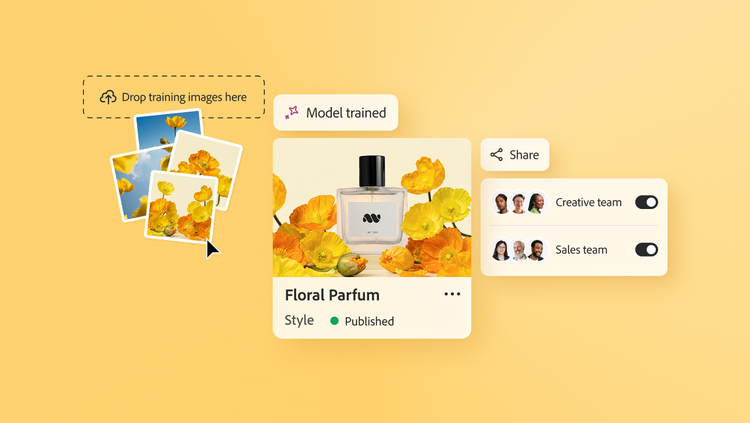
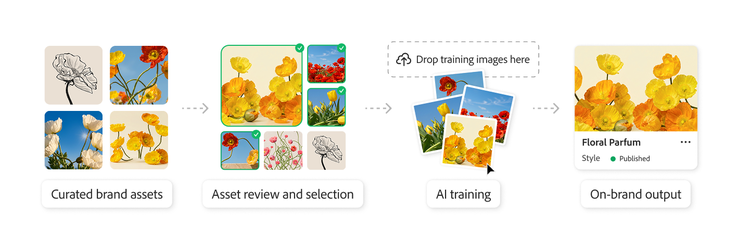
Workflow showing how a customised AI model is trained and used to create on-brand creative assets.

Step 3: Configuring customised AI models with prompt engineering.

Once the AI model is trained, the third step is configuring it. A crucial part of customised AI model configuration is known as prompt engineering. Using prompt engineering, teams can design, test and refine prompts to consistently generate outputs aligned with campaign goals. Over time, effective prompts can be organised in prompt libraries. As enterprises scale their use of generative AI, prompt libraries become an extension of the brand system, as they make it easier to:

  • Translate brand guidelines into AI-ready instructions, enabling teams to express the brand consistently across AI-generated content.
  • Capture proven creative patterns, such as campaign frameworks, approved visual directions and audience-specific nuances.
  • Provide a shared creative foundation for teams across markets, business units and functions to maintain brand authenticity while allowing for local adaptation.

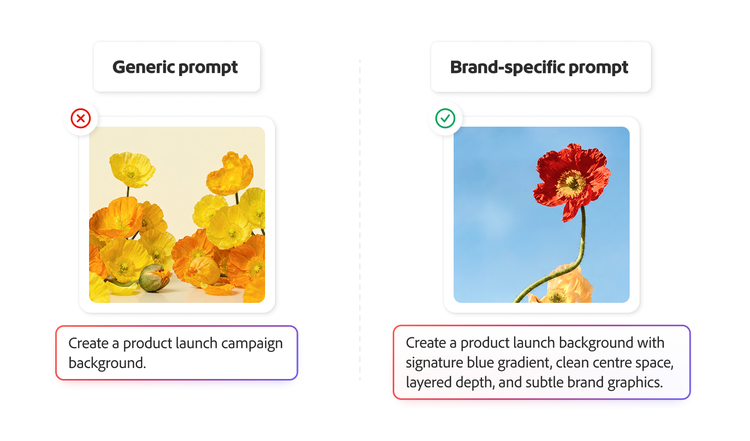
Even a highly refined customised AI model can produce a vague or generic output without a good prompting strategy. Whether launching a new product or a seasonal campaign, an AI model must work in tandem with well-structured prompts to translate creative strategy into visuals that are unmistakably on-brand, relevant and impactful.

An illustration comparing creative assets generated from a generic prompt versus a context-specific prompt.

An illustration comparing creative assets generated from a generic prompt versus a context-specific prompt.

Step 4: Reviewing AI-generated brand content.

The strongest AI models improve through continuous refinement while learning from regular reviews and feedback. By testing AI models for bias, inconsistencies and generic outputs, teams can maintain brand standards as the model evolves.

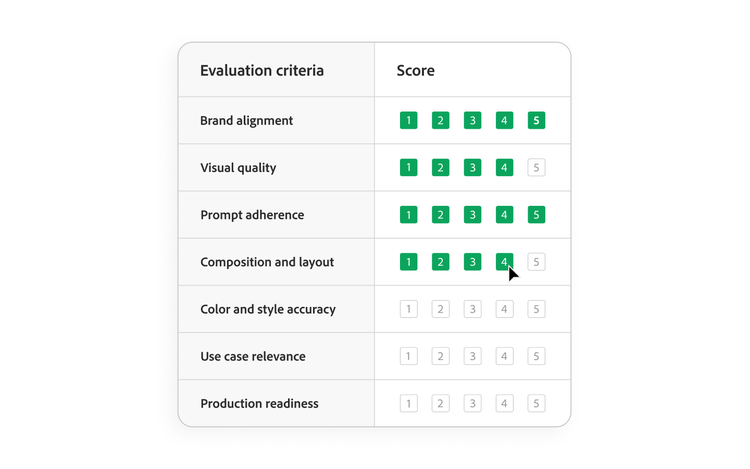
The next step is to evaluate whether each output truly embodies the brand — not only in appearance, but in the visual qualities that drive recognition, trust and connection. This helps ensure that the model continues to create work that strengthens its connection with a target audience over time.

A thorough review goes beyond spotting errors. To make the process effective, you should:

  • Evaluate beyond surface-level similarities: Assess whether the output truly belongs within your brand's creative ecosystem. An image may resemble the brand’s visual style while missing the distinct mood, composition or emotional qualities.
  • Assess performance in context: Review images against their intended use cases, including channels, formats, audience segments and campaign objectives. An asset may appear on brand in isolation, but that doesn't always mean it will perform effectively in its intended environment.
  • Identify gaps in curation and direction: Analyse recurring issues in mood, lighting, composition or aesthetic execution. Consistent shortcomings often reveal opportunities to strengthen training assets or prompting practices.
  • Preserve high-quality outputs as benchmarks. Curate examples that demonstrate successful AI-assisted brand expression. Over time, these benchmarks establish shared quality standards across campaigns, regions and teams.
  • Keep human judgement at the centre: No model can fully replicate the contextual understanding, strategic perspective and aesthetic discernment that creative leaders bring. Human oversight is essential to ensure adherence to brand standards.

AI is most powerful when it's used to amplify creativity, not replace it. Ongoing review and retraining help models stay relevant, adapt to change and improve over time. A customised AI model should be treated as a collaborator in the creative process, generating a range of possibilities. At the same time, human expertise identifies the ideas that represent the brand.

Sample evaluation scorecard for reviewing AI-generated assets against predefined brand standards.

Sample evaluation scorecard for reviewing AI-generated assets against predefined brand standards.

Step 5: Scaling your customised AI model across teams.

A brand-specific AI model delivers its greatest value when it moves beyond experimentation and becomes part of everyday creative workflows. Once deployed, the focus shifts to scaling its impact across the organisation through broader adoption. The final step is providing the AI model access to additional teams. This enables these teams to create brand-aligned content to increase creative output, reduce bottlenecks and improve consistency before assets even reach central creative review. A crucial aspect of this process is creative teams providing development teams with feedback to improve customised AI models.

Successfully scaling a customised AI model across an organisation depends on four key principles:

  • Build a strong operating framework.
    No matter how powerful your model is, unrestricted access without clear guardrails can lead to inconsistent outputs, weakening creative standards. Structured guidance and well-defined best practices are important to help teams use the model in ways that strengthen the brand.
  • Invest in effective onboarding.
    For teams to get the most from a customised AI model, they need more than access. They need a shared understanding of what great looks like. Providing proven prompts, successful examples, reference outputs and established workflows helps teams ramp up faster and produce more consistent results, without starting from scratch each time.
  • Tailor the experience to each team.
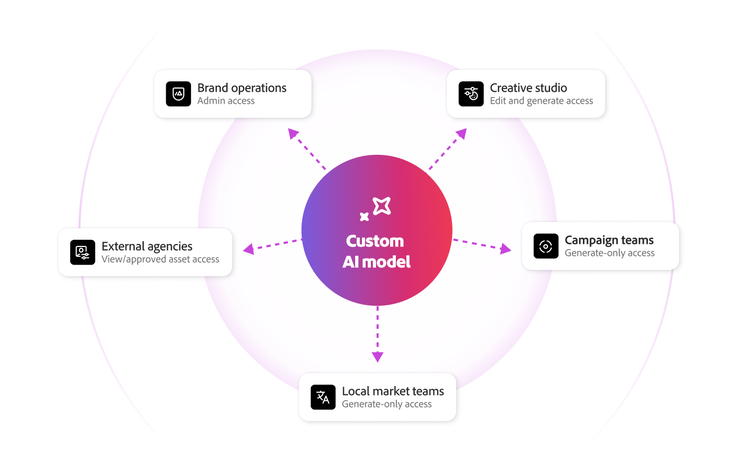
    Different teams use AI in different ways, based on their responsibilities and experience levels. Creative teams may use the model more freely to explore ideas, while social media managers and regional teams often benefit from prompt libraries, approved workflows and reusable templates. Tailored approaches help different teams work efficiently with confidence.
  • Establish clear governance and safeguards.
    Using a customised AI model effectively requires more than technical know-how. Teams must also understand what the model is designed to support, when additional review is required and which assets or campaigns need creative oversight. Clear governance builds trust, reduces uncertainty and protects brand integrity.
  • Incorporate creative team’s feedback into the model.
    Gathering feedback from creative teams can make AI models better from the outset. For any new customised AI model, all user feedback is very important. Formal processes should be set up to capture this feedback and deliver it to development teams.

When a brand-specific, customised AI model is scaled with these principles, it stops being just a specialised tool used by a handful of experts. Instead, the customised AI model empowers more people to contribute to business impact, while ensuring the brand remains recognisable, distinctive and trusted across every touchpoint.

Explore how Adobe Firefly Enterprise Solutions help you scale creative excellence, delivering high-quality, brand-aligned content at speed.

An illustration of role-based access and permission levels for a customised AI model.

An illustration of role-based access and permission levels for a customised AI model.

Unlocking creative advantage with a customised AI model.

According to a survey of 418 marketing leaders conducted by Gartner, 77% of organisations using generative AI adopted it for creative development tasks. Staying ahead now depends on how effectively you harness AI to amplify creativity, sustain high performance and deliver measurable business impact. For creative teams, this shift is especially significant as the gap between organisations that use AI and those that use it to build enhanced creative workflows increases.

Building this advantage requires a more brand-centric approach to AI. You need systems that understand your brand and work with your team as creative collaborators. A customised AI model becomes a living extension of your brand’s visual language, enabling faster production, bolder experimentation and extended creative capability across the organisation without sacrificing quality or consistency. Used thoughtfully, these models don't replace creative judgement — they help enterprises apply it more broadly, efficiently and at scale.

Learn how Firefly Custom Models can transform your brand’s creative workflow.

Let’s talk about what Adobe can do for your business.

Get started