On-brand assets across channels: Agentic adaptation with Adobe Brand Intelligence.
11-10-2026

Generative AI has accelerated how quickly a hero asset can come to life. A concept that once took days to sketch and develop can now be explored, refined and approved in a fraction of the time. However, the hero image is only the beginning. Before a campaign can launch, that single approved creative needs to be adapted for every channel, from vertical stories and square social posts to display banners and connected TV and more. Each has its own format and specifications. Today, much of that adaptation is still manual and repetitive and every new variant creates another asset that needs to be reviewed to ensure that it stays on brand.
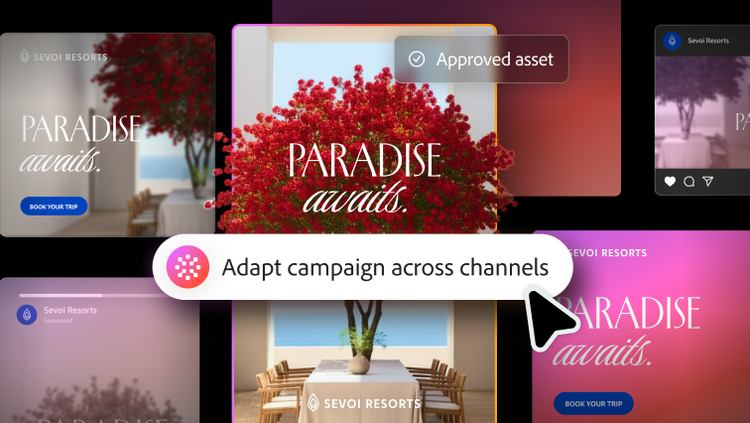
Instruct to Assemble in Adobe Brand Intelligence now includes a new adaptation capability designed to solve this challenge. Starting with an approved hero asset, it agentically adapts the creative for different aspect ratios and channel formats — while preserving the design rules and brand elements that keep every version consistent and recognizably yours.
One campaign, more placements than ever.
The number of places a brand needs to show up keeps growing. Audiences move between social feeds, short-form video, streaming and connected TV, in-app placements, email, web and out-of-home, often within the same day. New channels like retail media networks are constantly diversifying those opportunities even further. Brands need to spread their investment across more of them not only to stay visible but also to maintain full-funnel impact, leveraging both awareness-orientated channels and conversion-orientated channels.
Personalisation adds another layer of complexity. Each audience segment, market or language may require its own set of creative variations across channels and formats. What starts as a single hero asset can quickly become dozens or sometimes hundreds of deliverables. The challenge for creative teams isn’t coming up with more ideas. It’s adapting each idea to work everywhere.
Why the last mile still slows teams down.
The task sounds simple: “We have the hero asset. Now resize it for 12 placements.” In practice, it is one of the most repetitive and error-prone parts of production.
A hero asset is designed for a specific canvas. The focal point, headline, logo lockup and call to action (CTA) are balanced for that frame. Change the aspect ratio and that balance can quickly fall apart. Designers who have adapted artwork for web ads, book covers and outdoor banners know the story an image tells can shift entirely between formats. Even with tools like Generative Expand to extend a background, someone still has to decide what moves, what scales and what stays untouched.
That work often falls to creative producers and the friction shows up in familiar places.
- Rebuilding layouts manually. Every new format can mean re-cropping imagery, resizing copy and repositioning elements one asset at a time.
- Drifting off-brand. Logos can become crowded or cropped, safe zones can break, CTAs may move out of view and typography can stray from the approved hierarchy.
- Repeating brand reviews. Because resizing happens outside the governed assembly workflow, brand reviewers have to recheck every adapted variant for compliance.
- Delaying activation. Campaign managers can’t launch until every format is ready, so even a single missing asset can delay the campaign.
The result is a familiar cycle. A producer adapts an asset, a reviewer catches an issue, the producer fixes it and the asset goes back for another review. Multiply that process across every placement, market and language and the time saved during ideation is spent again on adaptation.
How adaptation works in Instruct to Assemble.
Instruct to Assemble already helps teams move from brief to production-ready content. This new adaptation capability removes another time-consuming step from the last mile of production.
Today, teams often need to manually create base creatives in every required aspect ratio before they can assemble new text and image variants. With adaptation, they can start with a single hero asset or a small set of hero assets when distinct square, horizontal and vertical compositions are needed. Teams can then let Adobe Brand Intelligence adapt the assets to the required sizes and formats. In practice, the workflow is straightforward.
- Start with an approved hero. A creative producer selects one or more approved base creatives as the source for adaptation through a plug-in experience that is directly embedded in the creative tools teams already use.
- Define the placements. The campaign manager or producer provides a list of placements needed, including dimensions, aspect ratios and channels.
- Adapt the layout agentically. Adobe Brand Intelligence analyses the structure of the hero asset and adapts it to each new canvas. Focal detection keeps the subject in frame, while intelligent cropping, scaling and repositioning adapt elements as needed. Instead of relying on a generic template, the system follows the brand’s design rules for safe zones, logo placement and clear space, typography and CTA positioning.
- Generate every format at once. Rather than adapting assets one by one, Adapt in Brand Intelligence generates the full set of required placements in a single batch.
- Validate against your brand. Each adapted asset is automatically checked with Validate in Brand Intelligence.
Because adaptation draws on the same continuously learning brand intelligence that powers the rest of the platform, the capability doesn't just stretch pixels to fit, it also understands which elements define the brand and how they should behave as the format changes. As teams approve and revise outputs, those decisions feed back into the system so that adaptation gets more effective over time.
From one hero to every channel, on brand.
Generative AI has already accelerated the earliest stages of the creative process, giving designers more time to explore ideas and focus on crafts. Adaptation in Assemble brings that same efficiency to the last mile of production.
The benefits extend across the workflow.
- Creative producers can turn hero assets into production-ready variants for every required placement without manually resizing each one. Their time shifts from repetitive production work to making creative decisions that need a human eye.
- Brand reviewers receive adapted assets that have already been validated against brand intelligence, reducing the need to review every variant from scratch.
- Campaign managers get complete placement sets faster, so they can activate campaigns across channels without waiting for individual formats to be produced.
- Brands stay consistent across formats because the same design system rules govern every adaptation, from a 9.16 story to a 16:9 banner.
The bigger shift is that adaptation becomes part of the governed creative workflow. When adaptation is conducted inside Adobe Brand Intelligence, it is no longer a side workflow that bypasses brand guardrails. Assembly, adaptation and validation run in one connected system, so content stays on brand as it scales across channels.
As brands continue to expand into new channels, markets and formats, making every creative idea work everywhere becomes a competitive advantage. Adobe Brand Intelligence now makes that possible without adding more manual work to the end of every campaign.
Learn more about how Adobe Brand Intelligence helps you scale on-brand content with precision.
Recommended for you
https://business.adobe.com/fragments/resources/cards/thank-you-collections/brand-intelligence