AI is accelerating vulnerability discovery. Not every PDF solution is built to contain the threat.
AI is changing the economics and speed of cyberattacks. In September 2026, The Wall Street Journal reported that a three-person security research team used Anthropic's Claude to chain together software flaws and reach OpenAI’s internal code systems. The researchers were white-hat testers working through a bug-bounty programme and the full path from a newly found bug to access took under three days. The lesson is sobering: work that once required a well-resourced team can increasingly be done by a few people using off-the-shelf AI. And this shift is showing up at scale: CrowdStrike reported that AI-driven adversary activity rose 89% year over year and the fastest intrusion it recorded spread across a network in 27 seconds. As AI makes it faster and cheaper to find vulnerabilities and turn them into working attacks, enterprises have less time to detect, contain and respond to threats.
As the widely adopted format for information exchange, the PDF can also be one of the largest attack surfaces in the enterprise. Trillions of PDFs are in circulation, carrying documents that organisations run on: contracts, financial records, board materials, patient files and government forms. Every day employees open files that arrive from outside the organisation: an emailed invoice, a signed contract, a resume, a statement from a vendor. Any one of them can carry malware and AI has sharply lowered the cost of creating it. The most reliable defence is not to keep playing catch-up after each new exploit is discovered, but to contain the threat at its foundation, in the desktop software that opens the file. That software is a core part of your security perimeter and it deserves the same scrutiny you already apply to operating systems, browsers and collaboration tools.
What to look for in a secure PDF solution.
When evaluating a PDF solution, organisations should look beyond features and price and consider four security requirements that apply to every vendor.
1. Containment: Can it prevent a malicious file from compromising your system or network?
Untrusted files enter the organisation constantly through email, web downloads, shared drives and vendor portals and any one of them can be crafted to exploit the very application that opens it. That’s why most modern browsers and other applications that routinely process untrusted content use sandboxing as a first line of defence.
A sandbox creates an operating-system-enforced boundary around the application that restricts direct access to the file system, the network and other applications, so that even a successful exploit is contained and cannot spread. Any action that needs to cross that boundary, such as saving a file, should be mediated by a small, tightly controlled broker with strictly validated permissions. The attack surface is now reduced to this tiny broker that can be tightly audited and secured. For this protection to be effective, sandboxing should be enabled by default, not an option an administrator has to discover and switch on.
2. Detection Coverage: Will your security tools detect threats targeting your PDF solution?
Antivirus products, file scanners and other security tools help identify malicious PDFs before they can do harm. To analyse a suspicious PDF, some security tools open it in a controlled environment and observe how it behaves. But an attack designed to exploit one PDF application may not activate when the file is opened in another. If the security tool doesn't analyse the file using the application the attack was designed to target, the malicious behaviour can go undetected.
That's why the PDF solution an organisation chooses can affect more than its ability to contain an attack. Organisations should also consider whether the security tools they rely on routinely test against that PDF solution, helping identify threats specifically designed to exploit it.
3. Security programme: How mature is the security programme behind the software?
Software is never finished, so the software provider’s ongoing security programme matters as much as the product functionality. Look for a dedicated security team and a secure development lifecycle that’s secure by design, embedding security controls at the beginning of development and includes threat modelling, code review, static and dynamic analysis and continuous fuzzing. A strong programme should provide transparency and invite external scrutiny through a public bug-bounty programme and coordinated vulnerability disclosure and it should publish the results of its security testing rather than a single summary. Increasingly, strong software providers also apply frontier AI models to help find and fix vulnerabilities in their code before it reaches customers — and adversaries.
4. Response Speed: How quickly and predictably are vulnerabilities fixed?
The gap between a vulnerability being discovered and exploited is now measured in days, which makes the speed and predictability of fixes a critical security control. Look for a solution that follows a regular, published update cadence and is able to deliver out-of-band emergency patches when a situation demands it. Updates should deploy across the whole environment - automatically in case auto-update is enabled and easy to deploy by Admins for scenarios where auto-update is disabled by Admins.
PDF Solution Evaluation Criteria Checklist
Use this checklist to assess any PDF solution before you buy or renew. Ask the provider to show evidence for each item.
1) CONTAINMENT: can a malicious file reach and attack our file systems & network?
[ ] Opens untrusted files inside an OS-enforced sandbox,
[ ] Sandbox is on by default
[ ] Sandbox available on every platform we run (Windows, macOS)
[ ] Actions that leave the sandbox go through a minimal, permission-checked broker
[ ] A successful exploit still cannot reach the file system, network or other apps
2) DETECTION COVERAGE: can our scanners see threats built for this software?
[ ] Major analysis services (VirusTotal, CrowdStrike Falcon Sandbox, Joe Sandbox,
ANY.RUN, Palo Alto WildFire) analyse PDFs as they open in this software
[ ] Exploits targeting this software would be caught by our detection stack,
not only discovered on the endpoint after they run
3) VULNERABILITY RESPONSE: how fast and predictably are flaws fixed?
[ ] Published, regular patch cadence
[ ] Out-of-band emergency fixes with a stated timeframe
[ ] Silent auto-update, plus easy admin deployment (Intune, SCCM, Jamf) when it's off
[ ] Vendor issues its own CVEs (is a CNA), not reliant on third parties
4) SECURITY PROGRAMME: is security a serious, ongoing investment?
[ ] Dedicated product-security team and secure development lifecycle
(threat modelling, code review, static/dynamic analysis, fuzzing)
[ ] Public bug-bounty programme and coordinated vulnerability disclosure
[ ] Publishes security bulletins and testing results, including internal findings
[ ] Applies AI to find and fix flaws in its own code before release
[ ] 24/7 incident response with a documented process
How Adobe Acrobat measures up.
Acrobat was built with these four requirements in mind, combining containment by default with broad security ecosystem coverage, a mature security programme and a predictable approach to vulnerability response. These capabilities can vary across PDF solutions, making them important factors to evaluate when choosing one.
Containment, by default
Acrobat processes every file inside a sandbox, the operating-system-enforced boundary described above. Almost all of its work, including parsing and rendering the file, happens inside that sandbox. When Acrobat needs to act outside it, the request passes through a small broker process that is the only component with real permissions and every request is validated. If a malicious file exploits a vulnerability, the exploit is trapped inside the boundary and prevented from reaching your file system, your network or your other applications. Containment is on by default. PDF applications without this type of sandbox architecture may process files with broader system permissions, increasing the potential impact if a vulnerability is successfully exploited.
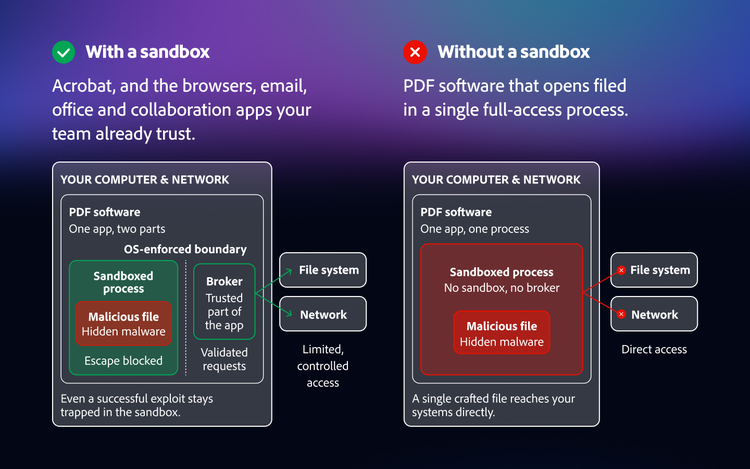
How sandboxing helps contain a malicious file: Acrobat processes untrusted content within an OS-enforced boundary while a trusted broker mediates requests that require access outside the sandbox.
Detection across the security ecosystem
Because Acrobat is one of the most widely used PDF applications in the world, the sandboxes and scanning engines inside antivirus and threat-analysis tools typically open a PDF in Acrobat and watch how it behaves. A file crafted to exploit a different PDF product often does nothing in Acrobat, so those scanners could clear it and it detonates only when it reaches a machine running the software it was built for. Independent researchers have documented this pattern. The software you choose affects not just how well it contains a threat, but whether your broader security stack can see the threat at all.
A mature, transparent security programme
Acrobat is backed by a dedicated, full-time security team and a secure development lifecycle: threat modelling, code review, static analysis, penetration testing and continuous fuzzing with memory and race-condition sanitisers. Adobe now applies frontier AI to Acrobat's own code before it delivers. Acrobat runs a bug-bounty programme that turns independent researchers into an extension of the team, practises coordinated disclosure and publishes the results of its security testing, including internal findings, not just an outside summary. A 24/7 incident response team stands behind Acrobat and Adobe has been recognised by Microsoft as its Security ISV of the Year.
Fast, predictable fixes
Adobe aligns with the secure-by-design and secure-by-default expectations set out by government cybersecurity agencies. Security updates ship on a regular, predictable cadence, with out-of-band emergency fixes when a situation calls for it and they install quietly across an organisation with no action required from users and no manual redeployment by administrators. Protection arrives without waiting on anyone.
Across all four requirements — from containment and detection coverage to security engineering and vulnerability response — Acrobat brings a comprehensive approach to PDF security. Adobe’s commitment to the full combination is one reason organisations of all sizes choose Acrobat for their most important document work.
The software that opens your documents deserves the same scrutiny as the software that opens the Internet.
Every organisation depends on documents and increasingly every document is a file that someone outside your organisation could use to reach inside it. As AI accelerates both attackers and defenders, the safest starting point is software that contains threats by design, is backed by a serious and transparent security programme and fixes issues quickly. When you evaluate an enterprise PDF solution, bring your IT and security teams into the decision and hold every vendor to the four requirements above. The right answers protect far more than a document. They protect everything your documents can reach.
To learn more about Adobe's approach to product security, explore the rest of this security series or visit the Adobe Trust Centre.
Recommended for you
https://business.adobe.com/fragments/resources/cards/thank-you-collections/acrobat