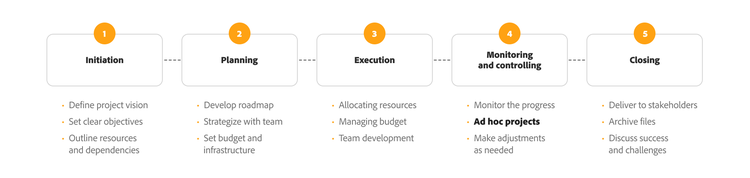
Ad hoc projects are defined by their flexibility, adaptability, and absence of formal structure. They can boost agility and sharpen problem-solving. However, they also bring real challenges – including resource strain, disruption to regular workflows, and difficulty tracking progress.
These unexpected challenges most often take the form of ad hoc projects and tasks. Project managers and team leaders regularly face unexpected challenges that throw standard operations into disarray. Ad hoc tasks are something nearly every business will encounter, and they’re particularly common in more complex projects.
In this guide:
What does ad hoc mean?
The term ‘ad hoc’ comes from Latin, meaning ‘for this.’ In modern usage, it refers to something created or done for a specific purpose or need — typically unplanned or improvised.
For example, you might come across phrases like:
- ‘The mayor appointed an ad hoc committee to study the project.’ (adjective)
- ‘We had to make some ad hoc changes to the plans.’ (adjective)
- ‘The decisions were made ad hoc.’ (adverb)
While ‘ad hoc’ has no direct antonyms, contrasting terms like ‘planned’ or ‘structured’ help clarify its core meaning. Common synonyms include impromptu, improvised, and unplanned.
What are ad hoc projects?
Ad hoc projects are unique, one-off endeavours that arise spontaneously to address specific situations or solve immediate problems. Unlike traditional projects that follow a predefined plan and schedule, ad hoc projects are defined by their flexibility, adaptability, and lack of formal structure. They might be a side project your line manager asks you to run.
Examples of ad hoc projects
Ad hoc projects can arise across many industries and take a variety of forms. Here are a few examples:
- Crisis management initiatives: Forming an emergency response team during a natural disaster
- Special client requests: Developing a customised marketing campaign for a niche market
- Event management: Organising a product launch or a corporate celebration
- Technology implementation: Urgently upgrading systems or implementing new software
- Research and development projects: Responding to a sudden market shift with rapid product development
- Sudden regulatory compliance needs: Assembling a team to address new regulations
Advantages and disadvantages of ad hoc projects
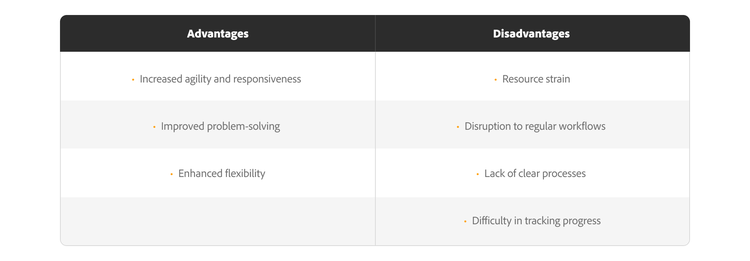
Ad hoc projects offer several advantages:
- Increased agility and responsiveness: They allow organisations to respond quickly to unexpected events or opportunities.
- Improved problem-solving: These projects focus on resolving specific problems, often sparking innovative approaches.
- Enhanced flexibility: They adapt to changing circumstances and requirements more readily than traditional projects.
That said, ad hoc projects also come with their own challenges:
- Resource strain: They can divert resources from planned projects, potentially causing delays or disruptions.
- Disruption to regular workflows: Their unpredictable nature can disrupt established workflows and impact productivity.
- Lack of clear processes: The absence of predefined processes can lead to inconsistencies and inefficiencies.
- Difficulty in tracking progress: Without a structured plan, monitoring progress and measuring success becomes challenging.
Why track ad hoc projects?
Logging every last-minute request into your system might feel like unnecessary overhead. However, failing to track them can lead to inefficiencies, misallocated resources, and missed opportunities for optimisation. Keeping tabs on ad hoc tasks gives you valuable insights into your team’s workload, helping project managers make data-driven decisions. By integrating ad hoc projects into a comprehensive work management system, teams can:
- Gain visibility into workload distribution and accurately report how each team member spends their time.
- Optimise resource allocation by identifying where time is being spent and redistributing tasks as needed.
- Balance priorities by redirecting efforts towards strategic initiatives rather than getting consumed by unplanned tasks.
- Justify staffing needs, whether making the case for additional hires or reassessing current workloads.
- Make informed decisions on task prioritisation, confidently saying ‘not this week’ to lower-priority requests – backed by clear data.
Most project managers struggle to clarify, manage, and renegotiate their team’s workload. Without a clear picture of what’s being deprioritised to make room for ad hoc projects, teams can quickly become overwhelmed, leading to frustration, burnout, and inefficiencies.
What happens when ad hoc requests are untracked?
Untracked ad hoc requests don’t just consume time – they make it nearly impossible to measure their impact. If you’re wondering why a portion of your team’s time or budget seems to disappear without explanation, unlogged ad hoc tasks could be the hidden culprit.
Failing to track these requests can lead to:
- Decreased productivity: Unplanned tasks quietly pull team members away from core priorities, affecting overall project timelines and deliverables.
- Inefficient staffing decisions: Without tracking, it’s difficult to assess whether ad hoc requests justify additional resources, specialised expertise, or workload adjustments.
- Poor resource management: Without visibility into how much time ad hoc tasks consume, leadership finds it harder to allocate resources effectively.
Tracking ad hoc projects ensures last-minute requests don’t derail your strategic initiatives.
What’s the best way to track ad hoc projects?
Successful tracking isn’t just about choosing the right tool — it’s about having a structured approach that delivers visibility and accountability. A well-defined planning phase helps teams establish the scope of work, making it easier to determine what to track and prioritise.
Many project management solutions help teams organise and deliver complex projects, but few bring together structured project planning and the unpredictable nature of ad hoc work. Adobe Workfront gives teams the ability to manage both long-term initiatives and last-minute tasks in one unified system.
Even without a dedicated work management platform in place, following four core principles will improve efficiency and keep your team on top of ad hoc requests.
1. Stop accepting ‘under-the-table’ ad hoc requests
Every task, no matter how small, should be documented and submitted through a formal project request process. Untracked ad hoc tasks may seem minor, but they accumulate quickly — affecting efficiency and resource allocation.
Ad hoc project managers often find themselves stepping in to resolve issues that don’t fit neatly into standard business workflows. When that happens, they should:
- Gather the right people by consulting with departmental leads.
- Quickly identify and source the necessary expertise.
- Define the scope of the ad hoc project to prevent scope creep.
- Assign clear responsibilities and begin collaboration immediately.
A structured intake process helps teams stay ahead of unexpected work, ensuring every task is properly accounted for.
2. Standardise your request management process
Instead of letting requests filter in through email, chat, or casual conversations, streamline incoming ad hoc work with a standardised request process. A clear system cuts through confusion and ensures both planned and unplanned projects are properly assessed.
Key steps to improving ad hoc request management include:
- Creating a centralised request hub to capture all incoming tasks.
- Prioritising requests based on urgency and impact.
- Standardising request formats using a creative brief or intake form.
- Defining project requirements early to manage stakeholder expectations.
A structured request intake process reduces chaos and helps teams assess whether they have the capacity to take on new work — or whether additional resources are needed.
3. Create ad hoc project blocks
Instead of letting ad hoc requests disrupt planned work throughout the day, encourage team members to set aside dedicated time for these tasks. Batching last-minute requests together makes them more manageable and keeps high-priority projects on track.
Managers can appoint a rotating ‘ad hoc lead’ to capture, prioritise, and complete urgent requests while the rest of the team stays focused on strategic initiatives. This structured approach keeps ad hoc work moving without disrupting core business objectives.
4. Make every task visible
Tracking only large projects can give leadership the impression that’s all your team handles — meaning they may not realise how much time and resource unplanned requests are consuming. Documenting ad hoc work paints a more accurate picture of workload distribution and team contributions.
To improve visibility:
- Log all tasks — whether planned projects or last-minute requests.
- Use a work management system to centralise project tracking.
- Use dashboards or reporting tools to showcase ad hoc project impact.
- Implement Agile-inspired tracking methods, such as a burndown chart, to visualise task completion rates.
Full transparency into your team’s workload helps managers make informed decisions, allocate resources effectively, and justify hiring additional staff when needed.
Best practices for managing ad hoc projects
To effectively manage ad hoc projects, consider these best practices:
- Prioritise and allocate resources: Assess the urgency and importance of the project and allocate resources accordingly.
- Communicate clearly and collaborate effectively: Ensure clear communication and collaboration among team members and stakeholders.
- Embrace flexibility and adaptability: Be ready to adjust plans and priorities as needed.
- Document and track progress: Keep clear documentation of the project’s goals, objectives, and progress.
- Apply a decision-making framework: Assess whether an ad hoc project justifies bypassing established processes.
- Develop improvisation skills: Build improvisation as a key skill in ad hoc project management.
Using smart ad hoc project collaboration
Collaboration is essential for managing ad hoc work effectively. Team members need to stay across shifting priorities, while project managers need streamlined processes to keep work on track.
For on-site teams, a quick in-person check-in can help align on urgent tasks. For remote or hybrid teams, the right collaboration software makes all the difference. Adobe Workfront helps teams work together effectively by:
By combining structured project planning with the flexibility to handle ad hoc work, Workfront helps teams stay agile, productive, and aligned – no matter how unpredictable the workload gets.
Watch our quick Adobe Workfront overview to see it in action.