Adobe Workfront Features
Work automation
Eliminate manual steps and bring products, campaigns, creative work and content to market with efficient workflow automation.
AI form fill
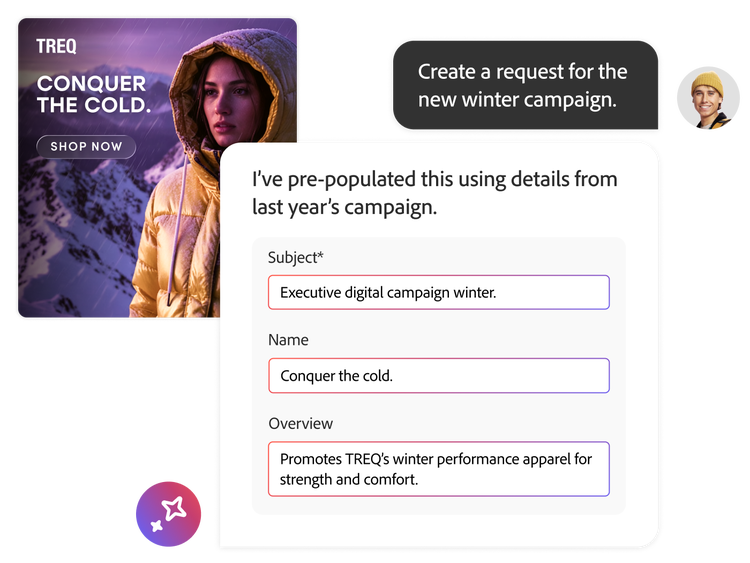
Eliminate manual data entry and speed up work intake by having AI populate request forms for you. Describe what you need in plain language or upload a document and Adobe Workfront automatically extracts key details, applies them to the right fields and reuse relevant context from past requests and objects — so your teams can start work faster with cleaner, more consistent information.
- Faster form completion. Generate form values from a simple prompt instead of typing everything in field-by-field.
- Document fill. Upload a brief or supporting file and let AI extract the details to populate the form automatically.
- Proven context reuse. Reference past requests or Workfront objects so new requests stay consistent with similar work from before.
AI-powered briefs
Accelerate creative alignment and production by auto-generating briefs from planning records. Workfront lets you upload unstructured documents — such as Microsoft Word documents, PowerPoint presentations and PDFs — to populate projects and planning records by leveraging AI. This frees marketers from manual data entry, saving time and money and letting them focus on high-value activities.
Project templates and blueprints
Automate repeatable work by templatising project structures, processes and settings that are often replicated to create your own library of “starter” projects that speed up work initiation. Or, leverage Workfront's curated blueprints, which provide ready-to-deploy templates for common use cases, such as digital asset production, services delivery plans or IT organisation set-up.
Learn more about project templates and blueprints.
Content as a Service v3 - work-automation1 - Tuesday, 14 January 2025 at 16.20
Automated workflows
Keep work and content moving by automating common processes and workflows.
- Easy review set-up. Create simple review assignments or a series of sequential and parallel review stages and establish dependencies between stages.
- Managed permissions. Limit visibility to required stakeholders where needed.
- Streamlined workflows. Templatise frequently used workflows to speed content activation and ensure brand and process compliance.
- Microsoft Copilot integration. Manage your work by seamlessly summarising projects, keeping work on track, proactively monitoring project health and more.
Learn more about automated workflows.
Content as a Service v3 - work-automation2 - Tuesday, 14 January 2025 at 16.21
Learn how to use workflow automation features to digitise your work processes.
Find what you need in Experience League, our library of how-to content — including documentation, tutorials and user guides.
Learn more | Learn more Experience League Adobe Workfront Fusion overview.