Mastering work breakdown structures (WBS) for effective project management

Adobe for Business Team

06-25-2025

Image of a man outside a building, overlaid with an Adobe Workfront UI element and a Q2 social campaign task.

If you manage projects or oversee a large scope of work, a work breakdown structure (WBS) can make everything far more manageable. At its core, a WBS breaks a project down into tasks and deliverables, ranked by priority. The result is better planning, organisation, and control over your project.

There are two types of WBS – deliverable-based or phase-based – and both can be tailored to suit your priorities and ways of working. If you’re a professional looking at project management tools, read on to find out more about work breakdown structures.

What is a work breakdown structure (WBS)?

A work breakdown structure (WBS) is a tool that breaks down everything involved in completing a project. When facing a large project, it can be hard to know where to start. A WBS solves this by splitting one big task into multiple manageable ones, helping you work out what to tackle first. A work breakdown structure should include the following:

Put simply, a WBS lets you build a flowchart that turns all deliverables into manageable tasks and gives your team a clear guide for developing or completing a project.

A key aspect of a WBS is how the structure, project scope, schedule, and budget all interact. Each element influences the others and determines what’s achievable. For example, a tight two-week schedule will limit the scope – but it can also help reduce the overall budget. On the other hand, a generous budget might allow you to bring on extra staff, letting you expand the scope or get more done within the same timeframe.

Another important consideration is the 100% rule. This states that the work breakdown structure must cover 100% of the project’s scope and deliverables. Put simply, nothing should sit outside the WBS – every aspect of the project needs to be accounted for, no matter how small.

Deliverable-based vs. phase-based WBS: Choosing the right approach

There are two distinct approaches to creating a WBS – deliverable-based, which focuses on individual tasks or parts of the project scope, or phase-based, which breaks down projects by timeline.

Deliverable-based

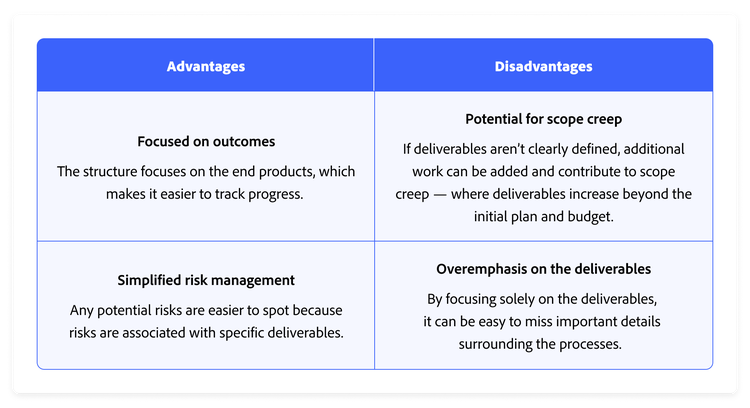
Deliverable-based approaches are the most common in project management. They create a visualisation of how the project’s deliverables relate to the overall scope of work. This approach also helps break tasks down into subtasks.

Chart showing the advantages and disadvantages of a deliverable-based WBS.

Advantages:

Disadvantages:

Phase-based

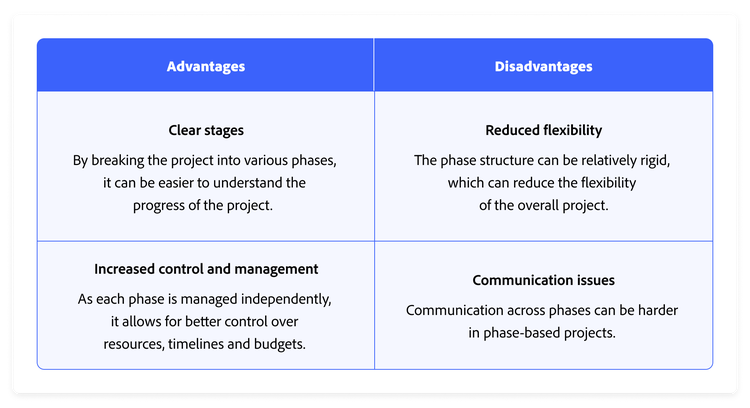
Phase-based approaches typically follow five core stages: initiation, planning, execution, control, and closeout. Once these phases are defined, the project team collaborates to sort and assign tasks to the appropriate stage.

Chart showing the advantages and disadvantages of a phase-based WBS.

Advantages:

Disadvantages:

Key components of a work breakdown structure

A clearly defined work breakdown structure ensures every detail and project phase is accounted for before work begins. The WBS gives everyone a clear view of the big picture, keeping the whole team aligned throughout the project.

A work breakdown structure is built around several key features, each sitting on its own Level. The top Level – Level 1 – represents the overarching goal (or goals). As you work down through the Levels, goals are divided into tasks, and tasks into smaller subtasks. The core components of a typical WBS are:

The deeper you go in the structure, the more detailed the tasks become. Higher up, you’ll find broad goals that depend on completing multiple smaller tasks. Use a WBS to track your Project milestones by assigning a clear objective to each subtask. Once that’s done, your WBS lets you monitor and tick off each individual section.

Create a work breakdown structure: A step-by-step guide

When creating a work breakdown structure, start by outlining the desired outcome. Working backwards from completion to kickoff, divide the Project into smaller deliverables, then break each deliverable down into manageable tasks and subtasks.

Depending on the size and scope of your Project, your work breakdown structure might have three Levels or ten. There’s no set number of Levels or tasks for a finished WBS – just keep breaking work down into its smallest parts. You’ve reached the right Level of detail when a deliverable can no longer be divided into sub-deliverables and each work package has a single Project outcome.

Step 1: List every major deliverable

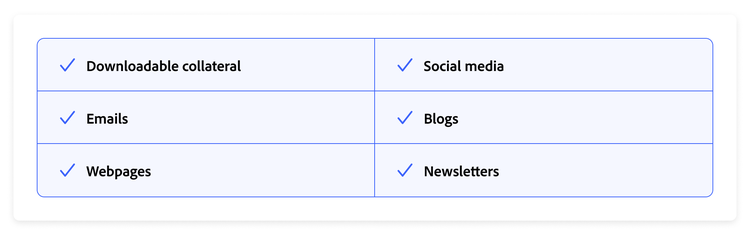
Chart listing the deliverables of a campaign, including downloadable collateral, emails, webpages, social media, blogs, and newsletters.

Start by identifying your final deliverable – the overall outcome or Project goal. This sits at the top of your WBS (Level 1) and might be something like: Launch a targeted content campaign.

Once that’s defined, break it down into major deliverables (Level 2) – the key categories of work needed to achieve that goal. These might align with departments, workstreams, or Project phases.

For example, the major deliverables of a targeted content campaign might be:

  1. Downloadable collateral
  2. Emails
  3. Webpages
  4. Social media
  5. Blogs
  6. Newsletters

If there’s any ambiguity or confusion about the Project resources, deliverables, or constraints, resolve them before you start on your work breakdown structure. Sorting this out early will save considerable time on revisions and prevent conflicts down the track.

Finally, make sure your list is reviewed and approved by all the stakeholders using a digital proofing tool. Depending on the Project, there may be multiple stakeholders from different teams, departments, or even different companies. It’s important that everyone has signed off on the list of deliverables and that all parties are in agreement.

Step 2: Break each deliverable into work components

Work components are groups of related deliverables that combine to form a larger, major deliverable. Depending on the size and scope of your Project, you may have more than one Level of work components. A practical way to start dividing them is by task type or role. For example:

Deliverable: Social media

Chart with social media broken down by platform, including X, Instagram, Facebook, and LinkedIn.

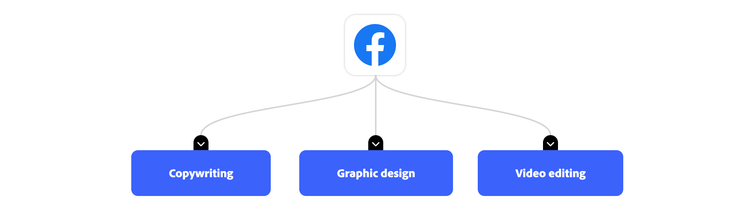
You can break down work components further if needed:

Work component: Facebook

Chart breaking Facebook down into copywriting, graphic design, and video editing.

There’s no requirement or limit on the number of work components you can have. Whatever works best for your team is the right answer.

Step 3: Break each work component into work packages

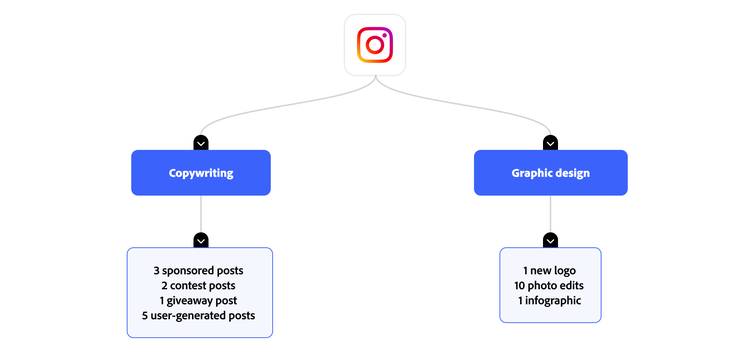
The final and most detailed Level in your work breakdown structure is made up of work packages – lists of individual tasks that one person can complete. Think of each work package as a mini project with its own budget, resources, schedule, and milestones.

Each work package should be unique, and no work package should appear more than once under any work component.

For example:

Deliverable: Social media

Chart breaking down Instagram into copywriting and graphic design.

Step 4: Identify dependencies

Once you’ve mapped out all the work down to the most detailed task, identify any work that depends on other tasks being completed first. For example, you can’t complete video editing until you receive the voiceover script from the copywriter. Understanding the order in which work must be completed will help you schedule, manage time effectively, and anticipate roadblocks.

Step 5: Prioritise and assign

The final step in creating a work breakdown structure is organising all work in priority order, using your list of dependencies. Once your WBS is in logical order, assign work packages to individuals, then build your schedule from work packages all the way back through to the final deliverables.

Your WBS can also include any of the following information to support organisation and transparency:

Different formats for visualising your WBS

While you can create a work breakdown structure in an outline format, one of its key benefits is a visual hierarchy of your workflow, broken down into its smallest components. Every deliverable is accounted for and assigned, and it’s easy to see how individual components fit within a larger task — and, ultimately, the entire project. Consider creating your work breakdown structure using a table, flowchart, or collaboration software.

When sharing your WBS, you have several options. Common choices include spreadsheets, flowcharts or tree diagrams, outlines, or Gantt charts. Each has its own advantages and disadvantages, so experiment to find the version that works best for you.

Best practices for creating a WBS

One of the most widely used best practices for work breakdown structures is the 100% rule.

Developed by Gregory T. Haugan, the 100% rule states that a work breakdown structure must include 100% of the work required to complete the deliverables — and must not include any work outside the defined project scope.

Your WBS should be exhaustive and detailed, helping you identify work gaps or redundancies while cutting out any unnecessary work. Be specific, be thorough, and don’t shy away from detail.

Another best practice for WBS is exclusivity. Limiting repetition is essential — not only to avoid breaking the 100% rule, but also to prevent misspending resources, budget, or time. Beyond that, focus on outcomes rather than actions. Direct your energy towards delivering results, not just completing tasks.

Getting started with Adobe Workfront

While you can build work breakdown structures by hand or with flowchart tools, it’s often time-consuming and hard to keep up to date. Using project management software to build a work breakdown structure keeps all information current, gives your team clarity, and gives you the flexibility you need to plan work.

Adobe Workfront is a work management solution that lets you and your teams plan, track, and organise your workload. It also has the tools to create, visualise, and manage a WBS.

Find out how Adobe Workfront can help you build your work breakdown structure and achieve your project goals.

https://business.adobe.com/fragments/resources/cards/thank-you-collections/workfront