Document workflows just got smarter.
No matter your business, documents play a key role in daily operations. From contracts to financial reports, internal communications, sales collateral and more, turning information into actionable insights is at the core of knowledge work. At some point, you’ll need to analyse, create, refine, repurpose and share documents.
That’s why business professionals turn to Adobe Acrobat Studio, an AI-powered document and content platform that combines trusted PDF editing, natural language AI assistance, a collaboration workspace and on-brand content creation. If you’re already familiar with Acrobat Pro, you’ll appreciate how familiar Acrobat Studio will feel — and how much more you’ll be able to do with it.
Where comprehension meets creation.
Acrobat Studio helps teams by quickly extracting insights from documents, letting them collaborate in context and create polished outputs all within the same platform. If you’re an IT professional, you’ll value that you can stay in control with measurable ROI, on one governed platform, to deploy, manage and secure document workflows across every team. And everyone benefits from measurable productivity gains.
Still have questions? We have answers.
What is Adobe Acrobat Studio and how is it different from Adobe Acrobat Pro?
Adobe Acrobat Studio is the enterprise document platform built on Adobe’s 30-year foundation in PDF, built for IT to deploy without disruption and for business users to use without heavy training.
Business users get:
- Skilled AI assistants like Analyst or Instructor or create your own to get insights aligned with your documents, role and business decisions. With every answer linked to clickable citations, you now have AI that can not only be trusted but verified.
- Design tools powered by Adobe Express for fast-action templates and quick, on-brand content creation in a variety of formats (not available in Acrobat Pro).
- A full PDF toolkit to create, edit, convert, combine, organise, protect, redact and compare documents and forms.
- Integrated e-signature workflows.
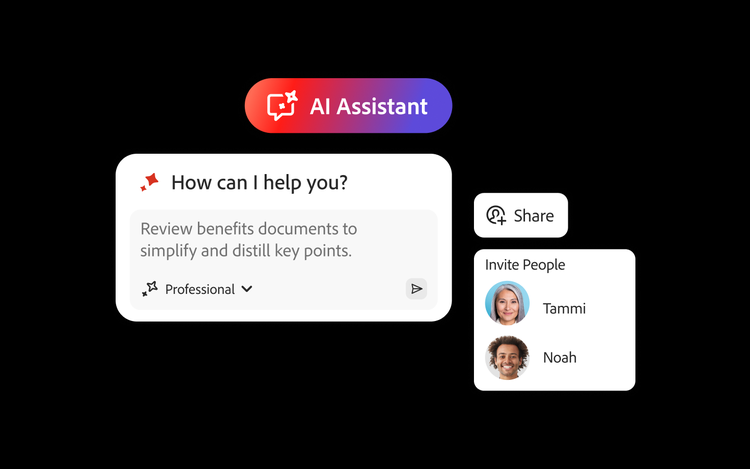
Acrobat Studio also offers PDF Spaces, the new standard for intelligent document sharing and collaboration. PDF Spaces lets you share and comment on documents for review directly in a shared workspace. It enables conversational feedback in one secure, interactive place that preserves context, surfaces insights with AI Assistant and lets teams manage how information moves across the organisation.
Admins have one governed platform to deploy, manage and secure document workflows across every team, replacing point solutions and ungoverned consumer AI with role-based access, audit logs and enterprise security all built in.
What AI features do users get in Acrobat Studio?
Acrobat AI Assistant helps reduce “busy-ness” for professionals across your organisation from legal, finance, sales, HR and marketing by:
- Summarising lengthy PDFs to produce executive summaries and tailored insights that surface key information to drive faster, more confident decisions
- Allowing users to ask questions and converse with AI assistants to extract important points and get recommendations for next steps
- Generating drafts for new content like emails, summaries, briefs and more
- Enabling admins to manage AI Assistant, chat history and Adobe Express access per product profile
How does Acrobat Studio streamline document workflows for teams?
Acrobat Studio centralises PDF creation, editing, e-signing and AI-powered document summarisation into a unified platform, along with on-brand content creation for a variety of outputs. And, because it’s designed for business, it integrates seamlessly with systems such as Microsoft 365, allowing for shared administrator controls and streamlined collaboration across distributed teams like legal, sales, marketing, human resources, procurement and more.
How does Acrobat Studio enhance collaboration between internal teams and external partners?
Acrobat Studio empowers real-time collaboration with versioned document sharing and commenting to reduce cross-talk and review cycles and to keep teams and stakeholders aligned. Studio integrates with Microsoft Copilot, ChatGPT, Adobe Experience Manager and Workfront — extending the business tools you already use, not replacing them.
Does Acrobat Studio support shared templates and centralised document libraries for teams?
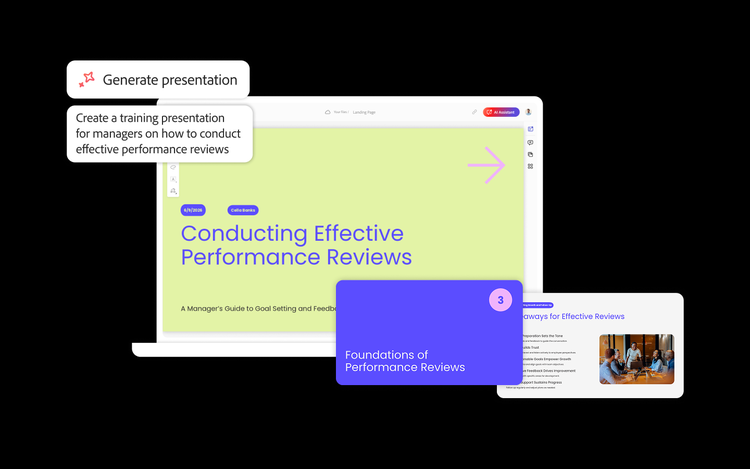
Acrobat Studio lets your business self-serve on-brand content with shared templates and provides centralised libraries of branded forms, contracts and policies. Adobe Express, within Acrobat Studio, offers templates for other types of content production for destinations like social media channels, while Generate Presentation empowers users to create on-brand presentations from documents quickly and easily. And admins can manage access and updates across teams for brand and legal compliance.
How does Adobe Acrobat AI Assistant improve document productivity and decision-making for businesses?
Acrobat AI Assistant empowers teams to quickly surface insights and key takeaways or summarise long or complex documents across desktop, web and mobile. It can handle multiple documents at once and helps convert content into emails, reports, presentations or blog posts within minutes, saving significant effort and accelerating business-insight generation.
Comprehension meets creation. Explore Acrobat Studio.
Acrobat Studio is designed to transform everyday documents into intelligent, on-brand content so you can save time. Explore how Acrobat Studio can boost your business’s productivity and turn information into actionable insights — all in one place.
Learn more about the benefits of Adobe Acrobat Studio for businesses.