Data visualization tools: Guided analytics help teams make decisions.

Enterprise teams have never had more data, and it’s never been harder to use it with confidence. In a multi-channel world, a single customer interaction can span a mobile app, a website, a brick-and-mortar store, and a call center, but decision-making still relies on fragmented views of that experience.

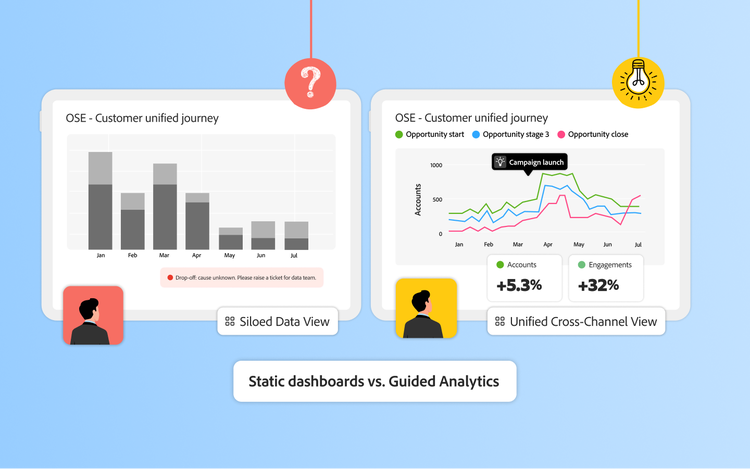
Traditional dashboards, powered by widely used data analysis and visualization tools, are effective for monitoring known KPIs. They can tell you revenue is up, churn is at 5%, or campaign X drove 10,000 clicks. But they often stop at reporting outcomes. A dashboard shows what happened, but not reliably why it happened, which audiences drove the change, or which journey moments made the difference.

The result is a widening gap between what traditional dashboards show and what strategic leaders need to act. Teams end up asking more follow-up questions, relying on analysts for additional data, and waiting longer for answers, often missing the window to act. This is how enterprises become data-rich but insight-poor.

As customer journeys grow more complex, enterprises require an analytics approach that moves beyond static visualization to connect data across every touchpoint. This is the promise of guided analytics: a discovery-led framework that unifies cross-channel data to surface hidden anomalies and provides a logical path to the root cause. By guiding teams from a signal to an explanation, this approach turns fragmented data into the fast, confident decisions required to navigate customer journey complexity.

This post will cover:

How dashboards shape enterprise analytics today.

Dashboards are foundational to business intelligence, acting as the starting point for how most enterprises understand performance. They bring structure to large volumes of data, help teams standardize metrics, and create a shared view of progress across marketing, product, and operations. When leaders want to know how the business is performing against known goals, dashboards are often the first place they look.

To support this need, enterprises rely on a range of analytics and visualization tools, each optimized for a specific type of question or user:

  • Business intelligence (BI) platforms: Tools like Tableau and Power BI focus on aggregating and visualizing data to inform strategic decisions. These BI platforms are ideal for executives needing high-level overviews of an enterprise’s health.
  • Product analytics platforms: Solutions such as Mixpanel or Amplitude provide granular insights into user behavior within digital products, helping product managers optimize specific user experiences.
  • Visualization tools: Platforms such as Adobe Analytics provide flexible reporting in visually compelling formats, enabling teams to build dashboards that are easy to interpret for stakeholders.

These tools are essential for tracking targets and making data available to everyone across the company, and they are largely built for reporting on what is already known. They excel at monitoring steady KPIs, but they lack the flexibility to guide teams through a deeper investigation when performance shifts or unexpected patterns emerge. As data volumes increase and customer journeys are spread across multiple disconnected channels, this dashboard-driven approach begins to show its strain, failing to provide the cross-channel continuity required to understand the modern customer.

Why traditional dashboards create more questions than answers.

The core limitation of traditional dashboards is that they were built for a simpler analytics era. Early dashboards were built for relatively linear customer journeys, fewer data sources, and a small set of predefined questions that business users wanted answered on a recurring basis.

That model no longer holds. Today, customers interact across dozens of digital and physical touchpoints, and performance shifts are rarely driven by a single factor. When a key metric shifts, whether it’s a drop in conversions, a spike in churn, or a dip in engagement, the 'what' isn't enough. Leaders need to quickly pinpoint where that shift happened in the journey, who was affected, and the specific factors that caused it.

The limitation of a dashboard is that it is built to describe, not diagnose. It can report an outcome, but it can’t walk a team through the investigation needed to explain it. In practice, this creates several recurring enterprise challenges:

  • Limited root-cause visibility: Dashboards can show that performance changed, but not whether the issue stems from a checkout change, login friction, messaging issue, device experience, or a combination of factors.
  • Dependence on predefined questions: When new or unexpected issues arise, teams must request new reports or analyst support, slowing response times.
  • Fragmented, channel-specific views: Web, CRM, product, and offline data live in separate dashboards, making it difficult to connect signals across the journey.
  • Delayed decision-making: As questions multiply, reliance on analyst support increases, and the opportunities to act quickly diminish.

Because these tools were adopted in isolation, teams may agree that performance has shifted, but they lack a single source of truth to determine the cause.

Consider a subscription business experiencing an unexpected rise in churn. A marketing dashboard shows email engagement holding steady. A product dashboard reports no major outages. A finance report flags increased cancellations. The real issue may be a combination of login failures and billing confusion, but no single dashboard can connect those signals. Leaders are left stitching together partial views, losing time while customer experience remains affected.

What guided analytics is and why it matters.

Guided analytics is built specifically for the complexity of multi-touch attribution. It moves beyond static dashboards and predefined reports, giving teams the tools to actively explore their data. Instead of just seeing a result, teams can uncover the root cause and see exactly how different signals connect across the entire customer journey.

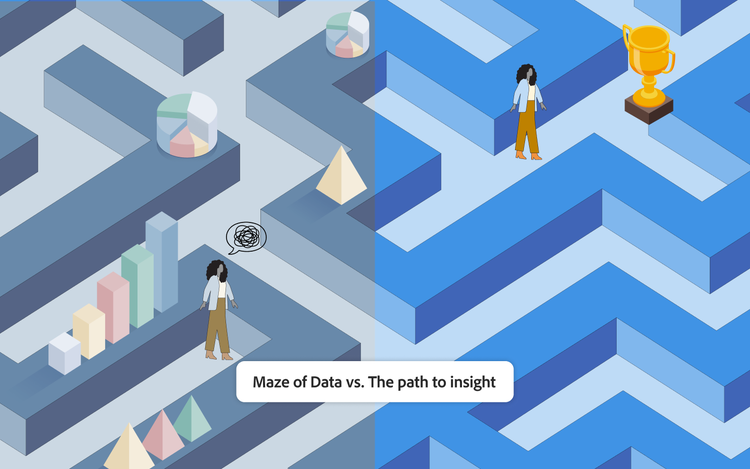
Guided analytics is a model that combines descriptive analytics with predictive and prescriptive analytics. It acts as a diagnostic layer, translating those 'why' questions into immediate answers through suggested paths and automated discovery. Instead of asking users to interpret dozens of charts and tables, guided analytics helps them follow a logical path to actionable insight.

Unlike traditional dashboards, it works from unified data sets and interactive analysis paths, allowing users to explore data dynamically, break it down by audience, channel, or moment in the journey, and surface patterns or anomalies that static tools often miss. The result is analysis or insights that is less like reporting and more like problem-solving.

For instance, if an e-commerce team faces declining conversion rates, guided analytics can help reveal where friction is occurring and connect those insights to the segments most affected. That level of clarity allows teams to respond quickly, test targeted changes, and course-correct before impact compounds.

The value extends across leadership roles. CMOs gain a clearer line of sight between marketing activity and downstream customer behavior, making ROI analysis more defensible and personalization more precise. CIOs benefit from greater visibility into systemic issues and reduced complexity, as analytics shifts from disconnected tools toward a more unified, governed approach.

How guided analytics goes beyond traditional dashboards.

Guided analytics improves upon dashboard-driven reporting in several ways, each designed to address the limitations of static, siloed views:

  • Cross-channel stitching: Guided analytics unifies data across web, mobile, CRM, and offline sources into a single analytical view. Instead of analyzing channels in isolation, teams can understand how interactions across touchpoints combine to influence outcomes across the customer journey.
  • Interactive exploration: Rather than limiting users to predefined views, guided analytics allows teams to drill into data, compare segments, and explore patterns dynamically. When performance shifts, users can immediately investigate different audiences, devices, or journey steps without waiting for new reports.
  • Anomaly detection: Guided analytics helps surface unusual patterns or deviations that warrant investigation. Highlighting meaningful changes in behavior enables teams to identify issues earlier.
  • Journey-level narratives: By connecting individual touchpoints into coherent journeys, guided analytics provides context that isolated charts lack. Teams can see how sequences of interactions contribute to outcomes such as conversion, retention, or churn, making cause and effect easier to understand.
  • Suggested breakdowns: Guided analytics recommends logical next steps for deeper analysis, such as breaking results down by channel, audience, device, or experience variation. This guidance helps users move forward confidently, even when they’re unsure which question to ask next.

Ultimately, guided analytics is about closing the gap between seeing a signal and taking the right action. Explore how guided analytics can bridge the gap in your customer journey data.

Customer success stories.

Guided analytics provides a powerful framework for understanding complex customer behavior, but realizing it at enterprise scale requires a purpose-built platform. Adobe Customer Journey Analytics is designed to operationalize guided analytics by combining unified data, governed self-service access, and advanced analytical capabilities in a single environment.

See the following customer success stories:

TSB logo

TSB unifies offline and online customer data to deliver personalization.

TSB, a banking leader, used Adobe Customer Journey Analytics to unify digital and branch interaction data into a single view of the customer journey. By connecting online behavior with in-branch and call-center activity, TSB gained clearer visibility into customer demand, helping teams deliver personalized offers and experiences across channels, and improve customer satisfaction. This shift in approach generated 11x more incremental income than expected. Read the full case study here.

The Coca-Cola Company logo

Coca-Cola uses self-service analytics to reduce warehouse waste.

Coca-Cola used Customer Journey Analytics to give teams beyond marketing direct access to customer and demand insights in order to optimize warehouse inventory. By enabling self-service analysis across functions, including operations, Coca-Cola improved visibility into demand patterns, helping teams reduce waste and respond more quickly to changing customer behavior. This shift reduced reliance on analysts and helped teams make timely, data-driven decisions across the organization. Read the full case study here.

Otto logo

OTTO uncovers the drivers behind conversion performance.

OTTO, a leading e-commerce retailer, used Customer Journey Analytics to analyze customer journeys across channels and uncover the specific factors driving conversion. By examining how users interacted with product pages, OTTO identified the optimal length for product descriptions and the number and type of images that influenced purchase decisions, turning high-level metrics into precise, actionable insights. Read the full case study here.

Stop building dashboards and start guiding decisions.

Enterprise data will only continue to grow in volume and complexity. As customer journeys become more interconnected, the cost of slow or incomplete understanding increases. In this environment, the limits of traditional data visualization tools and dashboards become harder to ignore.

Guided analytics represents the next step forward, helping teams move beyond reporting to explanation and enabling faster, more confident decision-making across the enterprise. Customer Journey Analytics powers this shift, transforming analytics from a retrospective exercise into a practical decision-support system.

Discover how Customer Journey Analytics gives you a complete view of the customer journey. Learn more about Adobe Customer Journey Analytics.

See guided analytics in action. Watch our 2-minute overview video to discover how your entire team can find deeper insights, faster.

Let’s talk about what Adobe can do for your business.

Get started