Adobe Customer Journey Analytics Features
Customer-level analysis
Power your first‑party data strategy with customer‑level analysis built for integrating large volumes of behavioural and customer enterprise data. Customer Journey Analytics unifies identity and interactions across channels and devices, delivering a complete journey view with rich visualisations, cross‑channel insights and real‑time self‑serve reporting.
Customer data collection and identity stitching
Unify customer IDs, traits and behavioural data across channels, devices and time — online and off-line — and assign it all to a single profile for comprehensive customer insights.
- Data collection. Use open and modern APIs for large-scale data streaming ingestion and computing.
- Off-line data ingestion. Integrate data from your existing CRM or any other off-line enterprise data source, for enriched dimensional analysis.
- Graph-based stitching. Combine IDs from multiple channels and devices into a single person ID, with the ability to automatically unstitch, restate historical data and restitch the profile for up to date context.

Customer data model
Run analyses with our modern data framework engineered to support all customer data types in their natural state and without loss of detail or structure.
- Modernised framework. Leverage flexible schemas and modern data structures, purpose-built for sophisticated on-demand customer data handling.
- Scalable structure. Use highly compressible database technology to power complex data queries that can quickly retrieve results from billions of rows and multiple data sources — without writing logic.
- Component-level analysis. Go beyond event-level analysis to reveal component-level insights. With sub-event segmentation, you can evaluate individual product categories or content assets within a single transaction or experience.
- Report-time processing. Pre-aggregate, connect and perform unlimited queries and real-time processing on customer data to get insights in seconds instead of the weeks or months.
Customer attribution models
Analyse integrated marketing performance by examining customer engagement across any combination of campaigns, channels and content.
- Algorithmic attribution. Dynamically determine the optimal allocation of credit for a campaign or even a selected metric.
- Rules-based attribution. Use out-of-the-box models that assign credit for engagement based on pre-determined rules to give you multiple viewpoints into marketing channel impact.
- Participation models. Take advantage of multi-touch attribution to understand which touchpoints customers are exposed to the most, letting you identify which part of your site, app or other channels are critical to conversion.


Analysis workspace
Give teams a simple-to-use, drag-and-drop canvas to perform complex customer-level analyses across multiple datasets and sources without the need to write SQL.
- Accessible insights. Build reusable projects customised to your unique questions while blending different views of data to tell a powerful data-driven story.
- Robust toolset. Leverage multiple tools to query and draw insights from your data, including freeform tables, cohorts, segmentation, attribution, visualisations and context labelling.
- Speed-focused design. Optimise your queries to return results quickly — with all the underlying data fully correlated — so you can make decisions in the moment, not after weeks or hundreds of static reports.
Customer journey visualisations
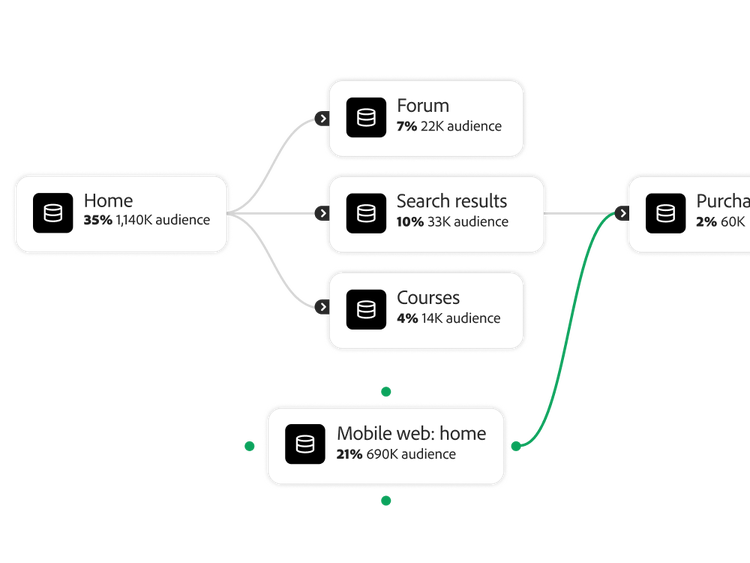
Visualise each step of the customer’s journey, in order and across channels, while putting every action into full context for insights that more accurately inform the next-best action.
- Journey canvas. Tap into a powerful, intuitive journey canvas to visually map and analyse customer journeys. Add visual nodes to the journey canvas to mark critical touchpoints and chart key metrics.
- Cohort analysis. Create and compare groups of customers over time with shared characteristics to recognise and analyse trends in retention, churn, latency or other unique cohorts.
- Flow and fallout analysis. Explore customer movement across channels to quickly understand their journey by viewing entry, exit and sub-flow activities to create segments.
- Guided analysis. Analyse product growth, engagement and release impact through guided workflows that surface trends in user acquisition, feature usage and performance over time.
- Total population. Get full visibility into your entire customer base — including customers who aren't engaging — so you can answer questions like “What percentage of digital customers were active last week?” or “How many gold members missed visits?”
More about customer-level analysis.
Content as a Service v3 - individual feature - Friday, 27 February 2026 at 11.04
Learn how to use customer-level analysis features.
Find what you need in Experience League, our vast collection of how-to content — including documentation, tutorials and user guides.
Learn more | Learn more how to use customer-level analysis features
Questions? We have answers.
