Prompt engineering for AI custom models.

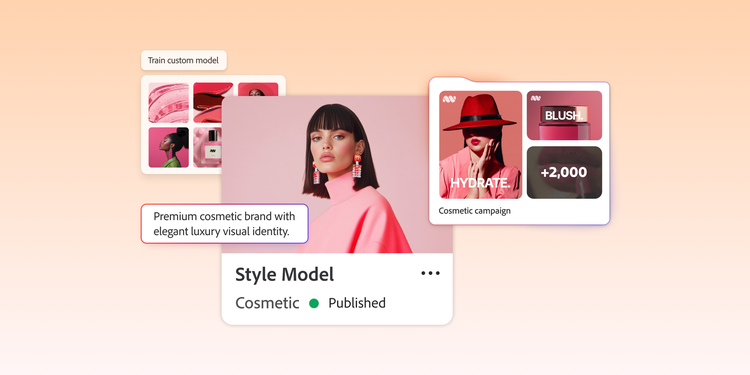
Customised AI models trained on approved brand assets give enterprise creative teams a better starting point for on-brand image generation. When a custom model is trained on the brand’s visual patterns and style, teams do not need to restate the same guidance in every prompt.

But brand familiarity does not guarantee campaign-ready output. A model may understand the brand’s visual aesthetics and still need direction for a specific campaign, channel, market, composition or mood. Often, teams will train a model for each campaign style and then use prompts to generate image variants that match the campaign aesthetic to use in the assets. Prompt strategy gives teams control to achieve creative goals.

Table of contents:

Why custom models need prompt strategy.

Custom models need a prompt strategy because customers need to caption their training images before a custom model is trained. These captions inform what the model learns from the training images. Having more specific captions enables the customer more flexibility in their prompt strategy

Also, custom models have "model tags," which are the common elements found between training images that reinforce consistency for style and character. With a custom model, you don’t need to repeat yourself as much in the prompt

A customised AI model gives creative teams a strong brand foundation for image generation. Because the model is trained on approved images, it can produce visuals that reflect your colour palette, styling, photographic approach and overall visual identity with less guidance in each prompt. That creates a major advantage over general-purpose generative AI tools, where teams often need to restate brand requirements each time they generate an asset.

Consider a product launch campaign. The same custom model might need to generate a polished background for a hero image for a landing page, a more energetic version for social media and a simplified version with clear copy space for display advertising. Each image should feel connected to the same brand system, but each one requires different framing, composition and format.

Distributed creative workflows add another layer of complexity. Regional teams, agency partners and internal creative groups may all use the same brand guidelines, but the outputs vary when each group interprets campaign direction differently. A shared custom model, along with a prompt strategy, helps align those interpretations in streamlining production.

In practice, teams can think about custom model workflows in two layers: the model provides a baseline for creating visuals that adhere to brand aesthetics and the prompt provides specific direction for subject, format, composition and creative treatment. Effective prompt engineering helps teams speed up the creation of campaign-ready assets that scale across markets, channels and production workflows.

Prompt engineering techniques.

Once a customised AI model has been trained on the brand, prompts help design teams guide how the model applies concepts. The techniques below help teams prevent unwanted visual elements, establish consistent aesthetics, refine assets and influence composition.

Negative prompting

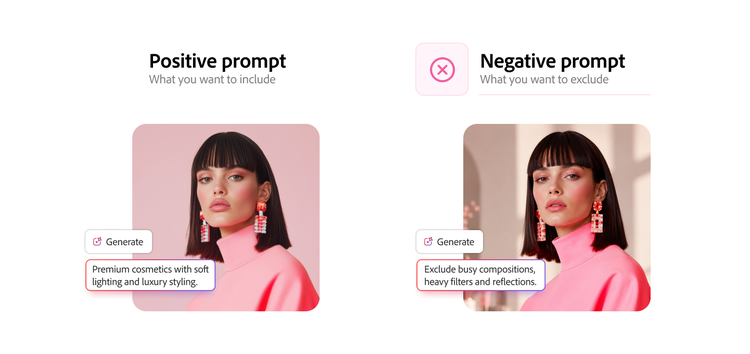
Side-by-side example of positive and negative prompts used to control AI-generated image outputs.

Negative prompting tells the model what to exclude in an image. In custom model workflows, it gives creative teams an added layer of control by reducing unwanted visual elements — even when a model has been trained on approved brand assets. Prompt-level exclusions help reduce unwanted elements in a generated image.

Negative prompting is especially useful for:

  • Excluding off-brand stylistic variations. A custom model may learn more than one visual pattern from the training data. Negative prompts help prevent unwanted stylistic drift when certain compositions, scenes or subject treatments pull the output away from the intended look.
  • Preventing campaign context bleed. For evergreen content, prompts such as “no holiday decorations,” “no seasonal elements” or “no weather-specific imagery” help prevent unintended visual associations from appearing in assets meant for year-round use.
  • Supporting consistent character or scene depiction. Negative prompts can exclude poses, expressions, styling treatments, scene configurations or visual details that conflict with the creative vision.

Negative prompts work best when they are focused. Long exclusion lists make the prompt harder for the model to follow and may weaken the impact of the most important constraints. Instead of relying on one universal negative prompt, teams should create targeted exclusion sets for specific campaign types, channels and asset categories. A social media asset, for example, may need different exclusions than an out-of-home placement because each format has different visual and production requirements. Negative prompts can improve control, but outputs should still be reviewed against brand and campaign requirements.

Few-shot prompting

Few-shot prompting is a technique in which you provide AI with a few examples to guide the model toward a specific creative treatment before the final generation request. In custom model workflows, these examples help steer the output beyond the model’s default visual tendencies and into a more defined campaign direction.

This technique is especially useful when a campaign needs to stretch the brand’s usual aesthetic. For example, a brand may train its custom model on clean studio photography but needs a seasonal campaign with saturated colour, editorial lighting and more dynamic compositions. The model may understand the brand’s core visual identity, but it can be further influenced with reference examples.

Iterative refinement prompting

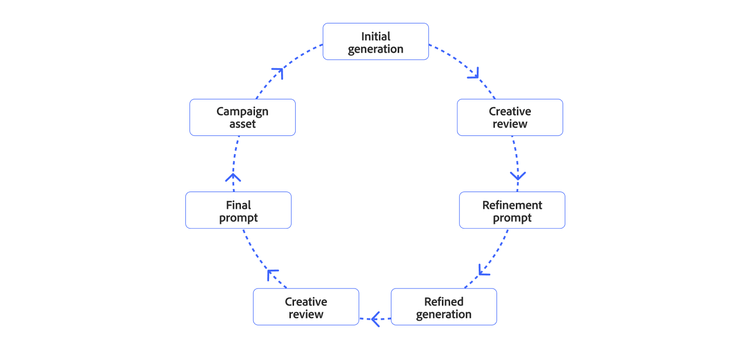
Diagram showing how refinement prompts improve AI-generated images through repeated review cycles.

Iterative refinement prompting helps teams improve an output through focused adjustments instead of starting with a new prompt each time. When an image is close to the desired direction, the next prompt isolates what needs to change while preserving the elements that already work. This approach reduces unnecessary generation cycles.

Two refinement approaches are especially useful in enterprise creative workflows:

  • Element-specific refinement. This approach adjusts one visual variable at a time, such as composition, lighting, subject placement, background treatment or styling. For example, if the composition works but the lighting feels too flat, the refinement prompt should focus on the lighting while asking the model to keep the framing, product placement and background structure consistent. This helps prevent the model from reworking parts of the image that already meet the brief.
  • Mood refinement. This approach adjusts the emotional tone or visual energy of an asset in controlled increments. Instead of making broad changes between versions, teams use directional language such as “slightly warmer,” “more dynamic,” “softer atmosphere” or “higher contrast.” These smaller refinements help dial in the campaign mood without disrupting the overall creative direction.

Iterative refinement supports a more structured review process. Initial generation establishes the starting point, creative review identifies what needs to change and the next prompt addresses those specific gaps. Each round becomes more targeted, giving creative designers and marketing teams clearer checkpoints between AI-assisted generation and final asset approval.

This workflow also helps teams see whether a problem can be fixed through better prompting or whether the model itself needs to be updated. If the image needs adjustments to mood, lighting, framing or channel fit, refinement prompting may be enough. If repeated prompt refinements still do not produce desired outputs, the team may need to review the training dataset, captions, model set-up or workflow assumptions.

Composition and visual direction prompting

Custom models are trained to learn a consistent character or visual style. Additionally, composition and visual direction prompting can help to provide guidance on how an image is structured, styled and perceived by its audience. Once a custom model has been trained on the brand’s visual system, the prompt can guide the creative choices that make an output feel intentionally art-directed rather than simply on-brand.

Strong composition prompts often include several types of visual direction:

  • Compositional structure. This includes framing, negative space, subject-to-frame ratio, layering and visual hierarchy. These details give the model clearer direction on where key elements should appear in the image, how much space should surround them and what the viewer should notice first.
  • Lighting treatment. Lighting direction defines the overall quality and consistency of an asset set. Prompts that specify soft diffused light, hard directional light, rim lighting, low contrast, high contrast or a warm colour temperature give the model clear technical direction.
  • Perspective and camera language. Camera direction helps shape how the viewer experiences the subject. Prompts can specify an eye-level view, elevated perspective, close crop, wide-angle feel, telephoto compression, shallow depth of field or deep focus to guide spatial relationships within the image.
  • Atmosphere and mood. Mood direction connects the technical elements of the image to the emotional goal of the campaign. Prompts describe the desired energy, pacing, atmosphere and visual tone, so the composition supports the broader creative intent.

Stronger visual vocabulary gives the model clearer direction from the start, helping teams create assets that feel closer to the campaign brief earlier in the process.

Scaling enterprise prompt engineering.

Creative teams looking to implement prompt engineering into creative production need systems that help distributed groups generate consistent, campaign-ready outputs from shared prompt frameworks, brand references and the same custom model. This becomes especially important when multiple teams are working from the same brand foundation. One team describes composition in design terms, while another focuses on campaign messaging. Over time, those differences create inconsistent assets, longer review cycles and less bandwidth for creative teams.

Consider the following best practices to scale enterprise prompt engineering:

  • Modular prompt structures. Separate brand foundation, campaign direction, channel requirements, audience context, composition and exclusions so teams can adapt prompts without rewriting them from scratch.
  • Shared creative vocabulary. Standardise how teams describe lighting, mood, framing, product treatment and visual hierarchy.
  • Reusable channel templates. Build format-specific requirements for social, display, email, ecommerce and out-of-home channels into approved prompt frameworks.
  • Campaign-specific prompt libraries. Preserve successful prompts so teams can reuse proven approaches and reduce duplicated effort.
  • Governance and approval workflows. Review and update prompt systems against brand and campaign requirements.
  • Version-controlled iteration. Track prompt changes, identify stronger versions and reduce prompt drift over time.

This structure helps teams understand when a challenge should be solved at the prompt level and when it may require model-level changes. If outputs need stronger composition, clearer channel fit or a more precise campaign mood, the prompt system may need refinement. If the model repeatedly struggles to depict products consistently, the training data or model set-up may need to be revisited.

At scale, prompt engineering becomes part of the creative operating model. Documented prompt systems help teams reduce inconsistency, preserve institutional knowledge and produce campaign-ready assets with fewer unnecessary review cycles.

Build a stronger prompt strategy for custom models.

Once a custom model is in use, prompts should become part of the production workflow. Shared templates, approved language, clear refinement steps and documented examples help teams reuse what works and create more consistent outputs across campaigns, channels and markets.

Start by identifying where the workflow breaks down most often. If review cycles are focused on removing unwanted elements, refine negative prompts. If outputs feel too generic, build stronger campaign references. If teams are generating inconsistent channel variations, create contextual prompt templates for each format. Each prompt technique should map to a real production gap.

Adobe Firefly Custom Models is designed to help teams easily generate brand-aligned imagery, trained on their own approved brand assets, with prompts providing additional control for content.

Let’s talk about what Adobe can do for your business.

Get started