

Adobe Firefly Graph For Enterprise
Build and share AI-powered creative workflows.
Turn the craft behind your best campaigns into something every team can use. Adobe Firefly Graph combines Adobe's creative applications with leading AI models and governance tools to build enterprise creative workflows that teams can share and reuse.
Watch overview | Watch an overview of Firefly Graph. Contact sales | Contact sales to learn more about Firefly Graph for enterprise

A visual canvas for enterprise creative workflows with built-in governance.
Build and refine workflows that can be reused and shared across teams to craft polished outputs, with admin controls and permissions to manage access, roles and deployment.
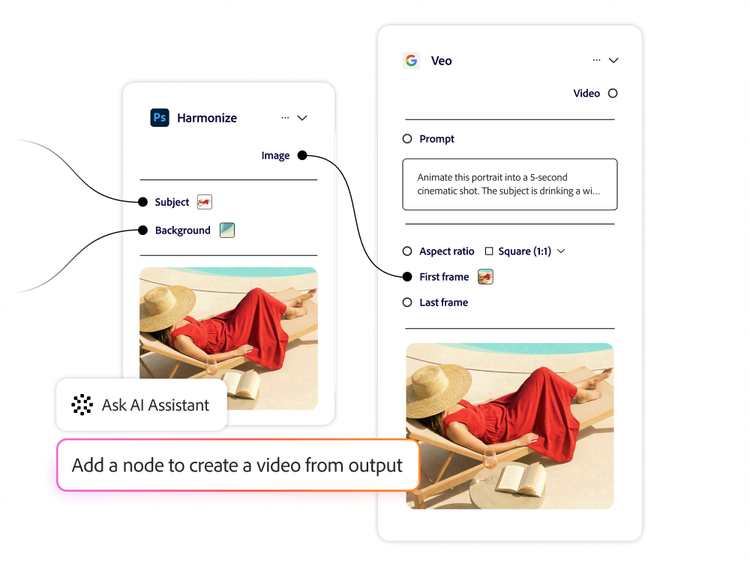
Design repeatable creative workflows with control and precision, using an AI Assistant.
Firefly Graph puts AI-powered creative control in every creative professional’s hands.
- Design workflows step by step, combining leading generative AI models with Adobe creative applications to craft polished outputs. These workflows can be consistently repeated, refined and reused.
- Connect more than 300 multimodal nodes and generative actions from Adobe Firefly and partner AI models, linking outputs to inputs to build end-to-end creative workflows.
- Build, explore and refine on a visual workflow canvas with the flexibility to edit steps along the way.
- Set up complex node graphs without starting from a blank canvas. Build and optimise workflows using natural language with an integrated AI Assistant.
Share and reuse hero workflows across teams.
Turn your best creative workflows into organisational assets.
- Save and share workflows across the organisation, so team members can craft standout content with greater consistency, speed and precision.
- Build modular, reusable components, packaging complex creative workflows into smaller pieces that can be saved and reused elsewhere.

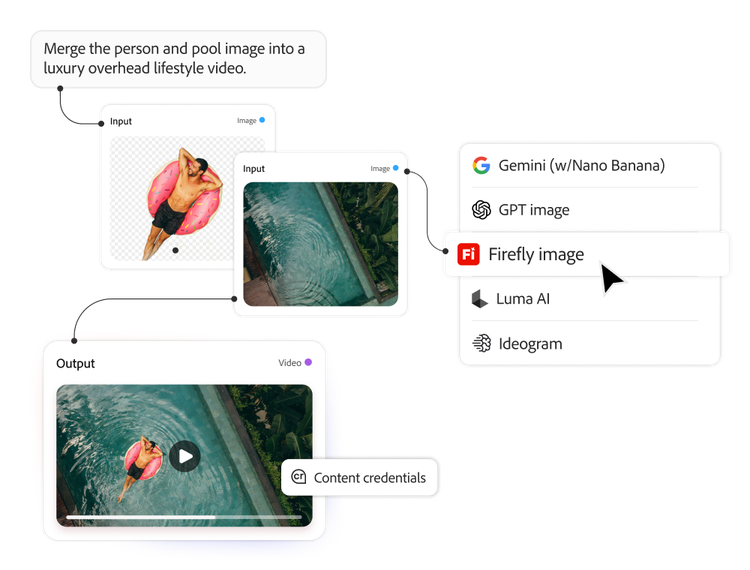
Govern creative AI across your enterprise.
Use generative AI-powered creative workflows as a strategic enterprise asset. Teams review outputs to confirm they meet brand, legal and compliance requirements.
- Turn AI complexity into a managed creative system, harnessing new models and capabilities as they emerge while helping minimise workflow disruptions.
- Maintain visibility and control across the organisation with admin controls and permissions to manage access, roles and deployment.
- Create with confidence, knowing Adobe intellectual property indemnification applies to eligible outputs from Adobe, OpenAI and Google models. Terms apply.
Learn more about Firefly Graph.
Questions? We have answers.
What is the difference between Firefly Graph and Adobe Firefly Creative Production?
Firefly Graph for Enterprise is built for upstream creative development, helping teams design and refine creative workflows. Firefly Creative Production for Enterprise is for downstream scaled production. They are complementary products that support different stages of the content supply chain.
Learn more about the difference between Firefly Graph and Firefly Creative Production
What is Firefly Graph and who is it for?
Adobe Firefly Graph for Enterprise is a visual canvas for designing and refining AI-powered creative workflows for enterprise creative teams. It gives enterprise creative teams a tool where they can connect generative AI, editing actions and creative workflows into structured processes instead of relying on one-off prompts.
For organisations ready to bring structure to creative AI, Firefly Graph for Enterprise helps move it from experimentation into a controlled system. Creative teams can build reusable workflows, refine them over time and share them across the business, so creative processes become more consistent, governable and repeatable. It is available exclusively in Adobe Creative Cloud for Enterprise Edition 5.
How can I get Firefly Graph?
How does Firefly Graph fit into an existing Adobe Creative Cloud for Enterprise deployment?
How do teams share and reuse creative workflows in Firefly Graph?
How does Firefly Graph for Enterprise help teams reuse creative workflows?
Does deploying Firefly Graph require developer or IT resources?
Which AI models and tools are available in Firefly Graph?
How does Firefly Graph work?
Does Firefly Graph guarantee outputs are on-brand or compliant?
What's next for Firefly Graph for Enterprise?
Firefly Graph for Enterprise is expanding with new capabilities to give organisations greater visibility and control over how AI-powered creative workflows are built, customised, shared and governed.
Upcoming capabilities will let enterprises extend Firefly Graph with customised nodes and integrations, package and share creative workflows with versioning and access controls and carry content provenance through every output.
Let us show you the full power of Firefly Graph for Enterprise.
