Commerce teams are under constant pressure to move faster. New customer needs emerge, market opportunities open, and even simple storefront or checkout improvements can become urgent.
A new commerce feature may require developers to interpret requirements, find the right extension point, navigate all the documentation, scaffold a project, and then write, validate, and prepare the integration code, for deployment. This process takes time, increases delivery costs, and can keep developers occupied with setup instead of innovation.
Today, we’re announcing the general availability of Adobe Commerce Developer Agent in Adobe Commerce — an agentic development experience that helps teams turn business requirements into launched features and code migrations faster, with human guidance built into the process.
It is designed around three priorities: helping teams innovate more quickly, improving developer productivity, and raising the quality and consistency of the code they produce.
A connected path from idea to deployed application.
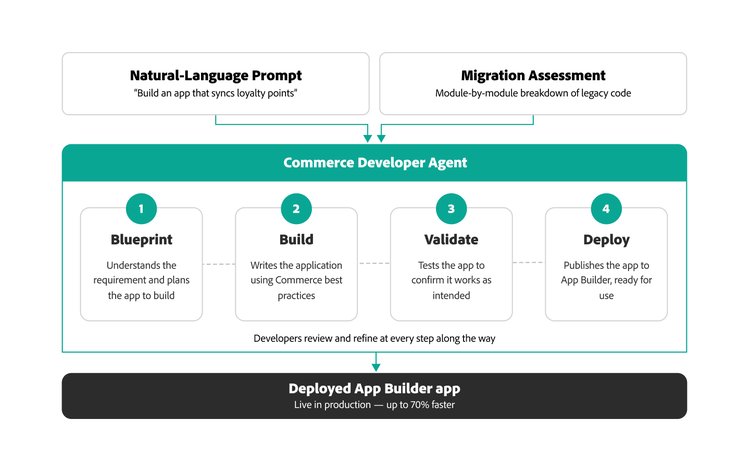
Many AI coding tools focus on a single moment in the development process: generating a function, explaining an error, or suggesting the next line of code. Commerce Developer Agent is designed to support the broader journey. It can help developers plan, build, test, and deploy apps that extend native capabilities or integrate with third-party services, starting with natural language requirements or legacy code that needs to be modernized.
Consider a business that wants to limit the total number of units a shopper can add to a cart. The requirement sounds simple, but implementing it correctly involves selecting the appropriate webhook, mapping its payload, defining configuration, validating the code, deploying it, and testing the experience on the storefront.
With Commerce Developer Agent, the developer can describe that rule in plain language. The agent creates a blueprint, builds and validates the webhook, and exposes values such as the cart limit and the customer-facing message as business configuration settings in Commerce admin. A merchant can later adjust those values without requiring another code change and deployment.
That is the difference between generating a piece of code and supporting an end-to-end development outcome.
Faster development without lowering the quality bar.
When teams spend days assembling boilerplates, working through configuration, and tracking down the correct implementation patterns, businesses spend more to deliver new experiences. Commerce Developer Agent helps compress that work into a single guided flow.
A developer can begin with a plain-language description of what the business needs. The agent interprets that requirement and creates a blueprint: a reviewable plan that identifies the capabilities, tasks, dependencies, and implementation approach needed to build the app.
That planning stage is important. The agent does not simply take a prompt and operate as a black box. Developers can question its assumptions, refine the scope, edit the plan, and approve the blueprint before code generation begins.
Once approved, Commerce Developer Agent scaffolds the App Builder project and generates the necessary code using Adobe Commerce development patterns. It then validates the build, identifies errors, and corrects issues as it works.
Since the code is generated based on Adobe Commerce documentation, sample code, project context, and established best practices, the result is a more consistent development process with higher-quality code.