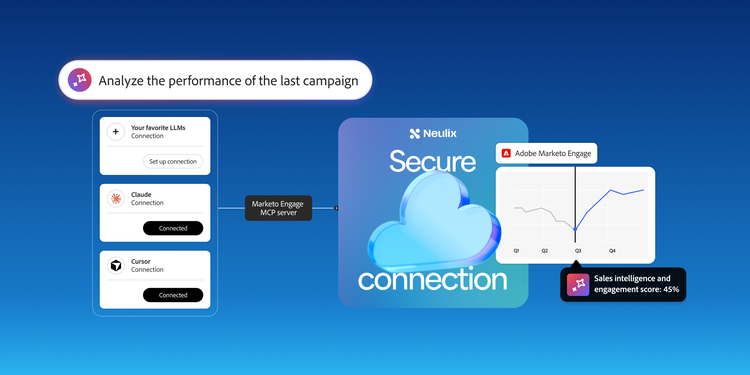
Marketing operations teams are under pressure to launch campaigns faster, improve buyer engagement, maintain clean data, support sales with better signals, and prove impact on pipeline. At the same time, AI is changing what teams expect from every system they use. Marketers want AI to understand the full context of their business, work across their existing systems, and help them take action with speed and confidence.
Unfortunately for many marketing ops teams, there’s a critical gap in doing this. AI tools often sit outside the systems where campaign logic, lead data, forms, programs, smart campaigns, lists, folders, and engagement history live. That means teams must manually pull data from one place, paste it into another, and re-explain context, forcing teams to serve as the bridge between AI and their marketing stack.
Adobe is closing that gap by integrating powerful AI tools with Marketo Engage using its MCP server, now in open beta. This MCP server allows teams to leverage the AI they already use with a direct, governed connection to their Marketo Engage instance. Now marketing operations teams can investigate, build, validate, and optimize work without losing time with manual handoffs.
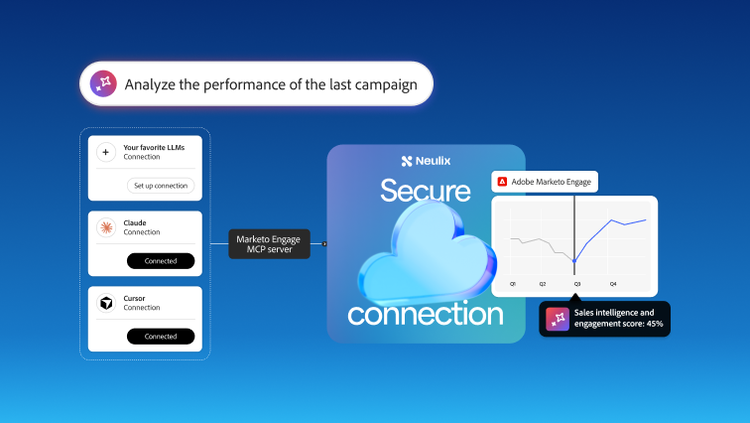
A more connected way to work with AI.
Marketing operations has always been where strategy meets execution. As AI use increases and campaign complexity grows, the day-to-day work in marketing ops has become fragmented across tools, spreadsheets, exports, documentation, and one-off checks.
The Marketo Engage MCP server is designed to address this new reality. It runs on the Model Context Protocol (MCP), an open standard for connecting AI tools to the systems where enterprise data lives. It gives them a shared way to read, query, and act on data through a single connection, so your team isn't stuck waiting on custom integrations for every tool it needs to use. Claude, GitHub Copilot, Microsoft Copilot Studio, Cursor, Windsurf, and Google Gemini are all supported today. This means your team can work in the AI tools it already knows best.
Adobe built and currently hosts the Marketo Engage MCP server in-house, so there's nothing for your team to deploy or maintain. You're up and running as fast as you can secure your internal approvals to connect the tools. Once connected, an AI client can act across Marketo, spanning forms, programs, smart campaigns, leads, emails, snippets, lists, and folders, with Adobe enabling all non-destructive actions.
This is the real value to your team: they can quickly build and validate work directly through the AI tools they already use, instead of bouncing between screens. Each request is translated into the corresponding Marketo REST API call, while the MCP server sits on top of the API you already know, rather than replacing it. And because Adobe built the MCP server that it hosts in-house, it can expose the full breadth of Marketo Engage public APIs rather than a limited set.
As a deliberate safeguard, harmful actions, such as deleting records or assets, are not permitted. This gives your team the speed of AI with the confidence that nothing important gets changed or erased by accident. Access controls are maintained by the API user permissions you already manage, and every action is still reviewed before it runs, so you stay in control, without slowing anything down.
And this is just the starting point. Adobe is already working to bring private API capabilities into the server over time, so the tools your team relies on today will only get more powerful.
From scattered workstreams to one shared connection.
Adobe customers are experiencing the benefits of the MCP server in Marketo Engage to provide:
- Faster insights: Ask which smart campaigns are active, or which leads have gone quiet.
- Fewer errors: Quickly surface what's missing, or where a flow step doesn't match intent.
- Rapid iteration: Describe a Smart List filter or program clone in plain language, then review it before it goes live.
The bigger payoff is what’s possible at a team level. Marketing and revenue operations don’t waste time and effort running their own AI workstream against their own export of the data. With the MCP server, everyone connects to the same Marketo Engage instance directly. That shared connection means personalization is no longer limited to what one person has time to configure themselves. Now teams can start scaling across every campaign and segment built on a single source of truth instead of separate versions of the data that require time to reconcile after the fact.
Time back for strategy and crushing your targets.
By handling the small steps that typically sit between a question and an answer, the MCP server can save your team significant time for all your important use cases, like exporting a list, re-explaining program structure, and switching windows to piece together context that an AI tool can't hold onto. With the MCP server connected directly to your Marketo Engage instance, that back-and-forth happens in a single conversation instead.
This time savings allows teams to focus on the work that moves the business, such as:
- Building campaigns that generate leads that convert,
- Personalizing outreach at a scale that no one can manage themselves, and
- Prioritizing how to meet pipeline and revenue targets instead of pulling the data needed to track them.
Because the server exposes Marketo's APIs through a standard protocol, teams can build repeatable workflows on top of that connection instead of a customized Marketo integration, whether it's a skill that triages inbound leads or one built specifically around how your team operates. From there, the possibilities really open up.
Built with trust in mind.
For marketing leaders, the essential question isn't whether AI can reach your Marketo data. It's what happens once it's inside. Fortunately, every connection to the MCP server flows through Adobe's secure framework, so your data stays protected in the same way it is through any other Adobe-hosted integration. Also, Adobe doesn’t use any MCP server prompts for model training.
It’s also important to note that only non-destructive operations are available to AI tools today. Harmful delete and other edit actions are not permitted through the MCP server. These actions can only be handled with special permissions. Teams can also deselect certain APIs within the AI tool itself, creating an added layer of guardrails on top of what's already restricted.
Try it in your own instance.
The Adobe Marketo Engage MCP server is in open beta, which means access starts with a request rather than a settings toggle.
To get started, check out the full setup steps and troubleshooting tips in the Marketo Engage MCP server documentation on Experience League. You can also leverage the Marketo Engage Experience League Community to ask questions and share best practices about the Marketo Engage MCP server with others.
Recommended for you
https://business.adobe.com/fragments/resources/cards/thank-you-collections/marketo-engage