Your questions answered: Top 5 ways Acrobat Studio empowers marketing teams’ productivity.
05-08-2026

Marketing drives in the fast lane.
If you’re involved with marketing in any capacity, you’ve experienced the pressure of today’s landscape: to create more content for more channels at a faster pace. But when the information and assets that teams require are scattered across different systems, delivering on-brand content at speed and scale is extra challenging.
Adobe Acrobat Studio is the complete solution. With AI Assistant, which can instantly identify insights and generate presentations in minutes — and with the built-in power of Adobe Express — anyone on a marketing team can quickly and confidently create on-brand content for every channel in any format without always depending on design or agency support.
Still have questions? We have answers.
How does Acrobat Studio help marketers?
Acrobat Studio is the AI-powered platform that takes marketers from insights to action so assets are ready to go with their campaigns. Combining on-brand content creation, AI-driven insights, and a collaborative workspace, Acrobat Studio provides an easy solution for marketers. Designed for data-driven marketing research and strategy, as well as campaigns that depend on high-volume content creation and localization, Acrobat Studio helps teams centralize all their assets and collaboration.
Key to marketing teams’ success are the abilities to:
- Turn scattered research, briefs, and decks into a central knowledge hub
- Use AI to summarize, compare, and analyze documents
- Generate on-brand presentations, reports, and campaign assets in minutes
- Collaborate with sales, product, and leadership in a single shared space
How can marketing teams use Acrobat Studio for research and insights?
Marketing teams have to move quickly from information gathering to creating content based on their research. Built-in AI Assistant in Acrobat Studio can automatically pull insights from surveys, reports, competitive analyses, and more to provide summaries or comparisons and identify common themes, so teams can create clear briefs and roadmaps.
Now Acrobat Studio makes these tasks even easier with PDF Spaces, where you can share and comment on documents for review directly in a shared workspace, enabling conversational feedback in one secure, interactive place. Use PDF Spaces to preserve context, surface insights with AI Assistant, and let teams manage how information moves across the organization. You can share PDF Spaces with other teams, like sales, product marketing, and leadership, and collect their comments, questions, and decisions directly on documents, saving review time and ensuring alignment.
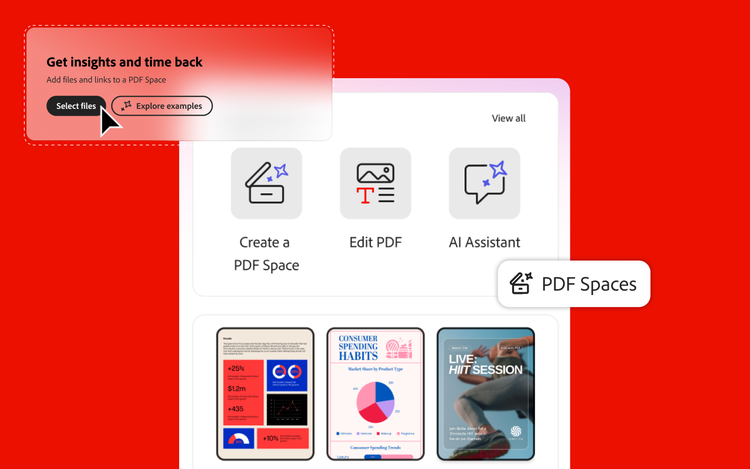
With Adobe Express integrated into Acrobat Studio, you can access branded templates to quickly build strategy decks, summary reports for partners or stakeholders, and export that content as secure, shareable PDFs. Templates also empower fast production of on-brand assets for presentations and even video content for social media channels.
How can Acrobat Studio help with campaign localization and regional marketing?
Given how big (and how small) the world is, being able to regionalize campaigns automatically is a huge time saver. AI Assistant in Acrobat Studio helps you quickly translate or adjust messaging (or visuals) to better align to regional preferences while maintaining your intended tone and value props.
You can also store messaging frameworks, brand kits and templates, and creative assets in PDF Spaces so they’re accessible to regional teams. And, using Adobe Express, you can resize or reformat ads or video assets for a multitude of end uses or channels incredibly fast.
For example, ABB cut content creation time from ~8 days to ~30 minutes per asset, accelerating turnaround and localization workflows.
How can a marketing team get started with Acrobat Studio?
Getting started with Acrobat Studio is easy, especially if marketers are already familiar with Acrobat Pro. First, choose a project where research, collaboration, and content creation come into play. Some suggestions: a thought-leadership report, a major event or webinar series, or a product-positioning initiative.
From there, step through this process:
- Create a PDF Space dedicated to your project.
- Add all the documents you need, like research, briefs, notes, and assets.
- Use AI Assistant to summarize key points and insights.
- Build the main narrative into a report, presentation, or campaign plan using Adobe Express templates from Acrobat Studio.
- Share the space with your team members or stakeholders to refine your project and iterate for other campaigns or regions.
What makes Acrobat Studio different from other AI or design tools for marketing?
Acrobat Studio is the trusted AI workspace where marketing teams turn company knowledge into verified insight and governed, on-brand content, at the scale and speed marketing demands. Marketers can quickly distill information from documents they frequently use, like research reports, strategy presentations, contracts, briefs, and more. With PDF Spaces, AI-powered insights, and Adobe Express templates, marketers can create new, on-brand content at scale. Enterprise-grade security and governance, SSO and identity controls, and AI that’s compliance-first and commercially safe mean every business can feel confident that its assets and content are protected.
Learn more about Adobe Acrobat Studio for marketers.
Recommended for you
https://business.adobe.com/fragments/resources/cards/thank-you-collections/acrobat