Why are agents not just smarter chatbots?
Many teams assume AI agents are just more advanced chatbots. They’re not — they operate differently at a system level. AI agents are a different class of system, defined by three capabilities that chatbots lack by design.
- Reasoning (decides what to do next): Chatbots match inputs to outputs. Agents break goals into steps, choose actions, and adapt in real time.
- Tool use (takes action): Chatbots generate text. Agents can interact with systems like APIs, databases, and CRMs, in addition to generating copy and performing other tasks.
- Memory (retains context): Chatbots reset after each session. Agents maintain context across tasks and time.
Chatbot vs. AI agent use cases
The distinction between AI agents and chatbots becomes clearer when applied to the same business problem.
Scenario 1: Customer service
The chatbot approach: A customer asks, "What is your refund policy?" The bot retrieves the relevant policy document and returns a clear, accurate answer — fast, cost-efficient, and highly effective for this exact type of query.
The agent approach: A customer submits a refund request for a specific order. The agent checks the CRM to verify purchase history and eligibility, assesses whether the request falls within policy parameters, initiates the refund in the payment system, updates the order record, and emails the customer a confirmation, all without a human touching the ticket.
Adobe Agent Orchestrator supports this pattern at enterprise scale, coordinating multi-step workflows — from verification and action to confirmation — across tools and data sources, with built-in governance controls.
Scenario 2: Data analysis
The chatbot approach: An analyst asks, "Where do I find the Q3 revenue report?" The bot returns navigation instructions for the dashboard, which is a strong fit for onboarding and self-service questions.
The agent approach: The agent receives a goal: 'surface any anomalies in Q3 performance,' and reasons over the governed data view, detects an illustrative 12% drop in one segment against baseline, traces the contributing dimensions through root-cause analysis, and returns an actionable summary directly in the analyst's existing workflow.
Adobe's Data Insights Agent is built specifically for this pattern — natural language queries translated into direct database interactions, surfacing insights that go well beyond what a retrieval-based chatbot can produce.
Scenario 3: Supply chain
The chatbot approach: A logistics manager asks, "What are the current inventory levels for SKU 4482?" The bot returns the accurate count from the inventory system reliably, and it stays appropriately scoped to a single, well-defined request.
The agent approach: The agent with connected commerce capabilities monitors inventory levels, detects a shortage forming for SKU 4482 based on consumption and projected demand, cross-references lead times with vendor data, predicts a delivery delay, and places a restocking order with the preferred vendor before a stockout occurs.
While chatbots answer questions, agents help avert issues before they escalate. Both deliver value. The deciding factor is the kind of value your use case requires.
AI agents vs. assistants: What's the difference?
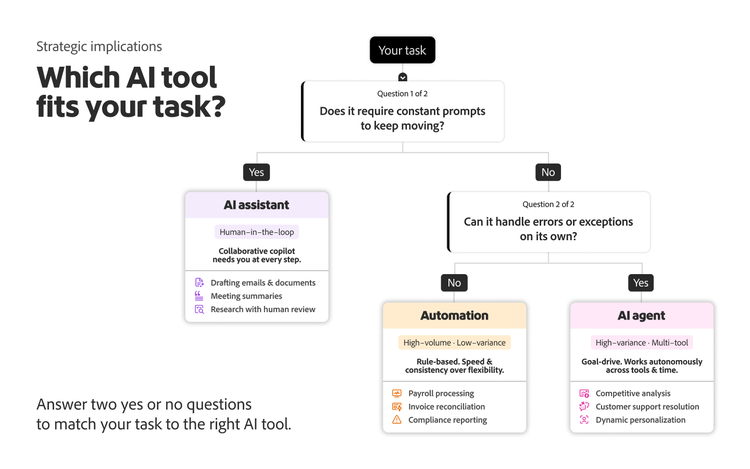
Agentic AI and assistants are frequently marketed interchangeably, but they are not the same. The core difference between an AI agent versus an assistant lies in who owns the workflow.
- Assistants require continuous human input. They execute tasks step by step, following prompts, and stop when the user stops.
- Agents operate independently. Once given a goal, they plan and execute tasks without ongoing input, stopping only at critical points that require human validation or approval.
Consider the contrast in practice:
- Assistant: "Draft an email to the enterprise renewal account flagging the upcoming contract expiration."
- AI agent: "Monitor all enterprise accounts for contracts expiring in the next 90 days. Draft and send renewal outreach at the 90-, 60-, and 30-day marks, adjusting tone based on CRM health scores. Escalate accounts below a threshold health score to the account manager for manual review.”
The assistant makes one human faster. The agent executes an entire workflow while the human does something else. Neither is inherently superior — the right choice depends on the task's variance, the stakes of autonomous action, and the governance framework in place.
This is why the shift from tool-based automation to goal-driven systems changes how enterprises need to think about deployment, oversight, and liability.
The litmus test: True agent or advanced automation?
Vendor claims about agentic capabilities are inconsistent. Some products marketed as AI agents are sophisticated, rule-based automation. Others are genuinely agentic systems. The difference matters for how you govern, integrate, and scale them across agent types, from task and workflow agents to monitoring and supervisor or router agents. Here is a three-question framework to separate the real from the rhetorical.
Use these three questions to determine whether a system is truly agentic:
- The prompt test (autonomy). If you walk away, does the system keep working? If the system requires human approval at each step to make progress, it functions as guided automation rather than a fully autonomous agent. Note that human-in-the-loop approvals are often a deliberate and valuable governance choice, particularly in enterprise contexts where oversight and compliance are priorities.
- The path test (reasoning). Does it determine its own steps or follow a script? Scripted bots and rule-based automation follow predetermined paths. When a new edge case appears, they fail or escalate. A true agent can construct a novel path to a goal based on the current context, even for problems outside its training distribution.
- The exception test (adaptability). When something breaks, does it adapt or stop? Automation often fails when the happy path is interrupted. AI agents adapt. They have a repertoire of alternative approaches and the reasoning capability to evaluate which to try.
Will AI agents replace chatbots?
In McKinsey's May 2024Global Survey on AI, 72% of respondents reported AI adoption in at least one business function. But a Gartner survey published in September 2025 found that only 15% of IT application leaders were considering, piloting, or deploying fully autonomous AI agents. The data is clear: AI agents won't replace chatbots anytime soon, but they will redefine how automation is structured in the enterprise.
Enterprise automation will become layered, with different tiers handling varying levels of complexity, so the strategic priority is routing each request to the right tier. Agents are inherently more expensive because reasoning, planning, and exception handling consume more compute than chatbot lookup queries — so use them where multi-step, multi-system work justifies the cost. Gartner estimates over 40% of agentic AI projects will be canceled by the end of 2027, due in part to escalating costs, an early signal that economics, not just capability, will determine where autonomy scales.
Legacy chatbot experiences will not hold up against agentic capabilities, but a better chatbot is not the same as an agent. Most enterprises will adopt a dispatcher layer that routes work to the right tier — chatbot, agent, or human — based on risk and complexity. Well-defined, single-turn query? Route to the chatbot tier. Complex, multi-step workflow requiring tool access and exception handling? Route to the agent tier. High-stakes judgment, for example, financial or legal? Escalate to a human. This architecture improves economic efficiency while aligning capability and oversight to task complexity.
The real shift isn’t replacement — it’s intelligent routing between tools based on task complexity.
What does an enterprise agent orchestration infrastructure require, and how to evaluate it?
Understanding AI tools is only the beginning. Because agents take action, not just generate content, failures can have real-world consequences, and that makes orchestration the critical next layer.
At a minimum, enterprise agent orchestration infrastructure should provide:
- Governance: Ownership, role-based access, and scoped tool permissions
- Observability: Traces of plans, tool calls, and inputs or outputs for debugging and audit
- Policy enforcement: Consistent brand, compliance, safety, and data-handling rules across channels
- Human escalation: Defined handoffs, approvals, and overrides for high-stakes or low-confidence cases
Without these capabilities, agent deployments become difficult to control and scale.
Adobe Experience Platform Agent Orchestrator is designed as the control and orchestration layer that makes enterprise-grade agent deployment possible — coordinating governance, observability, policy enforcement, and human oversight across Adobe Experience Platform Agents. Agents built on this foundation, including Audience Agent, Journey Agent, and Data Insights Agent, illustrate what goal-driven systems look like when they're designed for enterprise scale.
When evaluating any AI solution, three factors should guide the decision: the system's autonomy level, the variance and complexity of the task, and the consequences of errors. As autonomy rises, so must oversight. Enterprises that match tools to tasks with discipline will build AI architectures that scale.
The distinction between AI agents, assistants, and chatbots isn't semantic; it determines how enterprises invest, govern, and scale their AI programs. Chatbots remain highly effective for high-volume, well-defined tasks. Assistants accelerate human workflows. Agents take autonomous action across systems. Understanding where each fit and what infrastructure is required to support them is what separates AI implementations that deliver measurable value from those that create operational risk. Start by matching the tool to the task. Build governance before you scale autonomy. And evaluate vendor claims against real agentic criteria, not marketing language.
Frequently asked questions