Beyond paperless: How Sonoma County put AI to work in 16 departments with Adobe Acrobat Studio.
10-29-2026

Six months after Adobe Acrobat Studio went live across Sonoma County, nine departments asked for training of their own, three of them already in planning, and monthly active users climbed 46%.
For Carolyn Staats, Director of Innovation for Enterprise IT at the County of Sonoma, that momentum is the point. As she now tells peers, “Deployment is not adoption.”
It’s a lesson the County learned by refusing to call its transformation finished.
Sonoma County stopped pushing paper years ago. The Northern California county — roughly 4,200 employees across about 30 departments and agencies — had already converted its paper forms into digital files, then automated the workflows around them including routing, notifications, and approvals. By most measures, the transformation was finished.
Staats saw another problem emerging. Employees were spending their days reading, comparing, summarizing, and rebuilding information the County had just finished digitizing. The paper was gone — the work it created was not.
“Digitization solved one problem, but it exposed the next one,” says Staats. “The next question became, ‘What if the document itself could become part of the workflow?’
Answering that question fell to two people. Staats and Cieara McKetchnie-Stanley, Senior Business Analyst on the County Software Services team, began piloting Adobe Acrobat Studio, the complete workspace that combines trusted PDF tools with AI and content creation in one place. Employees use PDF Spaces and Acrobat AI Assistant to understand information and Adobe Express to turn it into polished, on-brand content. Sonoma County came in as an early tester, working through use cases and feature gaps alongside the Adobe team.
By then, the rollout had momentum of its own:
- The County trained 16 of 30 departments in six months.
- Employees have explored 22 use cases since those sessions.
- 87% of employees who participated in the initial training cohort remain active users.
Sonoma County employees are also using Generate Presentation for sharper internal and external decks, brand kits to stay on brand without a designer, and an AI Assistant to compare bill of materials versus quotes for discrepancies in procurement.
For Staats and McKetchnie-Stanley, the lesson was clear — giving employees access to AI was only the first step. Getting them to see how it could change their work requires a different approach.
Let employees lead.
Two weeks before 52 key power users, executives, and managers from 16 departments gathered for the County’s first hands-on Acrobat Studio sessions, Staats threw out the agenda. Rather than lead a guided exercise, she wanted employees to explore the product within minutes, using familiar materials to discover its potential for themselves.
That shift worked because McKetchnie-Stanley worked with Adobe to prepare every file and exercise in advance, making the hands-on approach possible. Within 15 minutes, first-time users were building shared workspaces, adding documents, using AI to uncover insights, and turning them into polished, on-brand Adobe Express presentations.
The approach sparked ideas beyond the training room. Across 10 two-hour sessions, employees identified more than 15 potential enterprise use cases and filed 13 product enhancement requests, particularly around training materials and social media content.
The countywide event became a traveling model: department-specific sessions using each team’s own material, another 52 staff trained, a creative enablement day in October, an Adobe Skills Week in November — all of it requested by employees rather than scheduled for them.
Find the answer and the source behind it.
The County’s first real test was already on someone’s desk: dozens of policies needed to be reviewed and retrofitted onto a new standardized policy template, which meant finding every duplication, conflict, and buried action item. Previously that work happened through email, with competing versions and no shared view of the source material.
The new version runs in PDF Spaces, a secure shared workspace within Acrobat Studio that holds up to 100 files. The team loaded the policies and the template into a space and used Acrobat AI Assistant to ask questions across all the files. The answers came back with clickable citations to the exact passage in the source documents.
“An AI answer can sound completely convincing and still be wrong,” Staats says. “In government, that information may end up in a board item or a public record, so the employee has to be able to get back to the authoritative source.”
“Acrobat AI Assistant helps you find and understand the answer,” Staats adds. “The source remains the authority, and the employee remains accountable for validating the work.”
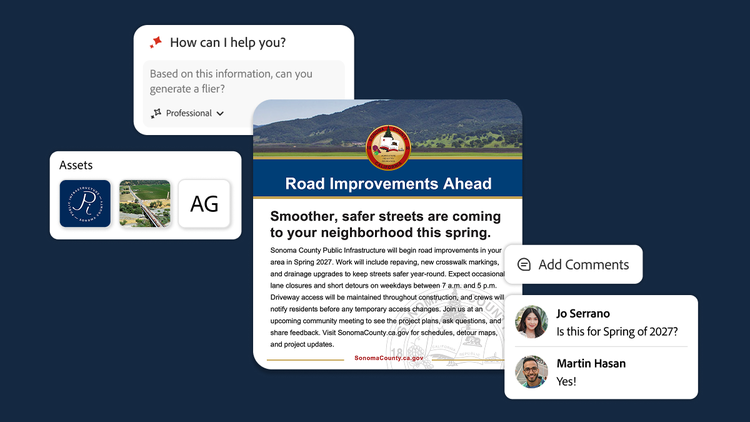
Turn information into impactful communication.
Because Acrobat Studio includes Adobe Express, employees can turn the insight they pull from documents into finished, on-brand content without starting over in another tool or process.
Sonoma Public Infrastructure (SPI) was the first department to take Adobe Express and run with it. After the countywide sessions, SPI brought its own material into a department-specific follow-up — recruitment and hiring, supervisor and safety training, a 30-page safety policy nobody wanted to read. Weeks after opening the product for the first time, SPI walked out with a brand kit and polished, ready-to-use materials.
Before, producing anything on-brand meant hunting down an intranet template or handing the job to the department’s public information officer. The County now runs two brand kits, one countywide and one for SPI, with locked templates that let non-designers create freely without breaking the brand.
“Their content manager locked the templates, so the things that need to change can change and everything else stays on brand,” McKetchnie-Stanley says. “She isn’t checking every single asset anymore.”
The result is a different model for creative work — governed self-service instead of a central bottleneck.
Put guardrails in place before scaling.
With a core team of just two people, Sonoma County brought Acrobat Studio to a 4,200-employee government in under a year, with security review built in from day one.
Every AI product entering the County goes through a formal security and risk assessment, while a separate county AI policy tells employees which use cases are in scope and which categories of data are off limits. Acrobat Studio cleared that review because the controls the County needed, including encryption, admin controls, and auditability, were already built in. Importantly, county content is never used to train or fine-tune the underlying AI models.
Give time back to public service.
For Sonoma County, the measure is capacity. Employees responding to post-session surveys estimate the tools save them three to five hours.
“There’s never a lack of work to be done. It’s often a lack of time to do it,” McKetchnie-Stanley says. “The more that we’re not stuck on projects, the more we’re able to put into services for our community.”
That’s what makes the County’s experience with AI different from a simple productivity story. The objective isn't to remove people from government work. It’s to give public servants more capacity for the work that still needs people.
Share the repeatable playbook.
Next on the County’s roadmap: working on a pilot for a self-service, multilingual policy assistant available to employees across the County, and support for the district attorney’s office in assembling trial materials.
Other government organizations are taking note. The National Association of Counties has invited Sonoma County to present its work with Adobe in Washington, D.C., and neighboring counties that joined the sessions have started their own rollouts.
For Staats, the experience has reinforced a lesson that applies well beyond Sonoma County. “Start with the work, not the AI. Bring the employees who perform the work into the room,” she says.
And the part she most wants her peers to hear: “No agency is too small or too large to innovate. If two people can accomplish this, then anyone can.”
Ready to move beyond paperless? See how Adobe Acrobat Studio helps public sector teams understand their files deeply, communicate clearly, and move work forward.
Recommended for you
https://business.adobe.com/fragments/resources/cards/thank-you-collections/acrobat