What are AI agents? How they work and why they matter for enterprise.
06-25-2026
AI is moving from answering questions to completing work. In the past, software required commands. Then came chat-based AI that could respond in natural language. Now, AI agents go a step further — they can take action.
This paradigm shift matters because it moves AI from a productivity tool to an operational engine. Moving from efficiency to autonomy changes team structure, experience delivery, and how brands show up in a digital environment increasingly navigated by AI systems, not just humans.
Key takeaways:
- AI agents complete work autonomously, and copilots assist individuals.
- Enterprise agents require stronger governance than traditional AI tools.
What are AI agents?
AI agents are software systems that can understand inputs, make decisions, and take actions to achieve a goal without constant human involvement. Unlike chatbots that only generate responses, AI agents can complete real work — updating systems, triggering workflows, and resolving tasks across tools.
Many enterprise AI agents are designed to operate within defined rules, permissions, and policy frameworks to help deliver safe, reliable outcomes.
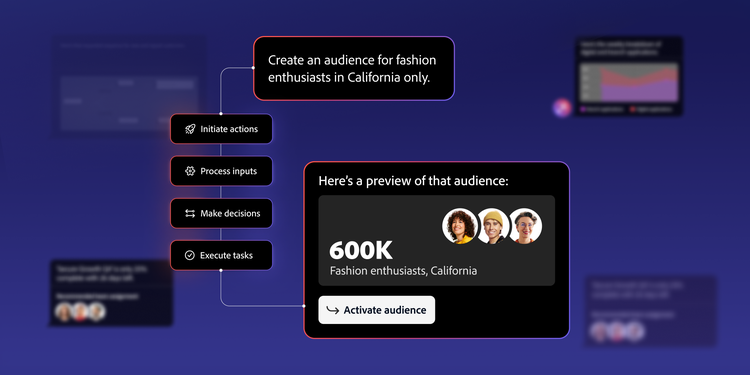
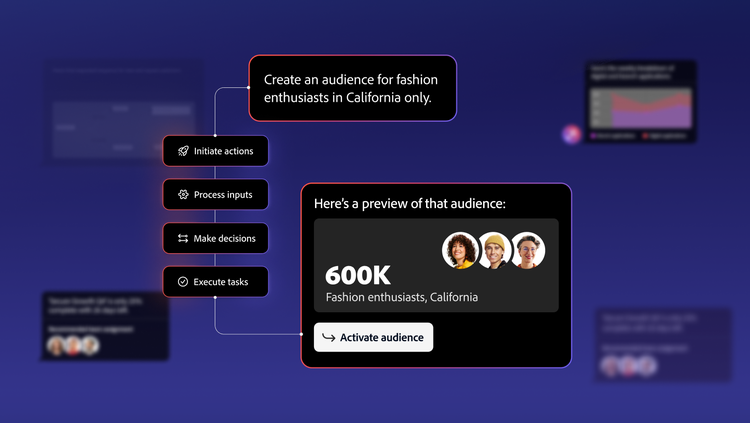
AI agents are defined by four key abilities:
- Initiate actions: Start tasks based on triggers or goals.
- Process inputs: Interpret data from text, systems, and other inputs.
- Make decisions: Use models to determine next steps.
- Execute tasks: Act across allowed tools and workflows.
AI agents are increasingly used to automate tasks and support decision-making across business workflows.
How do AI agents work?
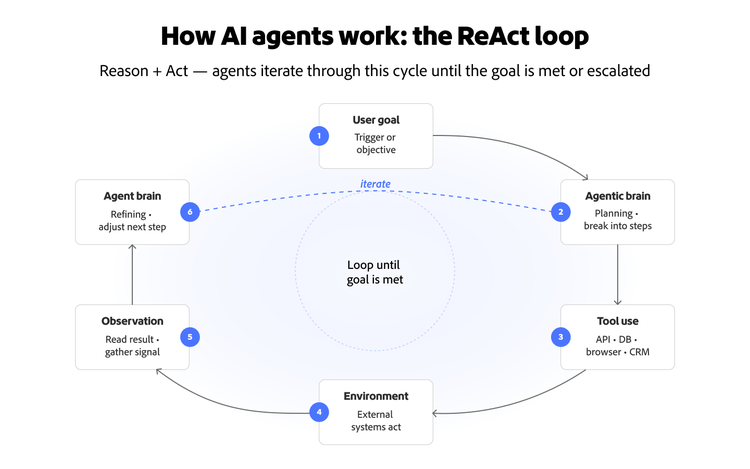
AI agents operate through a continuous reasoning loop, often called the ReAct (Reason + Act) loop. Rather than executing a single command, an agent iterates: it processes a goal, plans steps, uses tools to act on those steps, reads results, and refines its next move. This cycle repeats until the task is complete or escalated for human review.
The diagram above shows how agents iterate through this loop until a task is completed or escalated.
Organizations adopting AI agents must determine which workflows can be automated and where human review, approvals, or oversight should remain in place. One distinction worth understanding before diving in: workflows follow predefined paths, with AI executing steps in a set sequence.
AI agents vs. copilots.
The easiest way to understand AI agents is to compare them to copilots:
Copilots help individuals work more efficiently, while AI agents can automate and coordinate broader workflows across teams and systems. As a result, agents often require stronger governance, permissions, and operational oversight than traditional AI assistants.
What types of agents exist?
AI agents vary based on how they make decisions. These are the most common types used in enterprise applications:
Many enterprise systems use multiple agents working together in a “manager and worker” model. In this setup, specialized agents handle tasks like research, drafting, and validation, while a coordinating agent manages the workflow.
What industries use AI agents the most?
AI agents are delivering value across industries with high volumes of repeatable workflows. Common use cases include:
- Financial services: Fraud detection, transaction monitoring, and automated customer support
- Healthcare: Scheduling, intake automation, and documentation workflows
- Retail: Product discovery, returns processing, and personalized recommendations
Regulated industries like financial services and healthcare are also among the most active in evaluating agent deployments, though governance and compliance requirements shape how and where agents are introduced.
How AI agents drive value across marketing and customer experience.
For marketing and CX teams, AI agents create measurable value across five operational areas:
- Customer service and support automation. Agents handle tier-one triage, routing, and self-service flows that deflect routine tickets, reserving human attention for complex cases.
- Workflow and operations automation. Agents automate approvals, content and asset handoffs, and compliance checks, replacing manual workflows with continuous automated processes across the enterprise.
- Data and analytics. Agents can support automated reporting, anomaly detection, and forecasting, turning dashboards from passive views into active recommendations.
- Creative and content operations. Agents generate, adapt, and improve content across channels at a pace humans cannot match alone — a cornerstone of generative AI content management.
- Journey and campaign orchestration. Agents sequence cross-channel actions, select next-best actions, and make personalization decisions in real time.
The future of AI search will blur LLMs, agents, and the content agents consume.
Agents go further than LLMs to dynamically direct their own tool use to reach a goal. The three shifts below reflect that more autonomous model.
- From language models to action-driven systems. AI models are evolving from generating text to completing tasks and interacting with software.
- Multi-agent standardization. Emerging protocols and trust frameworks are making it possible for agents from different vendors to work together safely. This matters because no enterprise will run on a single vendor's agents alone. Interoperability across agents will become a core procurement question.
- The agent-to-agent economy. Increasingly, agents will consume content and APIs on behalf of humans. A shopping agent, not a shopper, will read your product page. A research agent, not a reader, will parse your thought leadership. This is why AI search visibility is no longer a side concern; your content strategy has to serve two readers at once.
The implication is that brands need infrastructure that not only deploys agents but also ensures they, and external agents visiting your properties, operate on structured, trustworthy content. Adobe’s Digital Trends report highlights this shift through survey-based research and customer insights as enterprise adoption accelerates.
Adobe's AI agents align to common enterprise workflow needs.
Adobe's approach to agentic AI centers on purpose-built agents designed to support common enterprise workflows across support, data, content, and journey orchestration, with additional workflow and experience-focused agents emerging across Adobe applications.
Adoption tends to accelerate when agents are introduced with clear guardrails (defined inputs, scoped permissions, and approval checkpoints) so teams can expand autonomy incrementally as confidence grows.
Product support AI service agents.
Adobe’s Product Support Agent helps customers streamline troubleshooting and support case management by providing conversational guidance to troubleshoot Adobe products using trusted knowledge sources, such as troubleshooting articles authored by Adobe Support, product tutorials, and legal documentation, and streamlining ticket creation and status tracking (See the Adobe Customer Success webinar on AI agents in Adobe Experience Platform for an overview and examples.)
Workflow automation AI agents.
Workflow optimization agents help teams automate planning and execution tasks, such as project setup, workflow monitoring, and operational coordination in tools like Adobe Workfront.
Typical agent-powered workflows:
Data and analytics agents.
Adobe Data Insights Agent helps users answer questions about their data using natural language and builds relevant visualizations in Analysis Workspace. Audience Agent helps teams explore audience inventory, surface audience insights, and streamline audience management, with broader creation and optimization capabilities expanding over time.
Creative and content optimization agents.
Adobe’s content-focused agents help teams discover, update, generate, and enhance content across channels, while experimentation-focused agents help analyze tests and propose next-best experiments. Experimentation Agent supports A/B testing use cases like producing product description variants.
Journey and multi-agent orchestration agents.
Adobe Journey Agent helps users analyze and refine journeys through natural language, including audience overlap and drop-off analysis, and in limited availability can also support prompt-based journey creation.
Four deployment risks every marketing leader should understand.
When AI can take action, risk increases alongside opportunity. CMOs should plan four common failure modes:
- Infinite loops and cost. Agents operate in steps; poorly scoped agents can repeat actions and increase costs. Cost ceilings, timeouts, and loop detection are standard guardrails.
- Hallucination in action. A chatbot hallucinating is a nuisance — an agent hallucinating is an operational risk. It might reference a non-existent file and delete the wrong one, or invent a discount code and send it to customers.
- Latency. The reason–act–reflect loop takes time, and agents can be slower than scripts. Architects should decide what can be precomputed versus what must run in the loop.
- Security and guardrails. Agents that can take action need clearly defined boundaries. Work with your IT and security teams to ensure agents operate with appropriate access limits, and that high-stakes actions like customer communications or pricing changes require human approval before execution.
Orchestrated agents outperform individual agents on enterprise workflows.
Individual agents are useful. Orchestrated agents are transformative. Adobe Experience Platform Agent Orchestrator coordinates multiple specialized Experience Platform Agents in a single connected workflow through a conversational interface such as AI Assistant, coordinating work with human oversight and governance.
In customer deployments we’ve seen, teams get the most value when orchestration is paired with explicit approvals, scoped tool permissions, and audit trails so autonomy scales without losing control.
Agent orchestration enables four patterns in practice:
- Content and experience creation. Coordinate agents across complete content workflows (brief → variants → checks → approvals → publication). The value is the integrated flow, not any single agent.
- Audience and journey orchestration. Audience Agent and Journey Agent can work together to plan steps, sequence journeys, and coordinate cross-channel actions. In B2B, that can mean building a buying-group audience, launching a multi-touch journey, and handing off qualified accounts with less cross-team friction.
- Data and insights-driven decisions. Data Insights Agent can feed segments and journey changes under Adobe Experience Platform Agent Orchestrator direction, so insights flow directly into activation rather than moving through handoffs.
- Support and operations. When a pipeline failure or service degradation occurs, agents can coordinate response in real time — triaging the incident, pulling logs for root cause analysis, and escalating to the right engineering team with full context already assembled.
Treat workflow design, not individual agents, as the driver of scale, with AI-driven validation as the final operational check. That’s how brands move from isolated copilots to orchestrated, trustworthy multi-agent systems and stay visible, protected, and differentiated as agents become both the workforce inside the enterprise and the audience outside it.
See how Adobe Experience Platform Agent Orchestrator helps teams deploy and manage AI agents across enterprise workflows.
Recommended for you
https://business.adobe.com/fragments/resources/cards/thank-you-collections/generative-ai