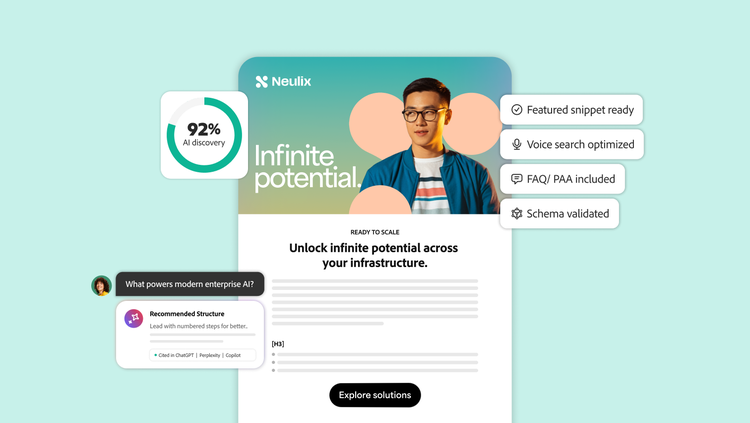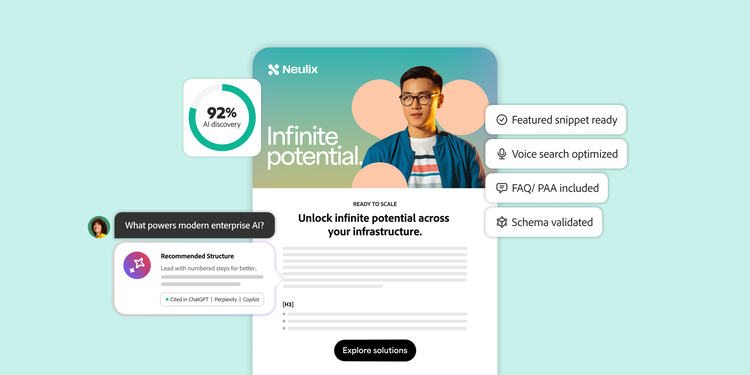
AEO strategies to optimize for featured snippets and voice search.

Today, more users get answers directly from voice assistants and AI-generated responses from platforms such as Alexa, Siri, Claude, ChatGPT, Perplexity, and Gemini. Search visibility is now about having content that can be easily understood, extracted, and surfaced.

An answer engine optimization (AEO) strategy is a repeatable approach to creating, structuring, and measuring content so it can be selected as a direct answer. For enterprises, this often means turning deep libraries of authoritative content into clearer, more consistent, and answer-ready experiences for featured snippets and voice search.

This article discusses the following AEO strategies:

Target answer-ready queries before creating content.

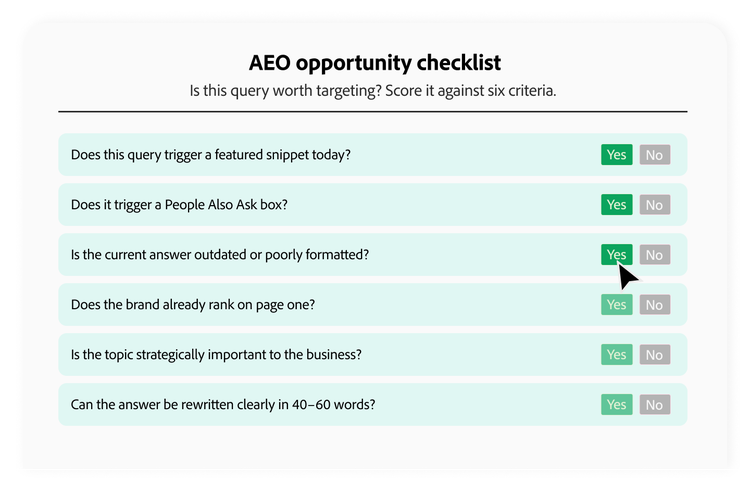
An AEO strategy starts with query research. Instead of optimizing every keyword the same way, prioritize queries where search engines already show direct-answer formats, such as AI Overviews, Copilot Search, featured snippets, People Also Ask results, or voice-friendly responses. These are the topics where users expect a clear answer, and where a better structure can improve the chances of being selected.

Furthermore, focus your optimization efforts on queries that include:

  • Question-based phrasing, such as “how,” “what,” “why,” “best,” “types of,” or “steps to.”
  • Existing featured snippets in search results.
  • AI Overviews and Copilot Search results related to your primary topics.
  • People Also Ask questions related to your primary topics.
  • Voice search keywords and long-tail questions that mirror natural speech.
  • Pages already ranking on page one that could be restructured for snippet capture.
  • Competitor-owned snippets where your content can provide a clearer or more complete answer.

Enterprise teams should begin this process by auditing their existing high-authority content. Identify pages that are already in striking distance of answer placements, especially those ranking on page one for relevant queries. Then prioritize updates based on business value, search demand, and snippet opportunities. This helps teams focus their AEO strategy on opportunities that are likely to improve visibility in answer engines and voice assistants.

Infographic showing the AEO opportunity checklist and related criteria.

Use the inverted pyramid to start with a direct answer.

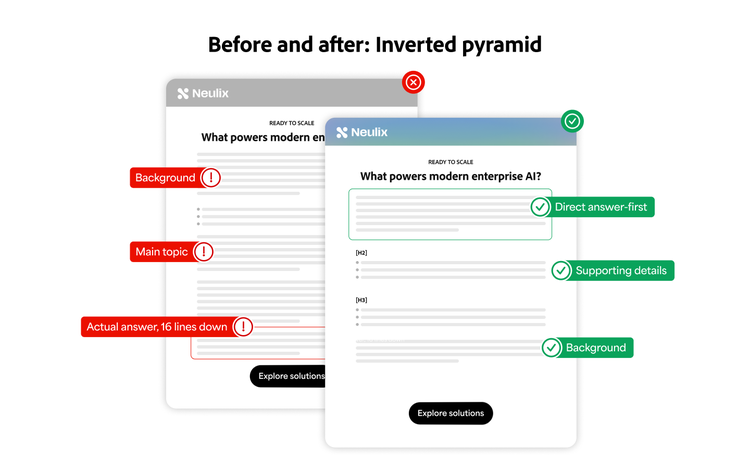
The inverted pyramid is a writing structure that places the most important information first, followed by supporting details and context. This helps search and answer engines quickly identify the clearest answer to a user’s question.

Traditional content builds toward a conclusion and focuses on narrative flow, starting with a broad subject and then moving to subtopics. AEO content does the opposite. It delivers the answer immediately, then expands with context, examples, and related information. This structure improves both the user experience and the eligibility of answers because the most useful information is easy to find, retrieve, and cite.

Apply these principles to optimize content for featured snippets and voice search:

  • Use the question as the H2 or H3 heading.
  • Answer the question in the first sentence or paragraph.
  • Keep the answer concise, ideally 40 to 60 words.
  • Follow with supporting details, examples, and relevant internal links.
  • Avoid burying the answer under long introductions or background information.
  • Use simple language that could be read aloud naturally by a voice assistant.

Create answer-block templates that writers, editors, and subject matter experts can follow consistently. When every team in an enterprise uses an answer-first structure, it becomes easier for users, search engines, and AI-powered answer systems to understand the site.

Infographic explaining the inverted pyramid structure.

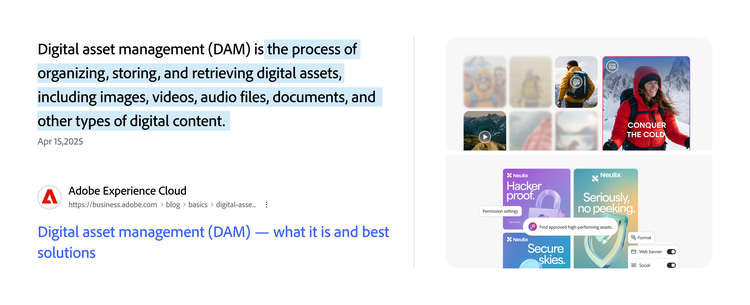
To rank for featured snippets, match your content format to the query type. Use short paragraphs for definitions, numbered lists for step-by-step processes, bulleted lists for benefits or features, and tables for comparisons, pricing, specifications, or category breakdowns. A user searching for a definition expects a concise paragraph. A user searching for instructions expects a clear, ordered set of steps. A user comparing options may need a table.

Use this format-matching approach when planning AEO content:

Query type
Ideal format
Example
“What is...”
Short paragraph
A concise definition or explanation.
“How to...”
Numbered list
A step-by-step process or workflow.
“Types of...”
Bulleted list
A grouped list of categories or examples.
“X vs. Y”
Comparison table
A side-by-side breakdown.
“Best tools for...”
List or table
A ranked or categorized set of options.
“How much...”
Table or concise paragraph
Pricing, ranges, or cost factors.

Large organizations should create content templates by query type. This standardizes structure across product pages, industry content, and customer support documentation. When writers know which format to use before drafting begins, featured snippet optimization becomes part of the workflow.

The main types of featured snippets are paragraph, numbered list, bulleted list, and table snippets. Each type serves a different search need, so teams should choose the format that best matches the query and answer.

The common types of featured snippets include:

  • Paragraph snippets: Best for definitions, explanations, and direct answers to “what” or “why” questions.
  • Numbered list snippets: Best for processes, steps, instructions, and sequential workflows.
  • Bulleted list snippets: Best for types, benefits, features, examples, and grouped ideas.
  • Table snippets: Best for comparisons, pricing, specifications, data sets, or category breakdowns.
  • Video snippets: Best for action-oriented queries for specific topics.

For enterprise content governance, these snippet types should inform planning from the start. Before a brief is written or a draft is assigned, identify which format matches the target query. This helps teams build optimization into the content creation process instead of retrofitting structure after the content is already written.

To optimize for People Also Ask and voice search, add question-based sections that mirror how users ask for information. Each answer should be short, clear, and complete enough to stand alone when read in a search result or spoken by a voice assistant. These features often surface pages that provide direct responses to specific questions. Pages that anticipate related questions are more likely to appear across multiple answer-driven results.

Apply these tactics to optimize content for voice search and People Also Ask visibility:

  • Add FAQ-style questions near the bottom of the article or within relevant sections.
  • Use natural question phrasing that mirrors how users actually speak.
  • Keep answers to two or three concise sentences.
  • Include follow-up questions that reflect the reader’s next likely concern.
  • Write answers that sound natural when read aloud.
  • Avoid jargon-heavy answers that would feel awkward in voice search responses.

For enterprise teams, People Also Ask and voice search optimization can be scaled through editorial governance. Maintain approved question banks organized by product category, industry vertical, and common customer pain points. Create answer templates that ensure consistency across contributors. Finally, build FAQ modules that can be reused across related pages.

These approaches help reduce duplication, prevent conflicting answers across a site, and make it easier to keep information current as products, messaging, or policies change.

Add structure, schema markup, and measurement workflows.

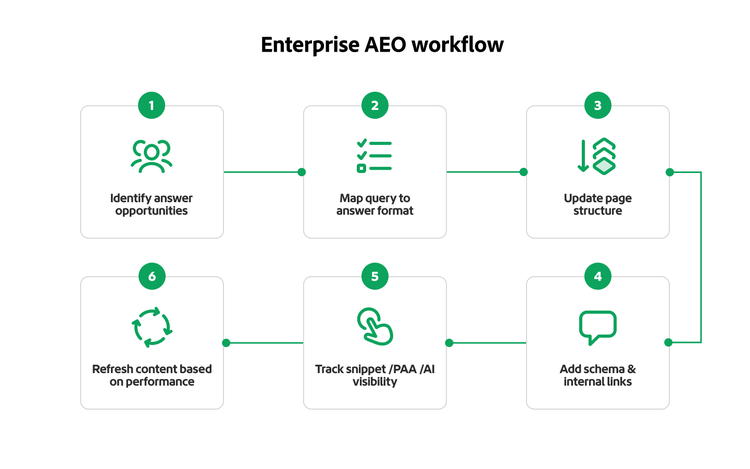
AEO depends on more than body copy. Search engines and answer engines need clear technical and editorial signals to identify, extract, and display answers. Content structure, schema markup, internal linking, and ongoing measurement are essential components of any sustainable AEO strategy.

Here are a few best practices:

  • Use a clear H1, H2, and H3 hierarchy that reflects the logical organization of content.
  • Provide descriptive headings that clearly indicate what each section answers.
  • Use HowTo schema for step-based instructional content.
  • Deploy FAQ schema for question-and-answer content.
  • Use Article schema for educational content.
  • Use BreadcrumbList schema for clear navigation paths.
  • Add internal links to authoritative supporting pages.
  • Regularly track snippets and the People Also Ask section to monitor performance.
  • Refresh workflows for content that has answers that are decaying or have lost visibility.

AEO measurement should track whether content is being selected, cited, or surfaced as an answer. Teams should monitor featured snippet ownership, People Also Ask visibility, impressions for question-based queries, AI search citations, engagement, and content updates that affect answer visibility.

AEO requires coordination across search engine optimization (SEO), content, development, analytics, legal, and compliance teams. Clear content standards, paired with technical implementation and ongoing measurement, help scale answer-first optimization across large site sections without relying on manual page updates.

Flowchart of enterprise AEO workflow.

Improve discoverability in AI-driven answer engines with Adobe Brand Visibility.

Once teams understand how to structure content for AEO, the next challenge is scaling and measuring that work across pages, business units, and AI-powered discovery surfaces. Knowing whether your content is being selected as an answer requires visibility into environments that traditional analytics may not fully capture.

Now that answer engines are a part of the search journey for users, enterprise teams need scalable ways to monitor how their content appears across AI-powered search and discovery experiences. Brand Visibility helps teams measure and improve brand discoverability, identify optimization opportunities, and understand how their brand shows up in AI-driven and answer-based channels.

Find out how Brand Visibility can support your AEO strategy.

Questions? We have answers.

Let’s talk about what Adobe can do for your business.

Get started

I'm the Adobe Assistant. How can I help you today?

1