Marketing Campaign Analytics helps marketing and finance teams decide where to invest, what to change, and what outcome a plan should pursue. Use it to understand how marketing investment relates to business outcomes such as revenue or conversions, assess channel performance and contribution, evaluate incremental impact, and compare budget plans before you commit spend. Results reflect the outcome, marketing data, and models configured for your organization, so they're designed to inform business judgment, not replace it.
Last-touch attribution gives credit to the final touchpoint, but it doesn't estimate how much of the outcome would have happened without marketing. Marketing Campaign Analytics builds on Adobe Mix Modeler, which combines marketing mix modeling (MMM), based on aggregate data over time, with multi-touch attribution (MTA), based on event-level touchpoint data, to estimate marketing's incremental contribution consistently across measurement and planning. Incremental impact is a model-based estimate, so review it alongside its inputs, assumptions, and model quality.
Marketing Campaign Analytics gives you two complementary views:
- Recorded campaign performance: impressions, clicks, conversions, revenue, and spend by campaign or channel, based on the data your organization supplies and maps.
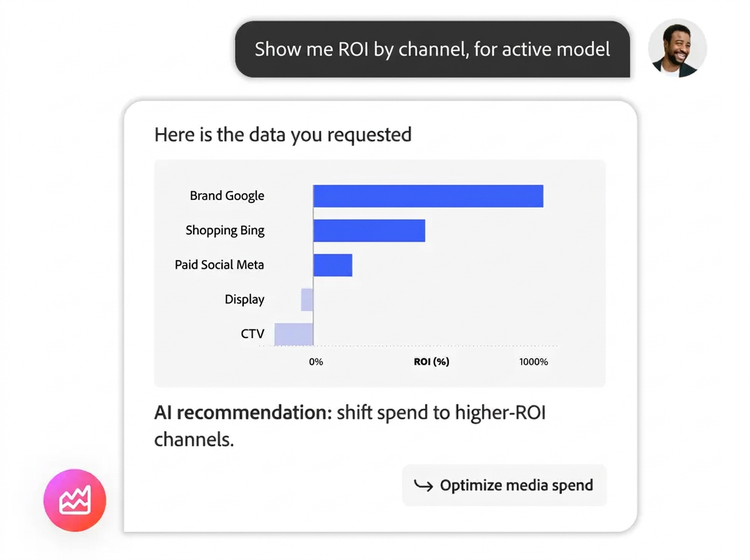
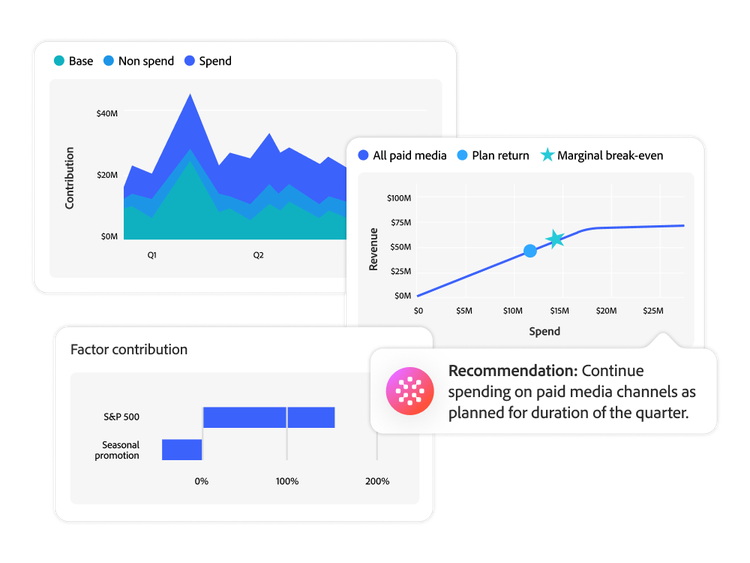
- Modeled measurement and planning: channel contribution, attribution results for MTA-enabled models, model diagnostics, and plan forecasts, including paid-channel ROI, revenue, conversions, CPA, and marginal return by channel.
Available metrics, breakdowns, and time comparisons depend on your data mapping, model configuration, and the Marketing Campaign Analytics capabilities included in your offer.
Observed performance shows what was recorded; modeled impact estimates how marketing contributed and what a plan may produce. Observed metrics such as impressions, clicks, conversions, revenue, and spend report activity for a selected campaign, channel, and period, but they don't explain what caused the results. Modeled impact uses a trained model—built on a defined conversion, marketing touchpoints, lookback and training windows, and optional internal or external factors—to estimate contribution and incremental impact. Use both together; they aren't interchangeable.
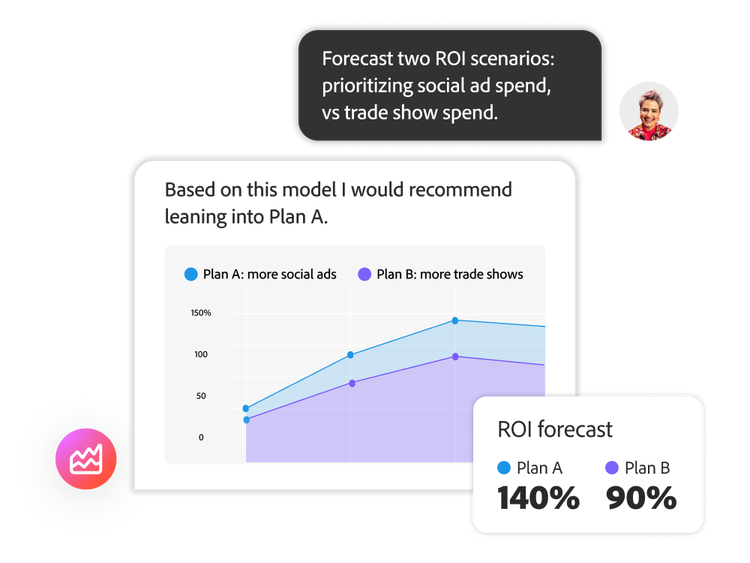
Yes. Marketing Campaign Analytics uses model results to help you build and compare budget scenarios before you commit spend. Each plan is tied to a model and a planning period, and plan insights forecast channel spend and outcomes such as ROI, revenue, conversions, and CPA. This helps you see how two allocations differ and what trade-offs a proposed budget creates. Forecasts depend on the selected model, data, objective, and plan inputs.
Assess reliability from the evidence behind each result, not from a single score. First, confirm that the model ran successfully, then review its model insights, channel analysis, diagnostics, and historical overview. Next, check that the setup reflects your business, including the conversion definition, touchpoints, date coverage, data mapping, granularity, factors, and model windows. Retrain or rescore models when your data or business conditions change, and share results with their scope, assumptions, data freshness, and caveats.
Start with the business outcome you want to measure, such as revenue, orders, leads, or another conversion. Each model needs one conversion, one or more marketing touchpoints—using summary-level data, event-level data, or both—and lookback and training windows. You can also add internal or external factors that may affect results. Before you begin, ask:
- What business outcome are we measuring?
- What marketing spend and activity history do we have?
- Which channels or touchpoints are in scope?
- Are dates, units, and definitions consistent?
- Which contextual factors could affect the outcome?
How much history you need depends on your data coverage and model configuration.
Yes. Marketing Campaign Analytics can use event-level data, summary marketing data, and internal or external factors stored in Adobe Experience Platform datasets. Sources can include walled-garden ad platforms, traffic sources, offline advertising, and Adobe Analytics or other Experience Platform sources. Data must be ingested through a supported Experience Platform method, mapped to compatible schemas, and harmonized. Not every platform has a built-in connector, so confirm supported ingestion options for each source with your Adobe team.
Each product answers a different question:
- Adobe Analytics: What happened across my websites and mobile apps?
- Customer Journey Analytics: How did customers interact across channels and touchpoints, and where did they progress or drop off?
- Marketing Campaign Analytics: Which marketing activities contributed to business outcomes, and how might we allocate budget next?
The products can work together. For example, you can export incremental touchpoint scores to Customer Journey Analytics or an external BI tool for more granular analysis.
Marketing Campaign Analytics builds on Adobe Mix Modeler's measurement and planning foundation and expands it into a broader campaign analytics experience. In addition to model-based measurement and planning, Marketing Campaign Analytics includes recorded campaign performance reporting and field mapping. Some product documentation and workflows still use the Mix Modeler name. If you're an existing Mix Modeler customer, contact your Adobe account team for details about naming, included capabilities, and access.