#F8F8F8

ADOBE CREATIVE CLOUD FEATURES

Streamline creative work in progress.

Keep reviews moving and projects on track. Adobe Creative Cloud for enterprise, paired with Adobe Frame.io, helps creative teams keep work, collaboration, and workflows connected throughout the creative process.

Gain stakeholder buy-in before starting work.

Unify assets, references, and AI iterations in Frame.io, so teams align faster and make decisions with confidence.

  • Centralize pre-production. Bring planning docs, reference files, and ideation assets into one place, so nothing gets lost across tools.
  • Organize and review in one place. Keep training images and custom model outputs organized in Frame.io for easier review and approval.
  • Build consensus early. Secure approvals sooner to keep projects moving and reduce costly rework later.

Centralize work in progress, collaboration, and reviews.

Connect assets, collaborators, and feedback in one place, across Frame.io and Creative Cloud applications.

  • Work across applications. Upload assets to Frame.io and open files directly in Creative Cloud applications to help reduce downloads, syncing, and version confusion.
  • Find the right asset easily. Search asset libraries using natural language and let Frame.io automatically index content so you spend less time searching and more time creating.
  • Speed up reviews and approvals. Organize and share assets for precise, in-context feedback that keeps projects moving and shortens approval cycles.

Scale asset production without added complexity.

Automate production workflows in Frame.io to boost output while keeping every step connected, reviewable, and on brand.

  • Keep workflows connected. Establish a source and destination for automated workflows so creative tasks move seamlessly from one step to the next.
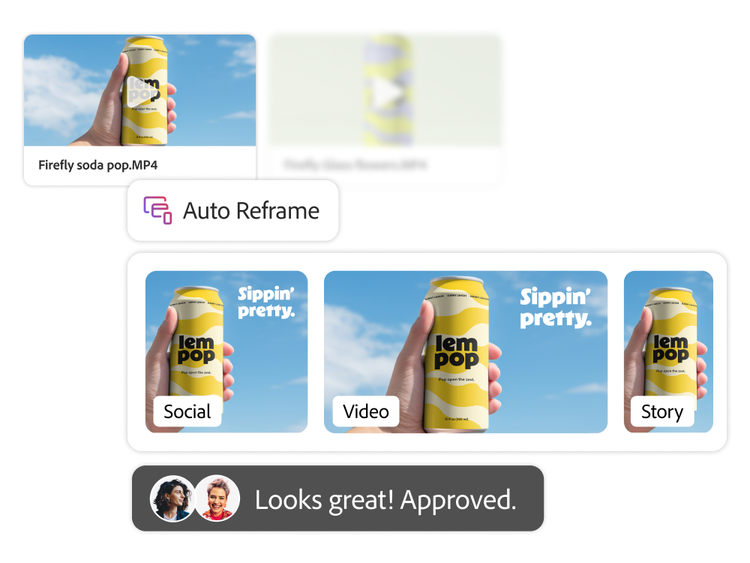
  • Generate variations in a few clicks. Kick off variations instantly and produce tens or hundreds of options, like reframing one video into aspect ratios you need.
  • Review at speed without compromise. Instantly review AI-generated content to maintain brand consistency, so teams can move faster without sacrificing quality.

Discover how Ford Motor Company uses Adobe Frame.io to streamline enterprise collaboration.

Learn more | Learn how Ford Motor Company uses Adobe Frame io

Questions? We have answers.

How does Adobe Frame.io connect to Creative Cloud applications for enterprise teams?

Adobe Frame.io connects to Creative Cloud applications by giving enterprise teams a shared environment for managing in progress assets, feedback, and approvals alongside their creative tools. With integrations such as the Frame.io extension for Premiere and Share for Review with Frame.io in Photoshop, teams keep creative collaboration, reviews, and approvals more closely connected to the applications where work is created.

How does Adobe Frame.io help enterprise teams reduce version confusion and keep work moving?

Adobe Frame.io helps enterprise teams reduce version confusion by centralizing assets, comments, revisions, and feedback in one place instead of spreading them across disconnected files, messages, and handoffs. For organizations focused on enterprise collaboration and creative project management, this can help teams keep work moving by making it easier to track revisions, align stakeholders, and maintain a more consistent source of truth throughout production.

How does Frame.io help enterprise teams speed up creative reviews and approvals?

Frame.io helps enterprise teams speed up reviews and approvals by centralizing feedback, enabling real-time comments, tracking revisions, and supporting faster stakeholder sign-off within a more structured workflow. For executive buyers evaluating approval workflows, the value is that teams can reduce delays caused by scattered review cycles and create a more consistent process for moving assets from work in progress to approved output.

What business value do automated creative workflows deliver for enterprise content production?

Automated creative workflows help enterprise teams reduce repetitive manual work, improve consistency, and increase throughput across content production. In practice, this means creative project management and enterprise collaboration become more efficient because teams can standardize handoffs, streamline approval workflows, and support higher-volume content creation without adding the same level of operational friction.