#F5F5F5

Adobe Customer Journey Analytics Features

Agentic and AI-driven insights

Use agentic, generative, and predictive AI to expedite and augment everyday analytics tasks like segmentation, attribution, data processing, queries, and data storytelling. With more efficient and enhanced insights, you’ll spend less time combing through data and more time improving your business.

Data Insights Agent

Automate analysis and visualization of cross-channel customer data with Data Insights Agent to reveal rich insights and take pre-approved actions such as diagnosing underlying drivers and recommending optimizations.

  • Data analysis. Track campaign performance, analyze customer behavior, and spot emerging trends using simple language prompts rather than complex dashboards and queries needed.
  • Rapid insights. Skip the analyst queue and use everyday language to ask questions, questions such as “What are my top 10 pages?” or “Which products have the highest revenue?"
  • Trusted insights. Build confidence in every decision with fully transparent, traceable insights and the ability for analysts to further verify, refine, and collaborate.
A graph of product revenue generated by Data Insights Agent

Proactive insights (in development)

Discover trusted, high-value insights with Data Insights Agent that proactively surfaces meaningful patterns and opportunities business users might not think to explore.

  • From reactive to proactive. Explore new insights and opportunities powered by continuous cross‑channel analysis that surfaces high‑confidence insights.
  • Analyst approved. Build trust with proactively generated insights that include built‑in controls that let analysts validate, curate, and enrich insights before they reach business users.

Root cause analysis

Turn every metric into an AI‑powered investigation with Data Insights Agent, that lets you move from “What happened?” to “Why did it happen?” in minutes — no analyst queue needed.

  • Top drivers. Instantly surface the top drivers behind any change, complete with confidence scores.
  • Confidence. Get scores for correlative strength, statistical significance, and impact quantification across every insight to drive trust.
  • Hypothesis validation. Use a conversational interface to ask questions and drill deeper into the underlying causes of each driver.

Data storytelling

Transform the Analysis Workspace into presentation-ready slides with a single click. Data Insights Agent analyzes your panels, visualizations, and metrics to uncover the story hidden in your data — surfacing trends, anomalies, and correlations you might have missed.

Intelligent captions

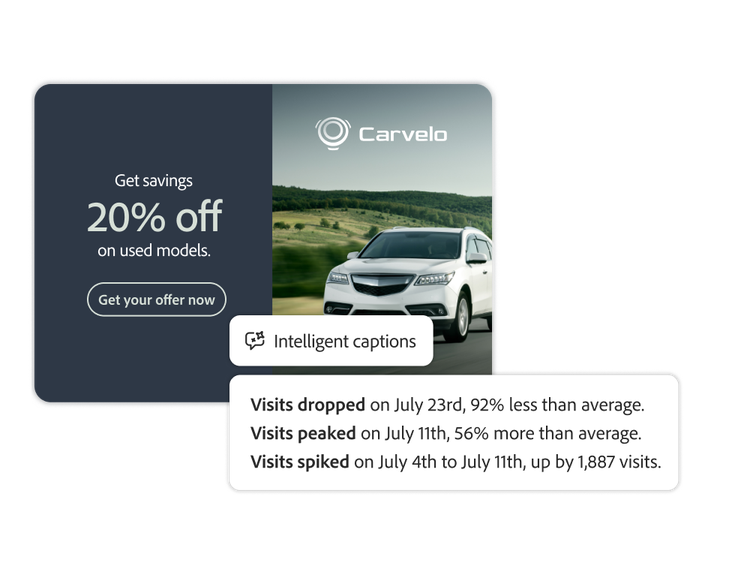
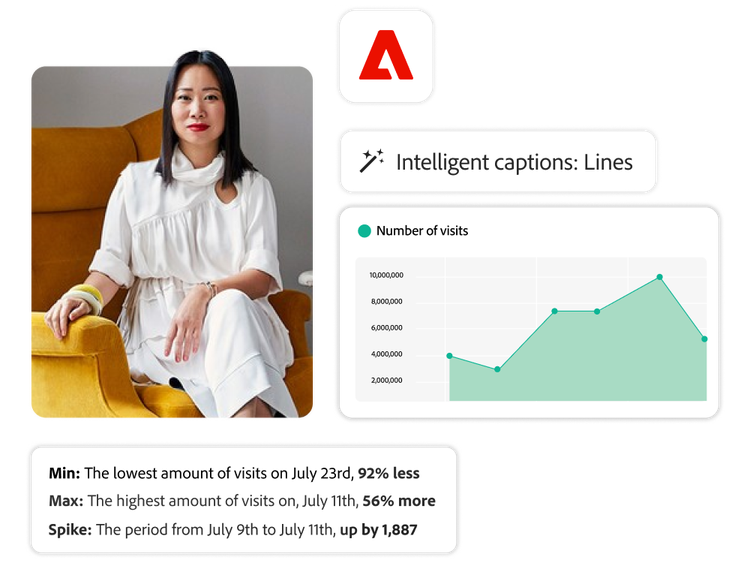
Generative AI automatically produces insights and provides user-friendly captions about key trends and important events found in data.

  • Generated insights. Jumpstart your analysis journey with auto-generated insights that are automatically updated as data changes.
  • Easy highlights. Help non-analysts easily identify and understand insights worth highlighting.
  • Contextual reporting. Enable non-technical users to be self-sufficient by automatically providing context when sharing insights to free up analysts’ time.
An AI-generated caption displaying engagement metrics for an auto ad
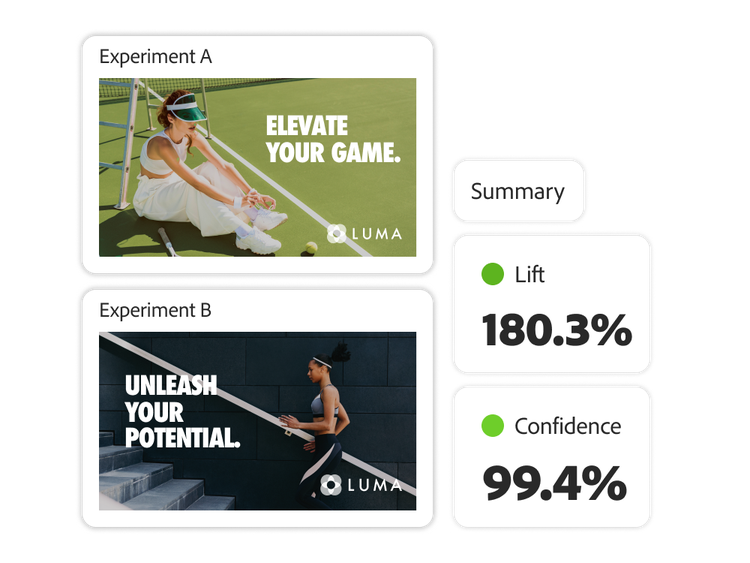
https://main--bacom--adobecom.aem.live/fragments/products/modal/videos/analytics/customer-journey-analytics/experimentation-panel#experimentation-panel |Two ad variations and results from an A/B test | :play-medium:

Experimentation panel

Evaluate the impact and validity of experiments across channels from any online and offline source with enhanced analysis supported by machine learning.

  • Machine learning-powered refinement. As more activity occurs and more data is accumulated, machine learning automatically refines the data to provide a more precise result and higher confidence in cause-and-effect relationships.
  • Cause-and-effect clarity. Understand the cause-and-effect relationships between customer interactions and how they drive specific outcomes through the native integration with Adobe Journey Optimizer.

Learn more about agentic and AI-driven insights.

Content as a Service v3 - Learn more about agentic and AI-driven insights. - Friday, May 22, 2026 at 16:48

#D0F1E1

Learn how to use agentic and AI-driven insights.

Find what you need in Experience League, our vast collection of how-to content including documentation, tutorials, and user guides.

Learn more | Learn more about Agentic and AI-driven insight features

Questions? We have answers.

Is Data Insights Agent available in Adobe Analytics too, or only in Customer Journey Analytics?
Data Insights Agent is native to Customer Journey Analytics and other Adobe Experience Platform-native applications; it is not available in Adobe Analytics, because Adobe Analytics is not built on Adobe Experience Platform. Adobe Analytics' own path to AI and agent access runs through MCP server support for natural-language and external-agent connections to its reporting data, which is a different mechanism from a native, built-in conversational agent. If AI-assisted insight discovery matters to your evaluation, that capability currently differentiates Customer Journey Analytics from Adobe Analytics specifically.
What can Data Insights Agent actually do, beyond answering questions about my data?
Data Insights Agent takes a natural-language question and builds the visualization or freeform table itself, in Analysis Workspace, using the real components of your connected data view, rather than just returning a text answer to a question. Beyond direct Q&A, it is designed to support root cause analysis, data storytelling, and proactive insight surfacing, with an analyst validating its output before anyone acts on it, so it accelerates the analysis workflow without removing the analyst from the loop.
How do I know Data Insights Agent isn't acting on data I haven't approved, or making things up?
Data Insights Agent only draws on data views your Customer Journey Analytics administrator has explicitly enabled for AI use, not on every data view in your organization by default, so exposure is a deliberate admin decision rather than an automatic default. It is also designed around an analyst-in-the-loop model: the agent surfaces a proposed insight or visualization, and an analyst reviews it before it informs a decision, rather than the agent taking autonomous action on your behalf.
What is Intelligent Captions, and how is it different from Data Insights Agent?
Intelligent Captions generates a natural-language summary directly on a Workspace visualization, such as a line chart, describing what that specific chart shows, while Data Insights Agent is the broader conversational agent that answers open-ended questions and builds new visualizations from scratch. Use Intelligent Captions when you already have the chart and want it explained at a glance; use Data Insights Agent when you are starting from a question rather than a chart.
What do I need in place to use Data Insights Agent?
You need a Customer Journey Analytics connection and data view with AI use enabled by your administrator; once that is set, the agent becomes available to any user with access to that data view, without separate setup per user. Confirm with your Adobe account team which data views are enabled for AI use in your environment before assuming it is available everywhere.